When decoding Panasonic S1M2 RW2 RAW files in Adobe Camera Raw, the Camera Matching V-Log profile is severely inaccurate. So I cannot accurately apply my Luts on Vlog profile.
When decoding Panasonic S1M2 RW2 RAW files in Adobe Camera Raw, the Camera Matching V-Log profile is severely inaccurate. So I cannot accurately apply my Luts on Vlog profile.
When decoding Panasonic S1M2 RW2 RAW files in Adobe Camera Raw, the Camera Matching V-Log profile is severely inaccurate.
Additionally, after applying the Camera Matching profile in ACR, it is not possible to apply a LUT on top of it. This is a critical limitation for the RAW → V-Log → color grading workflow. (All Bug and issues above do not exist in Lumix Lab which is offical APP of Panasonic, I think you can fix these issues according to their latest offical APP)
[View this post in your web browser. It contains formatting and images that don't appear in email.]
"I think there is a drawback of ACR and LR that it is unavailable to apply a Luts on the Vlog Camera Matching file, so I have to output Vlog color with JPG or Tiff file and open it in Camera RAW again, and then I can apply my LUTS."
This is correct. Part of the confusion here is that LR / Camera Raw doesn't apply LUTs, it applies enhanced profiles constructed from LUTs, and applying enhanced profiles does not behave the same way that applying LUTs in other apps does. (This is why terminology is so important in this discussion.)
You attached Panasonic's "V-Log to V-709.cube", not the enchanced profile "vlog to 709.xmp". But I can explain what's going on without that .xmp. The explanation is long but necessary:
LR / Camera Raw provide two different kinds of profiles, camera profiles and enhanced profiles.
A camera profile is specific to each camera model and stored in a .dcp file. It translates the raw sensor data in the raw file into a standard, pleasing rendering in the wide-gamut Melissa RGB color space. Every raw photo processed in LR has some camera profile applied to it.
Adobe usually provides two sets of camera profiles for most cameras, named "Adobe Standard" and "Camera Standard". The Adobe Standard profiles provide standard renderings based on Adobe's definition of what is "pleasing". The Camera Standard profiles provide renderings approximating camera manufacturers' renderings (their definition of what is "pleasing").
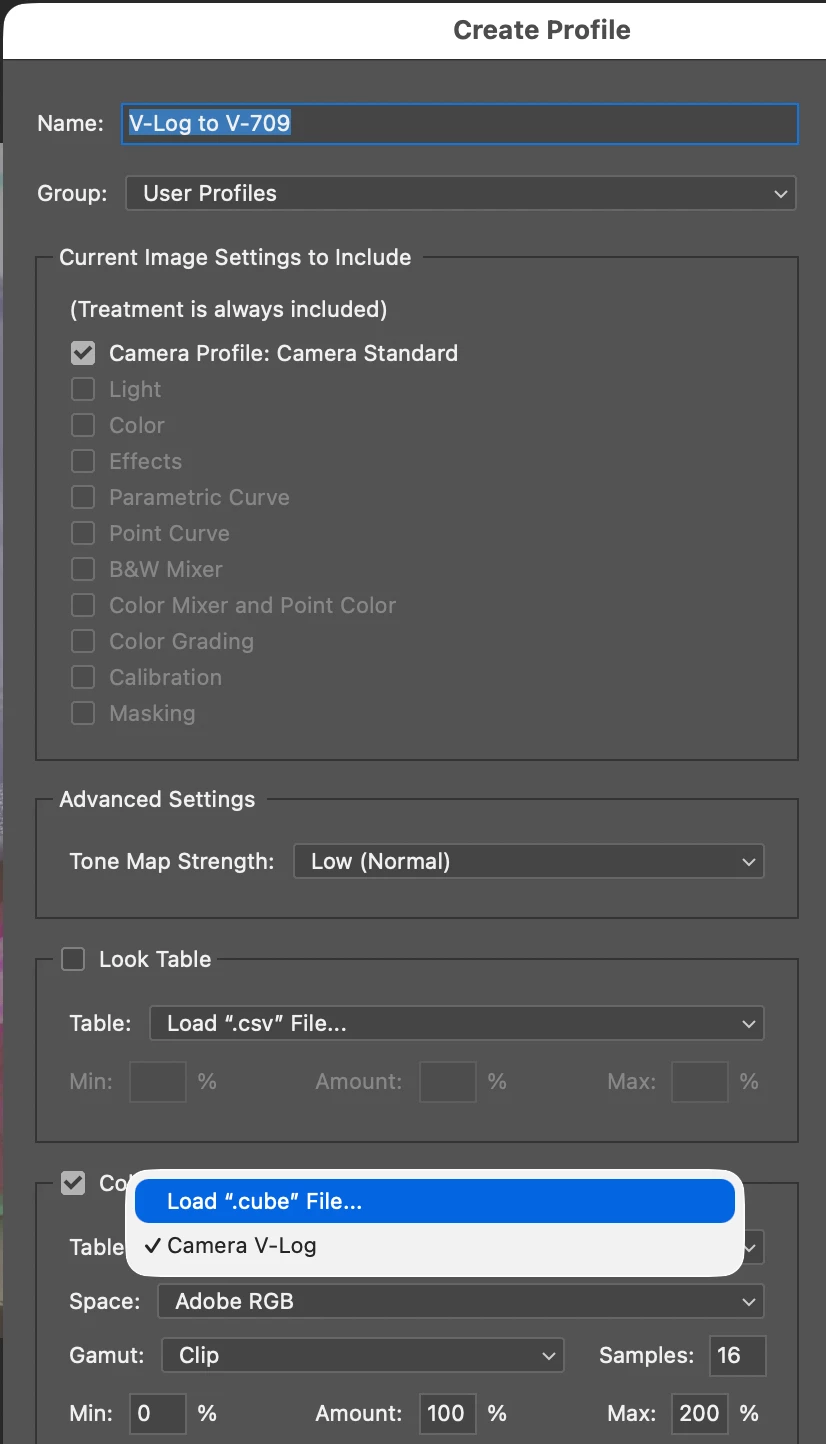
An enhanced profile has a number of components, all optional: An underlying camera profile, Develop settings (as you see in the Develop panels in LR), a look table (a form of color lookup table), and a LUT (.cube).
You can see all those components when you create an enhanced profile in Camera Raw:
There can only be one enhanced profile applied to a photo at a time. When you apply an enhanced profile to a photo that already has one applied, it completely replaces the previous enhanced profile. It does not add its effects on top of the previous profile, it replaces them (replacing the camera profile, Develop settings, look table, and LUT with those from the new profile).
The enhanced profile Camera V-Log is built-in to LR, stored in the file "Panasonic DC-S1M2 Camera V-Log.xmp", which you can find in the LR application folders. You can edit the file in a text editor. It sets the camera profile to Camera Standard and it contains an RGBTable (LUT) that converts the Camera Standard rendering of the photo into an approximation of the Photo Style: V-Log that the camera would produce in a JPEG or HEIF.
If you first apply Camera V-Log to a raw and then apply another enhanced profile, such as the V-Log To V-709 profile shown in the screenshot above, that second profile replaces the Camera V-Log profile, replacing its LUT with the LUT that was specified in V-Log to V-709. The LUT in the V-Log To V-709 profile isn't applied to the output of Camera V-Log profile, it is applied to the results of the Camera Standard profile. This will give completely unexpected results, since that LUT ("V-Log to V-709.cube") expects as its input pixel values that have been encoded with the V-Log gamma curve. But the output from Camera Standard is obviously not encoded with that gamma curve.
So the only way to apply the V-Log To V-709 LUT to a raw is to first apply the Camea V-Log enhanced profile and export the raw to a TIFF or JPEG. The pixel values in the TIFF / JPEG are now encoded with the same gamma curve as if you had produced the TIFF / JPEG directly in the camera with Photo Style: V-Log. You can then apply the V-Log To V-709 enhanced profile to that TIFF / JPEG and get the expected results, since the LUT in the profile will be getting pixel values encoded with that gamma curve.
The poor quality of LR's Camera V-Log enhanced profile for the DC-S1M2 camera means that this modified workflow (exporting a Camera V-Log photo to TIFF / JPEG and then applying another LUT) will give inferior results.
I think that Adobe will likely view this export-based LUT workflow as something that very users will employ. Since there doesn't seem to any other practical use for the Camera V-Log profile, I'm guessing that Adobe would make fixing the DC-S1M2 Camera V-Log profile a low priority.
* * *
I'm assuming that you're recording video in V-Log format and applying various LUTs to that video, and you want to record stills and use the same LUT-based workflow to them, so that you can get similar visual appearances.
I think a more effective and accurate way of doing that, regardless of which photo processing app you're using, is to shoot the stills in HEIF format with Photo Style: V-Log rather than raw. The camera records those stills with a depth of 10 bits and in a wide gamut, using the same exact gamma curve as for video. There should be no detectable loss of visual quality compared to raws converted to V-Log during post-processing, and it avoids the post-processing step of having to convert the raw to V-Log before applying other LUTs.
[View this post in your web browser. It contains formatting and images that don't appear in email.]
"I think there is a drawback of ACR and LR that it is unavailable to apply a Luts on the Vlog Camera Matching file, so I have to output Vlog color with JPG or Tiff file and open it in Camera RAW again, and then I can apply my LUTS."
This is correct. Part of the confusion here is that LR / Camera Raw doesn't apply LUTs, it applies enhanced profiles constructed from LUTs, and applying enhanced profiles does not behave the same way that applying LUTs in other apps does. (This is why terminology is so important in this discussion.)
You attached Panasonic's "V-Log to V-709.cube", not the enchanced profile "vlog to 709.xmp". But I can explain what's going on without that .xmp. The explanation is long but necessary:
LR / Camera Raw provide two different kinds of profiles, camera profiles and enhanced profiles.
A camera profile is specific to each camera model and stored in a .dcp file. It translates the raw sensor data in the raw file into a standard, pleasing rendering in the wide-gamut Melissa RGB color space. Every raw photo processed in LR has some camera profile applied to it.
Adobe usually provides two sets of camera profiles for most cameras, named "Adobe Standard" and "Camera Standard". The Adobe Standard profiles provide standard renderings based on Adobe's definition of what is "pleasing". The Camera Standard profiles provide renderings approximating camera manufacturers' renderings (their definition of what is "pleasing").
An enhanced profile has a number of components, all optional: An underlying camera profile, Develop settings (as you see in the Develop panels in LR), a look table (a form of color lookup table), and a LUT (.cube).
You can see all those components when you create an enhanced profile in Camera Raw:
There can only be one enhanced profile applied to a photo at a time. When you apply an enhanced profile to a photo that already has one applied, it completely replaces the previous enhanced profile. It does not add its effects on top of the previous profile, it replaces them (replacing the camera profile, Develop settings, look table, and LUT with those from the new profile).
The enhanced profile Camera V-Log is built-in to LR, stored in the file "Panasonic DC-S1M2 Camera V-Log.xmp", which you can find in the LR application folders. You can edit the file in a text editor. It sets the camera profile to Camera Standard and it contains an RGBTable (LUT) that converts the Camera Standard rendering of the photo into an approximation of the Photo Style: V-Log that the camera would produce in a JPEG or HEIF.
If you first apply Camera V-Log to a raw and then apply another enhanced profile, such as the V-Log To V-709 profile shown in the screenshot above, that second profile replaces the Camera V-Log profile, replacing its LUT with the LUT that was specified in V-Log to V-709. The LUT in the V-Log To V-709 profile isn't applied to the output of Camera V-Log profile, it is applied to the results of the Camera Standard profile. This will give completely unexpected results, since that LUT ("V-Log to V-709.cube") expects as its input pixel values that have been encoded with the V-Log gamma curve. But the output from Camera Standard is obviously not encoded with that gamma curve.
So the only way to apply the V-Log To V-709 LUT to a raw is to first apply the Camea V-Log enhanced profile and export the raw to a TIFF or JPEG. The pixel values in the TIFF / JPEG are now encoded with the same gamma curve as if you had produced the TIFF / JPEG directly in the camera with Photo Style: V-Log. You can then apply the V-Log To V-709 enhanced profile to that TIFF / JPEG and get the expected results, since the LUT in the profile will be getting pixel values encoded with that gamma curve.
The poor quality of LR's Camera V-Log enhanced profile for the DC-S1M2 camera means that this modified workflow (exporting a Camera V-Log photo to TIFF / JPEG and then applying another LUT) will give inferior results.
I think that Adobe will likely view this export-based LUT workflow as something that very users will employ. Since there doesn't seem to any other practical use for the Camera V-Log profile, I'm guessing that Adobe would make fixing the DC-S1M2 Camera V-Log profile a low priority.
* * *
I'm assuming that you're recording video in V-Log format and applying various LUTs to that video, and you want to record stills and use the same LUT-based workflow to them, so that you can get similar visual appearances.
I think a more effective and accurate way of doing that, regardless of which photo processing app you're using, is to shoot the stills in HEIF format with Photo Style: V-Log rather than raw. The camera records those stills with a depth of 10 bits and in a wide gamut, using the same exact gamma curve as for video. There should be no detectable loss of visual quality compared to raws converted to V-Log during post-processing, and it avoids the post-processing step of having to convert the raw to V-Log before applying other LUTs.
Actually, you really understood my thinking. I just want to make sure that in future color grading or post-processing, I have the chance to match V-Log video and photos, so that the LUTs I make can be used not only for video but also for photos, without losing the opportunity to later re-select other in-camera filters in post.
The suggestion you mentioned about directly outputting HEIF in-camera is something I had already thought of long ago, and it is indeed as you said—currently no software can perfectly convert RW2 to V-Log, so direct output is the only solution. But this again contradicts my original idea, because once I directly output V-Log with a LUT applied, I can no longer apply other LUTs in post-processing. Unless I output V-Log without applying a LUT, but that would affect the in-camera monitoring. It's really a dilemma!
And there is one more thing I must mention: the HEIF format directly output from the camera is 10-bit and has better color grading latitude, which is indeed true. But the most fatal problem is that Photoshop still does not support HEIF format photos, so if you want to color grade, you can only import them into DaVinci Resolve.
But coming back to the point, if ACR and LR could correctly restore V-Log colors (exactly the same as the in-camera photo output), then all the problems would be solved. Then I could completely stop considering the idea of making PS compatible with 10-bit HEIF format (because editing 16-bit RAW directly would be best).
In conclusion, I still hope Adobe can fix this huge problem as soon as possible, so that all Panasonic users can have a better post-processing workflow.
As I wrote previously, the poor quality of the Camera V-Log profile almost certainly isn’t affecting the result of applying the “vlog to 709” enhanced profile or other enhanced profiles based on LUTs. Attach the “vlog to 709.xmp” file here and I can demonstrate why that is.
So I think there’s little incentive for Adobe to fix the Camera V-Log profile, unfortunately.
Your hypothesis wii be definitely disapproving. How can a result perform well basing on the wrong Vlog color? I attach Lut and you can have a try. I also wrote the thread, you can vote for me~
[View this post in your web browser. It contains formatting and images that don't appear in email.]
Thanks for providing the additional sample raw. That confirmed my original post was incorrect -- sorry about that.
I agree that the LR / Camera Raw profile “Camera V-Log” provides a poor approximation for the Panasonic DC-S1M2 Photo Style: V-Log. I see the same red artifacts you do.
However, what you wrote and your screenshots show is that your goal is to apply the “vlog to 709” enhanced profile (and other enhanced profiles). In Adobe’s terminology, “vlog to 709” is an enhanced profile, not a LUT. It may include a LUT, as well as other things, but it’s not a LUT. (It’s important to be precise here, using Adobe’s terminology, so we can identify precisely what might be going wrong.)
I strongly suspect that the behavior of “vlog to 709” is not affected by the poor quality of the Camera V-Log profile. But to verify that, please attach that profile’s .xmp file here. To find the .xmp file, go to LR’s profile browser, navigate to “vlog to 709”, right-click it, and do Show In Finder.
If my suspicious is correct, then the fact that Camera V-Log is of poor quality isn’t affecting the output of your workflow. But let’s verify that.
To be honest, I am a photographer and also a filmmaker. That means I can use DaVinci Resolve proficiently.
I compared these two software programs and found that the LUT system and workflow in DaVinci Resolve are much better than those in LR and ACR. In fact, LR and ACR supported LUTs a long time ago, but they still don't do it well.
This bug only occurs with the S1M2, and other Lumix machines don't have this bug.
Even for other machines, the V-Log profile doesn't perform well when editing RW2 files (because colors may fringe), and that is not an issue in DaVinci.
What are the strengths of LR and ACR? I think it is definitely that they can apply the camera color embedded in the camera system.
In conclusion, I sincerely hope that LR and ACR can introduce functions and a color editing workflow similar to DaVinci Resolve. It would be a good thing for everyone who shoots videos and photos simultaneously.
Reading a little further about Panasonic V-Log, my previous answer may not be correct. The operation of Photo Style: V-Log with respect to raws is not defined in the S1M2 manual.
Please attach two sample raws of the same scene and exposure, one with Photo Style set to Standard and one set to V-Log.
[View this post in your web browser. It contains formatting and images that don't appear in email.]
The sample raws you uploaded were shot with the camera’s Photo Style set to Cinelike A2, not V-Log. You can verify that by opening the raws in Lumix Lab and pressing the “i” button. For example:
You can verify this in LR by setting Preferences > Presets > Raw Defaults > Global to Camera Settings and then import the raws. It will automatically apply the Camera Cinelike A2 v2 profile, not Camera V-Log:
This is why you’re getting unexpected results applying Camera V-Log to the photos.
[View this post in your web browser. It contains formatting and images that don't appear in email.]
I cannot attach rw2, because the system does not allow.
That’s a bug in the forum platform. Add the extension .nef to the sample .rw2 and attach that, as I’ve done here.
It’s important to provide sample photos that let Adobe quickly reproduce the problem, otherwise they’re not likely to pay much attention unless many people report the problem.
I cannot attach rw2, because the system does not allow. You can see this picture above, The Vlog profile color is severely inaccurate, and you can clearly see red fringing in this image.
This second picture also can be clearly seen, after color recovery(Vlog to rec 709 with offical Luts), that color is obviously inaccurate.
As a contrast, I can show you the RW2 raw of S1R2, which is without that problem. There is no any color fringing in this image.
After apply offical Luts, the color of RW2 of S1R2 is natural and accurate,without any color fringing. So what problem I post here just exists the RAW file of S1M2.




 AdChoices