Participant
April 6, 2023
Question

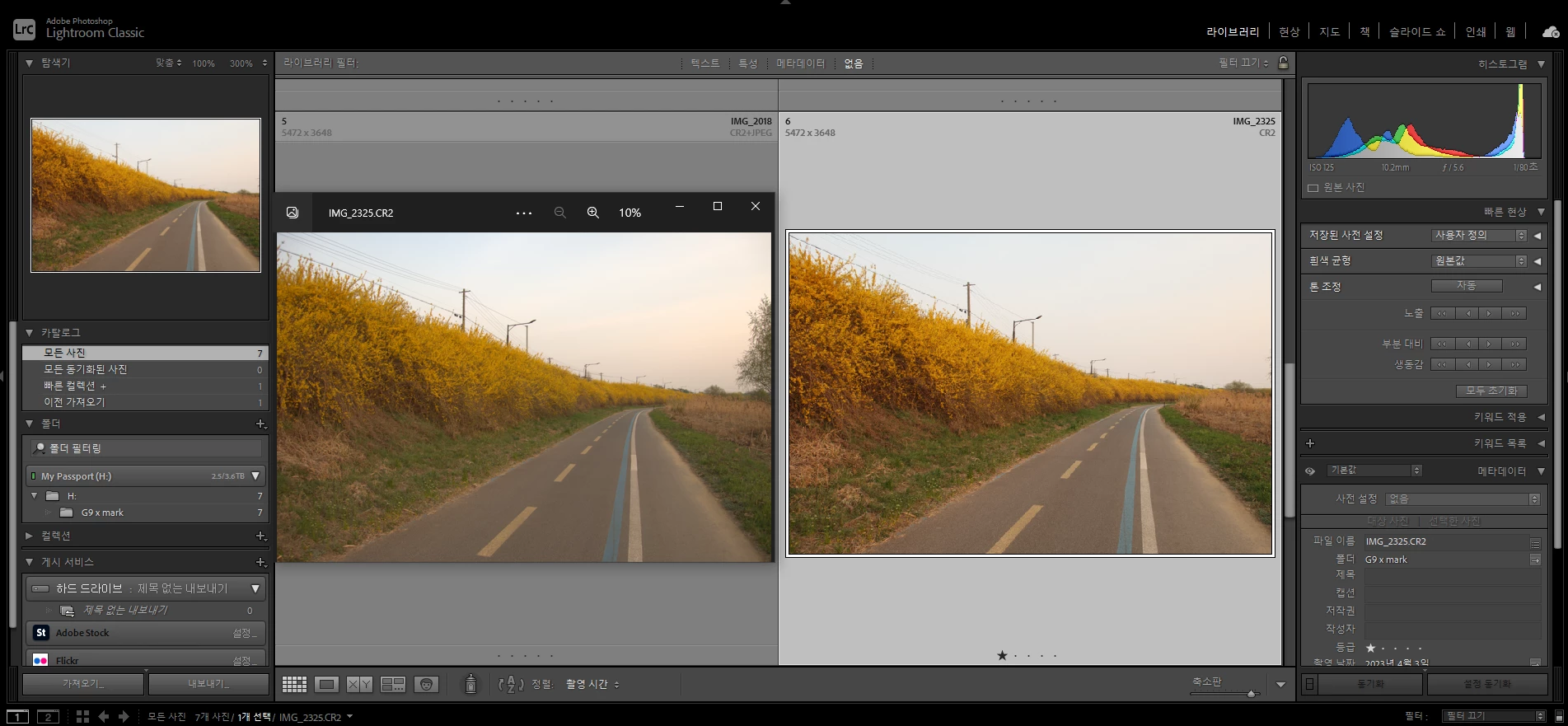
When you open an image, it expands and cuts the border
  • April 6, 2023
  • 6 replies
  • 204 views


All raw files taken from Canon PowerShot G9X Mark II are the same.

Same symptom in camera raw.

please help me.

This topic is closed to new replies. Start a new post to keep the conversation going.

6 replies

Per Berntsen
Community Expert
Community Expert
April 6, 2023

Please post a screenshot of the entire Lightroom window with the image open in Develop.

Make sure that the History panel is visible and expanded on the left, and the Lens corrections panel visible and expanded on the right.


Participant
April 6, 2023

I changed the camera model lens in the lens calibration tab you told me, but it was not solved. The problem is that all image borders in the library are truncated.

Community Expert
April 6, 2023

Do you have reset the preferences as I wrote in my former post?


My System: Intel i7-8700K - 64GB RAM - NVidia Geforce RTX 3060 - Windows 11 Pro 25H2 -- LR-Classic 15 - Photoshop 27 - Nik Collection 9 - PureRAW 6 - Topaz Photo AI
Participant
April 6, 2023

It seems that when you open the raw file, you automatically correct the lens. Is there a lens calibration on/off function?

Community Expert
April 6, 2023

Please try to reset the Lightroom preferences.

https://www.lightroomqueen.com/how-do-i-reset-lightrooms-preferences/

It's recommended to backup your preferences before you reset the preferences to the default settings:

https://helpx.adobe.com/lightroom-classic/kb/preference-file-and-other-file-locations.html


If this doesn't help we need more informations about your environment.

Which operating system do you use?

Which version of Lightroom do you use?

Please post the exact version and not only phrases as "recent", "latest" and so on.


Please provide also a copy of your 'System Info'. This can be get from the LrC Help > System Info menu item.

There's a copy button in the System Info dialog. Press this button and paste the info into your next forum post.


My System: Intel i7-8700K - 64GB RAM - NVidia Geforce RTX 3060 - Windows 11 Pro 25H2 -- LR-Classic 15 - Photoshop 27 - Nik Collection 9 - PureRAW 6 - Topaz Photo AI