
Ken Nielsen
Legend
October 5, 2022
解決済み

Where can I find the most complete info of the choices in the 'file handling' preferences menu

  • October 5, 2022
  • 返信数 1.
  • 437 ビュー

I'm thinking I kind of know, as it has been explained somewhat to me in my questions on this subject here, but fact is, I really do not know for sure. I think the file type reference is just what it says and choose between all caps and all lowercase and DNG means nothing... but that is what I think and I do not know if there is more implication. My main question is in the next choice for Library Preview as I've seen discussions on this that go into outer space with complexity about 'sidecars' or 'embed RAW' and the like. I really need the authorized version in straightforward and clear language to get a grasp on just this one menu and the choices that are offered. The Library previews are very important to me so I'm asking here for more help to get a good grasp on this subject.

TIA,

Ken
このトピックへの返信は締め切られました。
解決に役立った回答 Jim Wilde

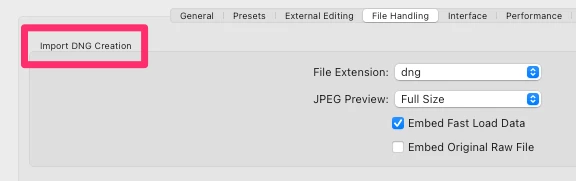
Ken, that specific section of that Preferences>File Handling tab that you have highlighted is exclusively reserved for the settings to be applied when a user decides to convert their raw files during import to the DNG format. Note the title of that particular section:


As such, this is entirely unrelated to the Library previews that you've recently been concerned about. The choices in this section are fairly obvious:


1. Do you wish the files extension to be in lower or upper-case?

2. Do you wish a jpeg preview to be embedded in the DNG, and if so what size do you prefer? The jpeg preview allows other software to show the file preview without having to do a full conversion of the raw data. As such this preview is only of use if you routinely try to look at the DNG files outside Lightroom.

3. Do you wish to have the Fast Load Data embedded in the DNG file? The FLD is the equivalent to the ACR cache entry which is created by LrC for all raw files during import, and is used only as a means of quickly showing the image when it is first opened in the Develop Module whilst the full raw conversion is being done in the background. That's the only time/place that the FLD is used.

4. Do you wish to embed the original raw file into the DNG (which effectively doubles the size of the DNG file). Some people do, some people don't....it's a personal preference (as you can see I don't do that).

返信数 1

Jim Wilde
Community Expert
Jim WildeCommunity Expert解決!
Community Expert
October 5, 2022

Ken, that specific section of that Preferences>File Handling tab that you have highlighted is exclusively reserved for the settings to be applied when a user decides to convert their raw files during import to the DNG format. Note the title of that particular section:


As such, this is entirely unrelated to the Library previews that you've recently been concerned about. The choices in this section are fairly obvious:


1. Do you wish the files extension to be in lower or upper-case?

2. Do you wish a jpeg preview to be embedded in the DNG, and if so what size do you prefer? The jpeg preview allows other software to show the file preview without having to do a full conversion of the raw data. As such this preview is only of use if you routinely try to look at the DNG files outside Lightroom.

3. Do you wish to have the Fast Load Data embedded in the DNG file? The FLD is the equivalent to the ACR cache entry which is created by LrC for all raw files during import, and is used only as a means of quickly showing the image when it is first opened in the Develop Module whilst the full raw conversion is being done in the background. That's the only time/place that the FLD is used.

4. Do you wish to embed the original raw file into the DNG (which effectively doubles the size of the DNG file). Some people do, some people don't....it's a personal preference (as you can see I don't do that).

Ken Nielsen
Ken Nielsen作成者
Legend
October 5, 2022

Wow, that little 'way off to the left' "Import DNG Creation" I had never noticed before. I'm apparently in the complete wrong preferences area. I have no need or interest in converting any files to DNG so don't see how to turn that choice off. Meanwhile, What I want to do, just for my own raw file imports from my camera card, is to have the largest library previews saved... where do I go to find the setting for that? 


@Jim Wilde wrote:

Ken, that specific section of that Preferences>File Handling tab that you have highlighted is exclusively reserved for the settings to be applied when a user decides to convert their raw files during import to the DNG format. Note the title of that particular section:


As such, this is entirely unrelated to the Library previews that you've recently been concerned about. The choices in this section are fairly obvious:


1. Do you wish the files extension to be in lower or upper-case?

2. Do you wish a jpeg preview to be embedded in the DNG, and if so what size do you prefer? The jpeg preview allows other software to show the file preview without having to do a full conversion of the raw data. As such this preview is only of use if you routinely try to look at the DNG files outside Lightroom.

3. Do you wish to have the Fast Load Data embedded in the DNG file? The FLD is the equivalent to the ACR cache entry which is created by LrC for all raw files during import, and is used only as a means of quickly showing the image when it is first opened in the Develop Module whilst the full raw conversion is being done in the background. That's the only time/place that the FLD is used.

4. Do you wish to embed the original raw file into the DNG (which effectively doubles the size of the DNG file). Some people do, some people don't....it's a personal preference (as you can see I don't do that).


Jim Wilde
Community Expert
Community Expert
October 5, 2022
quote

I have no need or interest in converting any files to DNG so don't see how to turn that choice off. Meanwhile, What I want to do, just for my own raw file imports from my camera card, is to have the largest library previews saved... where do I go to find the setting for that? 


No need to turn anything off. During import from a camera/memory card you have two basic choices at the top of the centre panel of the Import Dialog, "Copy" or "Copy as DNG". The first one copies the raw files without conversion, the second copies the raw files and converts them to DNG. Simple choice, no need to "turn anything off".


For previews settings, look at the "File Handling" tab of the Catalog Settings, not the Preferences.