cliffh73876430
Inspiring
May 8, 2018
Answered

Where is the auto-sync toggle switch?

  • May 8, 2018
  • 2 replies
  • 3942 views

Scott Kelby has explained how to update old Raw files to a new profile.

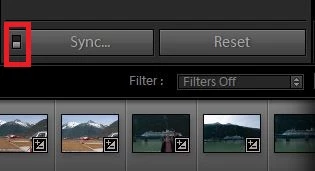
Part of the explanation states "Make sure that Auto-Sync is turned on. (It's that little toggle switch to the left of "Sync" at the bottom of the right side panels"

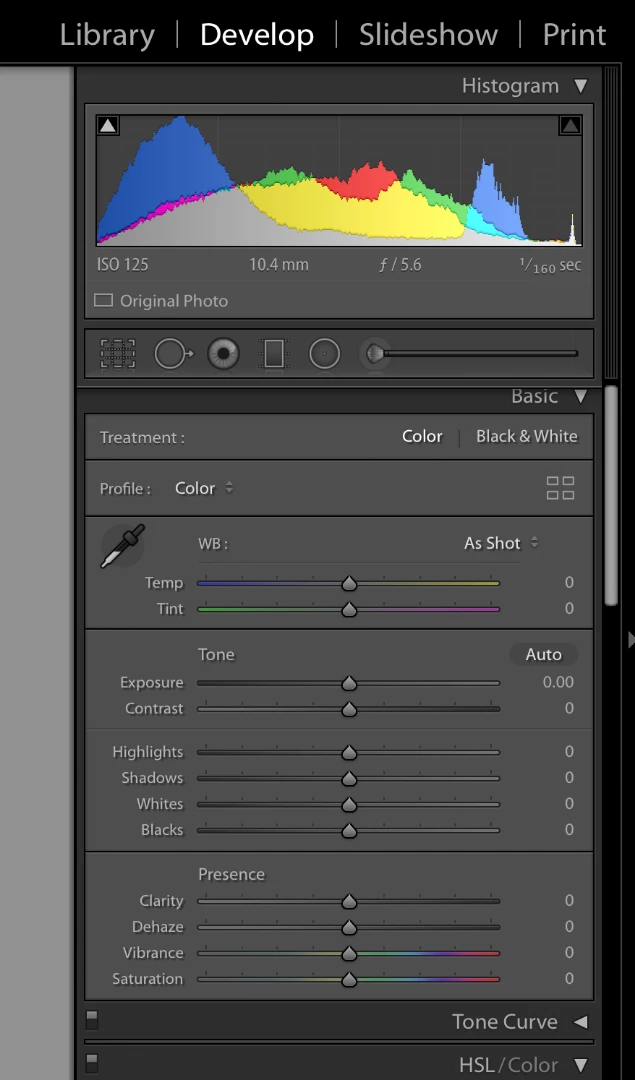
I can't see it. Here's a screen capture to illustrate ....

Cliff
    This topic has been closed for replies.
    Correct answer JP Hess

    You're not looking low enough. It's right above the filmstrip.

    When you click on that little switch, Sync will change to Auto Sync. But you must have multiple images selected in order to see the feature.

    2 replies

    Participant
    June 29, 2018

    Where is this toggle switch in the new 2018 Lightroom?

    johnrellis
    Legend
    June 29, 2018

    It's in the same place in Develop, lower-right corner, and it only appears when you have more than photo selected.

    If you don't see it, verify you are running Lightroom Classic CC and not Lightroom CC by doing the menu command Help > System Info. If you're not sure of the differences between those two confusingly named versions of Lightroom, see here: https://www.lightroomqueen.com/the-future-of-lightroom/

    Michael J. Hoffman
    Community Expert
    Community Expert
    May 8, 2018

    Hi Cliff,

    You need to look further down, at the bottom of the right-hand panel:

    Mike

    cliffh73876430
    Inspiring
    May 8, 2018

    My version 7.3.1 Camera Raw 10.3 doesn't appear to have have the same layout  as your screen capture.

    And I don't see that toggle anywhere at all.

    Yours,  Cliff

    JP Hess
    JP HessCorrect answer
    Inspiring
    May 8, 2018

    You're not looking low enough. It's right above the filmstrip.

    When you click on that little switch, Sync will change to Auto Sync. But you must have multiple images selected in order to see the feature.