
Known Participant
Mar 18, 2025 2:18 AM UTC
Answered

Where should I store Develop presets on a MacBook?

I am in the process of moving from a Windows laptop to a MacBook Pro. I have copied my Develop presets from my Windows laptop. Is there a particular location I should store them on my MacBook? For now, I have put them in a convenient location: a folder in Pictures, where I store my Lightroom catalog and associated Lightroom program files. I imported a few presets from there. But should I be storing them somewhere else? For example, If I create new Develop presets later, will Lightroom automatically store the new Develop presets elsewhere, so that I should really put the existing Develop presets in that same location to keep the presets together? Thanks.

Ian Lyons
Ian LyonsCorrect answer
Community Expert
Mar 18, 2025 8:18 AM UTC

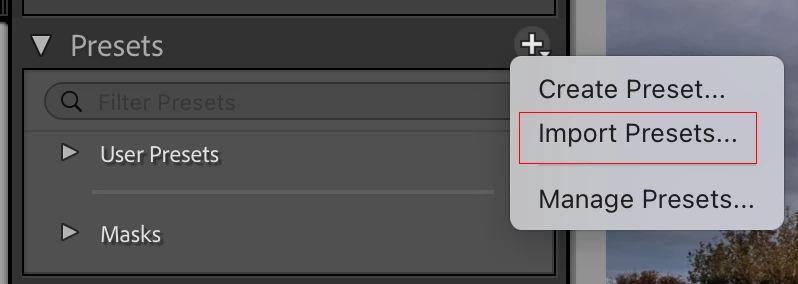
You can import the presets. Doing so will put them in the correct location/folder. I've attached a screenshot that should help.


3 replies

Ian Lyons
Community Expert
Ian LyonsCommunity ExpertCorrect answer
Community Expert
Mar 18, 2025 8:18 AM UTC

You can import the presets. Doing so will put them in the correct location/folder. I've attached a screenshot that should help.


Translate
JEK99Author
Known Participant
Mar 19, 2025 1:36 AM UTC

When you say that importing Develop presets  "will put them in the correct location/folder," do you mean the correct location/folder inside Lightroom or the correct location/folder on my hard drive? If the latter, where do I find that folder on my hard drive?

Translate
Ian Lyons
Community Expert
Community Expert
Mar 19, 2025 9:59 AM UTC

On your hard disk.


Custom (e.g. purchased) presets, custom profiles, etc are stored in a folder called CameraRaw > Settings. They're placed there to enable sharing with other Adobe photo apps.  I've attached a screenshot showing the macOS path.


Translate