
Participant
May 24, 2024
Question

Which Ligthroom files catalog can I delete without problems in win 11 ?

  • May 24, 2024
  • 2 replies
  • 718 views

Which Ligthroom files catalog can I delete without problems in win 11 ?

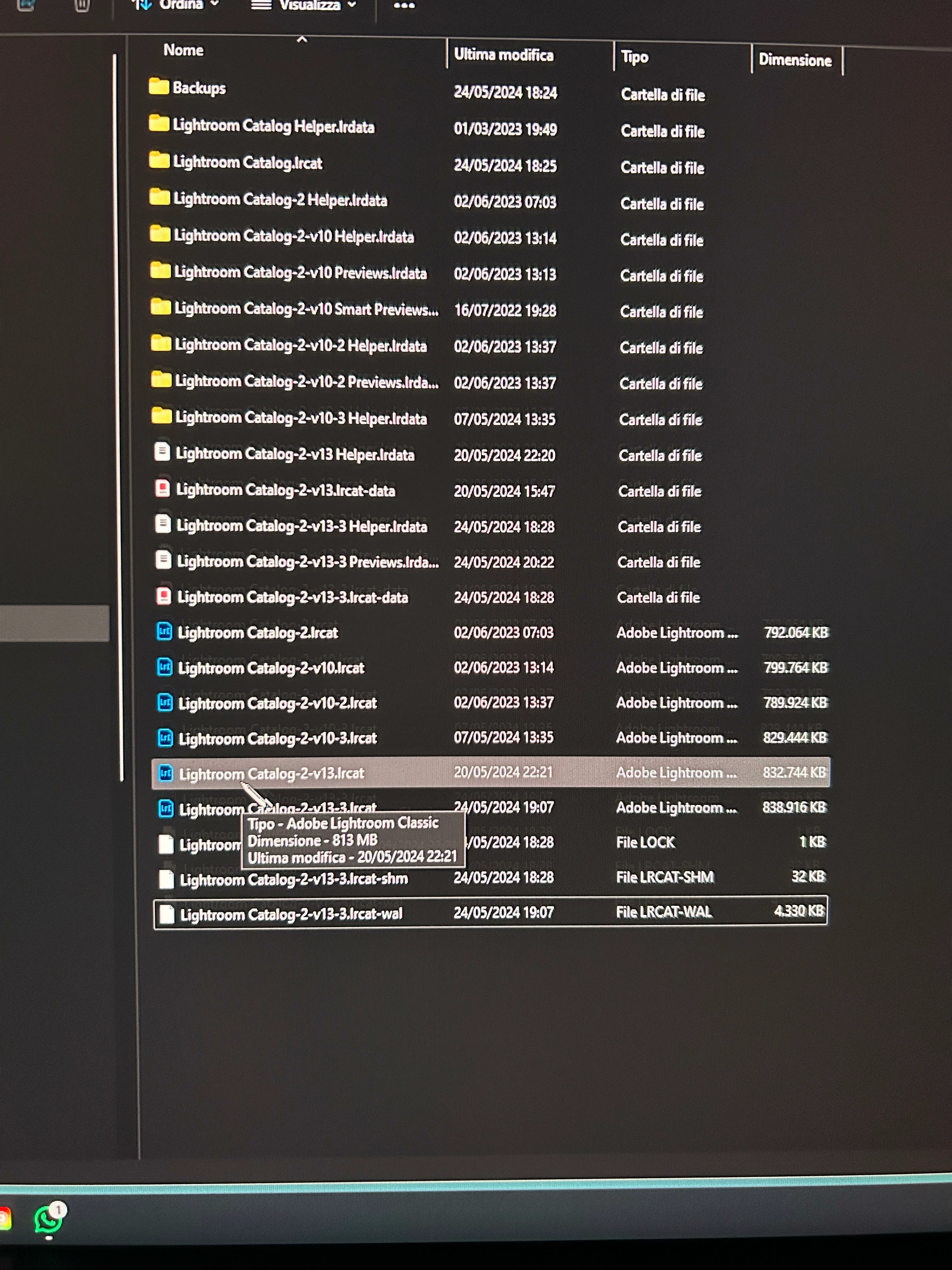
This is my directory;

Which files need to be kept and which can be safely deleted and.... why?  Thank you
 

This topic has been closed for replies.

2 replies

dj_paige
Legend
May 25, 2024

Another point: backups do NOT belong on the same disk as the working catalog. They MUST be stored on a different disk. Why? Because if your disk crashes, then not only have you lost your working catalog but you have also lost your backups. This leaves you with zero copies of your catalog file, and I'm going to guess you won't be happy about that.


Move the backups to a different disk, and store future backups on that same different disk.

Participant
May 26, 2024

Thank you, Dj Paige.

Have a nice sunday 🙂

Rob_Cullen
Community Expert
Community Expert
May 24, 2024

Lets start with the general suggestion that you keep every file or folder that contains "-v13" somewhere in the filename.  Now, EXCEPT for the two folders {Backups} and {Lightroom Catalog.LRCAT} - Archive the rest to another folder (for safe keeping . Can be deleted later.)


You have created a problem for yourself by continuing to re-open and consequently upgrading a v10 (or v11, or v12) catalog several times, thus you have three possible current catalogs, all with -v13 in the filename:

{Lightroom Catalog-2-v13.LRCAT}

{Lightroom Catalog-2-v13.-3.LRCAT}

And possibly another {Lightroom Catalog-2-v13-2} in that {Lightroom Catalog.LRCAT} FOLDER dated 24/5/2024!


It is not possible for me to determine which of these (possibly three) catalogs contains all your images, only you can check by opening each (by a [Double-Click] ) and obseving the contents.

Size and date of a catalog file (.LRCAT) might indicate which has been your primary catalog.


After determining your 'correct' working catalog, you should open your Preferences > General and set your "Default Catalog" to one of the options more suitable (eg. Specify the default). Also do not open LrC from a Catalog Shortcut - A shortcut might be sending you to the same old version catalog (-v10?).


Ask more questions if you are still unsure.


Regards. My System: Windows-11, Lightroom-Classic 15.1.1, Photoshop 27.3.1, ACR 18.1.1, Lightroom 9.0, Lr-iOS 10.4.0, Bridge 16.0.2 .
Participant
May 25, 2024

Hi, I would like to thank you for your response; I followed your instructions exactly and managed to identify the last saved catalogue. (obviously I moved the other files to another folder). Today I will test the program to make sure everything works as best as possible. My only doubt is that I did NOT -to re-open and consequently upgrade to v10- the upgrade was performed the first time I opened LR 13, only once. You have an idea why so many catalogs have been created. Thanks again for the perfect answer and have a nice day. Sergio from Italia (translated with google)

Rob_Cullen
Community Expert
Community Expert
May 25, 2024

Whenever you upgrade a catalog from one major Lr-Classic version to a 'higher' major version (eg.  12 > 13, etc) then you create a 'New' v13 catalog (via a 'copy') and the 'old' v12 catalog is left untouched (until you archive or delete).


If you repeat an upgrade more than once from the same 'old' catalog (by opening ANY old version catalog), then you will get filenames with a -2 or -3 suffix added to the name (incrementing with each repeated upgrade). The -3 in your filenames suggests you have upgraded an  'old' catalog/s twice.

eg. 10 > 13 three times will produce-

{Lightroom Catalog-v13-2.LRCAT}

{Lightroom Catalog-v13-3.LRCAT}

{Lightroom Catalog-v13-4.LRCAT},   etc.


You should always be aware of the name and location of your current working catalog, and be diligent in removing old version catalogs. An also keep catalog Backups on another physical hard-drive.


Regards. My System: Windows-11, Lightroom-Classic 15.1.1, Photoshop 27.3.1, ACR 18.1.1, Lightroom 9.0, Lr-iOS 10.4.0, Bridge 16.0.2 .