Participating Frequently
July 21, 2024
Question

White Balance shift when Editing Canon R5 Raw Photo on Macos

  • July 21, 2024
  • 2 replies
  • 594 views

Hello!

I am noticing a weird bug? lately in LR Classic on Macos Monterey.  With raw file white balance, or It/something seems to have changed , more recently,  from what I can tell.  

Basically, my raw image(s) white balance appears to shift as I edit my Canon R5 Raw Files, which didn't happen before/in the same way.  Sometimes the image now will turn more purple or blue, when it might have been more orange in the base raw exposure/AWB in the past.  


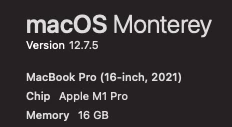
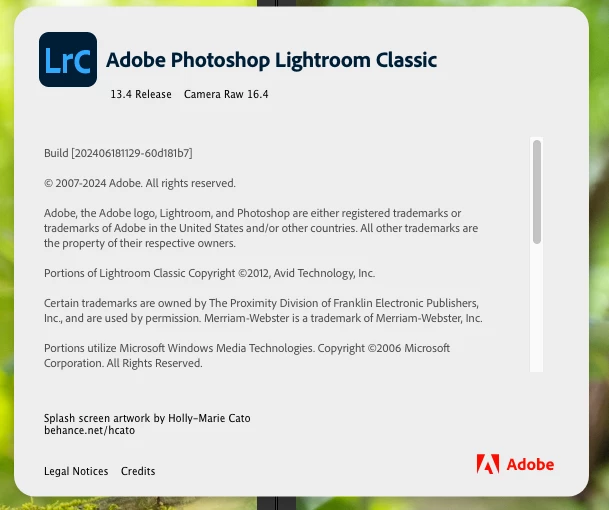
I have attached the split view/before after, and other specs/version imformation. 


[moved from bugs to discussions according to the community rules - Mod.]

This topic has been closed for replies.

2 replies

GoldingD
Legend
July 21, 2024

A couple of observations, well more like requests.


  • Some members detest screenshots posted as attachments. And it is more efficient if they are posted in the discussion directly via the insert photo button. (Screenshot from community guide below)
  • I for one, prefer to see the screenshots separately, not side by side. In this case, mainly due to the following point.
  • It is far preferable to see the entire LrC Develop Module Screen. In this case for example, the History Panel might give a clue.
  • And a pet peeve, some members posting screenshots of the Develop Module have a habit of having a large Presets Panel shown, so large that the History Panel is not shown. Please, if presets are not the subject, avoid that.


Also a request. Can you post in a reply, a screenshot of LrC /Preferences/Presets/


Participating Frequently
July 21, 2024


JohanElzenga
Community Expert
Community Expert
July 21, 2024

Why are you stil using MacOS Monterey? Your Mac supports MacOS Sonoma. There are some reports about incompatibility of Lightroom Classic 13 with Monterey, although I don't know if this is one of these known incompatibilities.


-- Johan W. Elzenga
Participating Frequently
July 21, 2024

Mostly since everything i use was / is working, so more of "if it ain't broke, down fix it". 

Not upgrading MacOS if I don't feel it's absolutely necessary. 

I've made that mistake on Windows with updates, and it ruined my system performance/made things unusable.  Especially since this is 16GB of Ram model, but maybe it would be ok..  I've heard mixed results on people upgrading to latest Sonoma.  

JohanElzenga
Community Expert
Community Expert
July 21, 2024
quote

Mostly since everything i use was / is working, so more of "if it ain't broke, down fix it". 

Not upgrading MacOS if I don't feel it's absolutely necessary. 

I've made that mistake on Windows with updates, and it ruined my system performance/made things unusable.  Especially since this is 16GB of Ram model, but maybe it would be ok..  I've heard mixed results on people upgrading to latest Sonoma.  


By @Kickflipkid687


Lightroom Classic was also not broken, so following this logic you should still use Lightroom Classic 11...


-- Johan W. Elzenga