Answered
Why can't you copy HSL settings to sync with other images
Tried to right click on an image in order to copy my HSL settings. There is no option for HSL settings. All the other adjustments can be copied, but not HSL. WHY?
Tried to right click on an image in order to copy my HSL settings. There is no option for HSL settings. All the other adjustments can be copied, but not HSL. WHY?
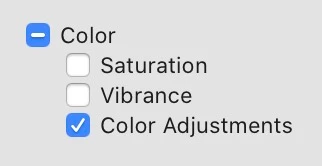
The Copy/Paste panel uses VERY confusing names for some of the adjustments. The HSL is under "Color Adjustments"
Already have an account? Login
Enter your E-mail address. We'll send you an e-mail with instructions to reset your password.
 AdChoices