jaigilchristtattoo
Participant
September 9, 2024
Question

Why does lightroom picture print display correctly but print wrong

  • September 9, 2024
  • 2 replies
  • 325 views

I am trying to print to file some montage images and have set up some custom templates to do so. I position the photos in the cells using  Command/drag  and it looks like the screen shot below but when I print it to file the images have moved position again - see second image. this happens even when i do not have to command/drag move the original image in the cell. Can someone please help me and tell me what i am doing wrong?

Thanks in advance!
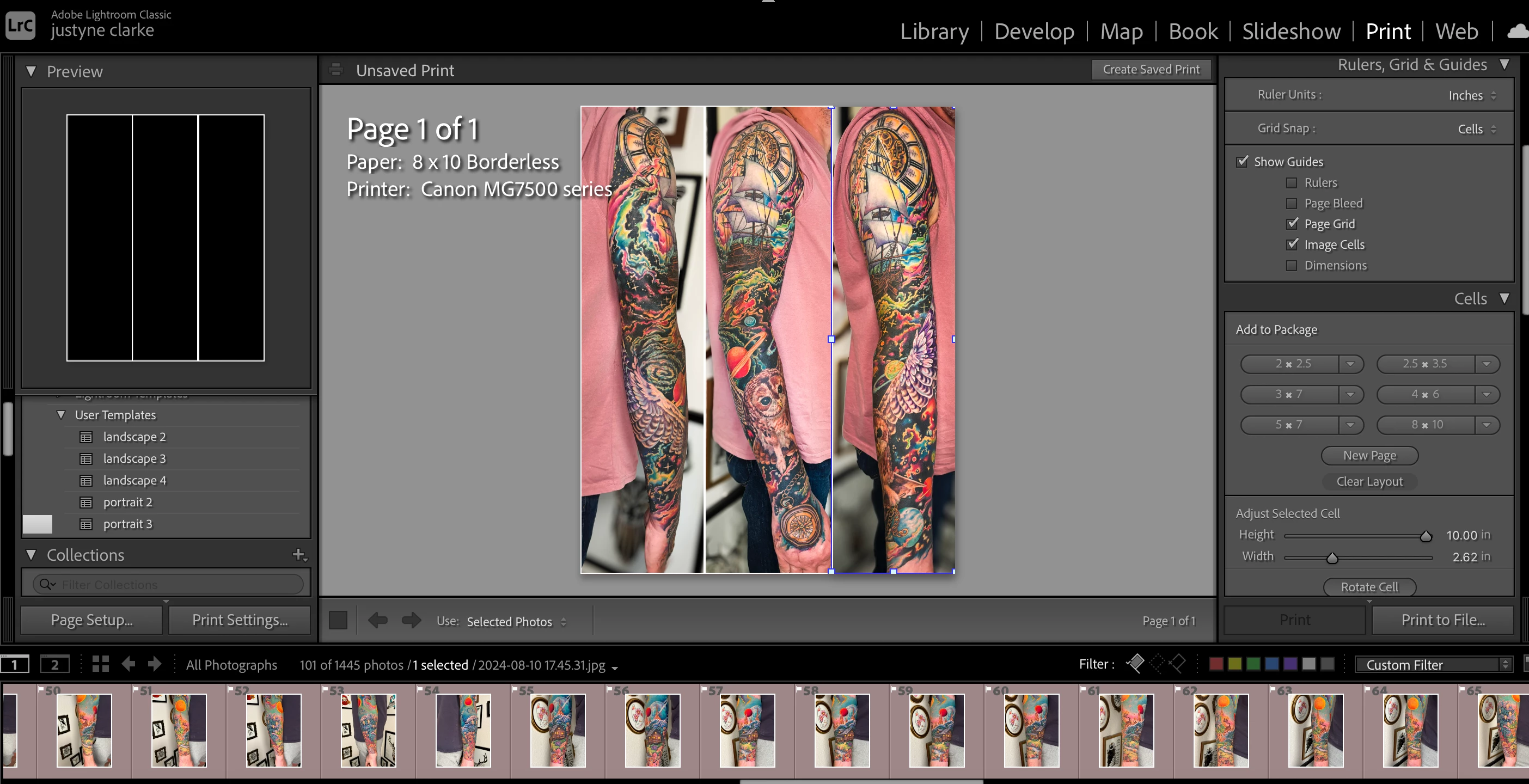

This topic has been closed for replies.

2 replies

Rob_Cullen
Community Expert
Community Expert
September 9, 2024

I cannot reproduce the result you are seeing by using my own images, but I would suggest that you change the print layout to 'Single Image/ Contact Sheet'  (and not Custom Package). Then it will be easier to set 'Three columns and One row'. The cells are 'fixed' in place and only the mouse is needed to drag images within a cell (not with Ctrl).

One thought is that your cells may be overlapping and one is over-laying the other. But you would expect that 'what you see'  is  'what you get'.


Regards. My System: Windows-11, Lightroom-Classic 15.1.1, Photoshop 27.3.1, ACR 18.1.1, Lightroom 9.0, Lr-iOS 10.4.0, Bridge 16.0.2 .
jaigilchristtattoo
Participant
September 10, 2024

Thank you Rob, I have checked and the cells are not overlapping and the images dont seem to be moving in any consistent way. I had a go with the "single image/contact sheet" (thank you for the idea) and unfortunately got the same result. the example below shows it even more extremely. I am absolutely stumped as to why it does this, and I am not sure if I can report it to Adobe as a problem? I would really like to use lightroom to make the photomontages - at the moment I need to export the individual images, open them on a different app, montage them, and then import them again into lightroom - a long process that means it almost never happens on a consistent basis.

kglad
Community Expert
Community Expert
September 9, 2024

in the future, to find the best place to post your message, use the list here, https://community.adobe.com/

p.s. i don't think the adobe website, and forums in particular, are easy to navigate, so don't spend a lot of time searching that forum list. do your best and we'll move the post (like this one has already been moved) if it helps you get responses.


<"moved from using the community bugs">
jaigilchristtattoo
Participant
September 9, 2024

Thank you, i think this is the first time i have used the community help and i was not sure how it worked.

kglad
Community Expert
Community Expert
September 9, 2024

no problem