

Why does LrC now automatically convert my RW2 files to DNG when I import?
I have been using Lightroom Classic with my Panasonic Lumix GX-9 for a few years. I shoot JPEG+RAW. In the past, when I did an import, the imported files showed in my catalog as <filename>.RW2.
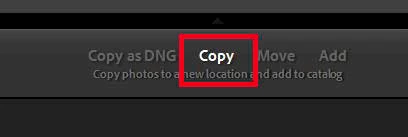
I haven't used lightroom for a few months (maybe longer?) and now when I import files from my GX-9's SD card, LrC automatically converts them to DNG. As you can probably tell, I'm NOT a skilled LrC user. I can use the basic adjustments well enough to suit me personally, but I don't have any presets or play with custom setting menus.
I have three questions:
1. Isn't it better to import files in their original raw state (RW2) instead of automatically converting them to DNG prior to post processing? LrC has supported the GX-9 for a number of years.
2. How do I get LrC to stop automatically converting my raws to DNG?
3. Did I (or Adobe) change some menu or default setting? If yes, what likely happened, so that I can avoid this problem in the future?
Thanks,
- Simon
 AdChoices