
Participating Frequently
May 28, 2024
Answered

Why doesn't the Temperature and Tint be reflected?

  • May 28, 2024
  • 3 replies
  • 382 views

It's a very simple piece of code.

For some reason, it is not reflected when the Temperature or Tnt value is 0.

Please let me know if there are any mistakes.


local LrApplication = import 'LrApplication'
local LrDialogs = import 'LrDialogs'
local LrTasks = import 'LrTasks'

local function applyFixedTemperature()
local catalog = LrApplication.activeCatalog()

LrTasks.startAsyncTask(function()
local photos = catalog:getTargetPhotos()
local numSelectedPhotos = #photos

catalog:withWriteAccessDo("Apply Temperature", function()
for i, photo in ipairs(photos) do
local settings = photo:getDevelopSettings()
settings.IncrementalTemperature = 5
photo:applyDevelopSettings(settings)
end
end)

LrDialogs.message("Message", tostring(numSelectedPhotos) .. " photos temperature adjustment completed", "info")
end)
end

applyFixedTemperature()
This topic has been closed for replies.
Correct answer johnrellis

[This post contains formatting and embedded images that don't appear in email. View the post in your Web browser.]


When run on non-raw files, that script does nothing, and @未来330400669qk1 was probably running it on non-raws.


Some experimentation shows that to change IncrementalTint and/or IncrementalTemperature, you must also do:


settings.WhiteBalance = "Custom"


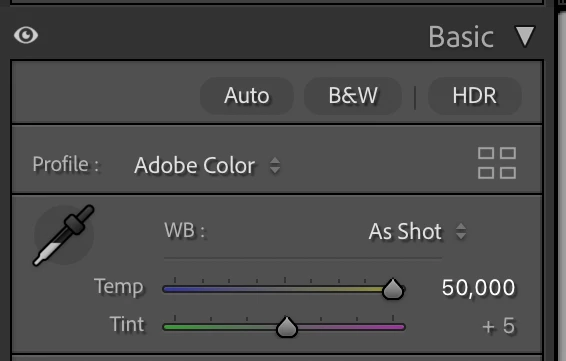
With raws, if a plugin sets Temperature or Tint without also setting WhiteBalance = "Custom", the slider in the Basic panel changes and the photo changes, but the WB: menu still shows "As Shot", which is incorrect, and that may confuse other parts of LR:


So the rule is: If the plugin changes IncrementalTint, IncrementalTemperature, Tint, or Temperature, it should also set WhiteBalance = "Custom".

3 replies

johnrellis
johnrellisCorrect answer
Legend
May 28, 2024

[This post contains formatting and embedded images that don't appear in email. View the post in your Web browser.]


When run on non-raw files, that script does nothing, and @未来330400669qk1 was probably running it on non-raws.


Some experimentation shows that to change IncrementalTint and/or IncrementalTemperature, you must also do:


settings.WhiteBalance = "Custom"


With raws, if a plugin sets Temperature or Tint without also setting WhiteBalance = "Custom", the slider in the Basic panel changes and the photo changes, but the WB: menu still shows "As Shot", which is incorrect, and that may confuse other parts of LR:


So the rule is: If the plugin changes IncrementalTint, IncrementalTemperature, Tint, or Temperature, it should also set WhiteBalance = "Custom".

Participating Frequently
May 29, 2024

Thanks for the info.

Thanks to your kind message, I was able to understand.

I tried the code and it worked.

Thank you so much. I can't find the words to thank you enough.

Conrad_C
Community Expert
Community Expert
May 28, 2024

Another way to look at that is for raw files, white balance is absolute (As Shot = specific Temperature and Tint values, and adjustments are along their scales), while for non-raw files, white balance is relative (As Shot = Temperature and Tint of 0, and adjustments are relative to 0).

Participating Frequently
May 29, 2024

Thanks for the info.

That's certainly true.The original values were different between the RAW and non-RAW files.

It was a blind spot. It's very informative.

JohanElzenga
Community Expert
Community Expert
May 28, 2024

Temperature and Tint are zero for RGB files, because RGB files already have a 'baked in' white balance. You cannot apply a white balance (like Temperature in Kelvin) to such images, you can only apply a white balance to raw files.


-- Johan W. Elzenga
Participating Frequently
May 29, 2024

Thanks for the info.

I see! The processing of RAW files and non-RAW files is different. It's very informative.