Participating Frequently
August 6, 2023
Question

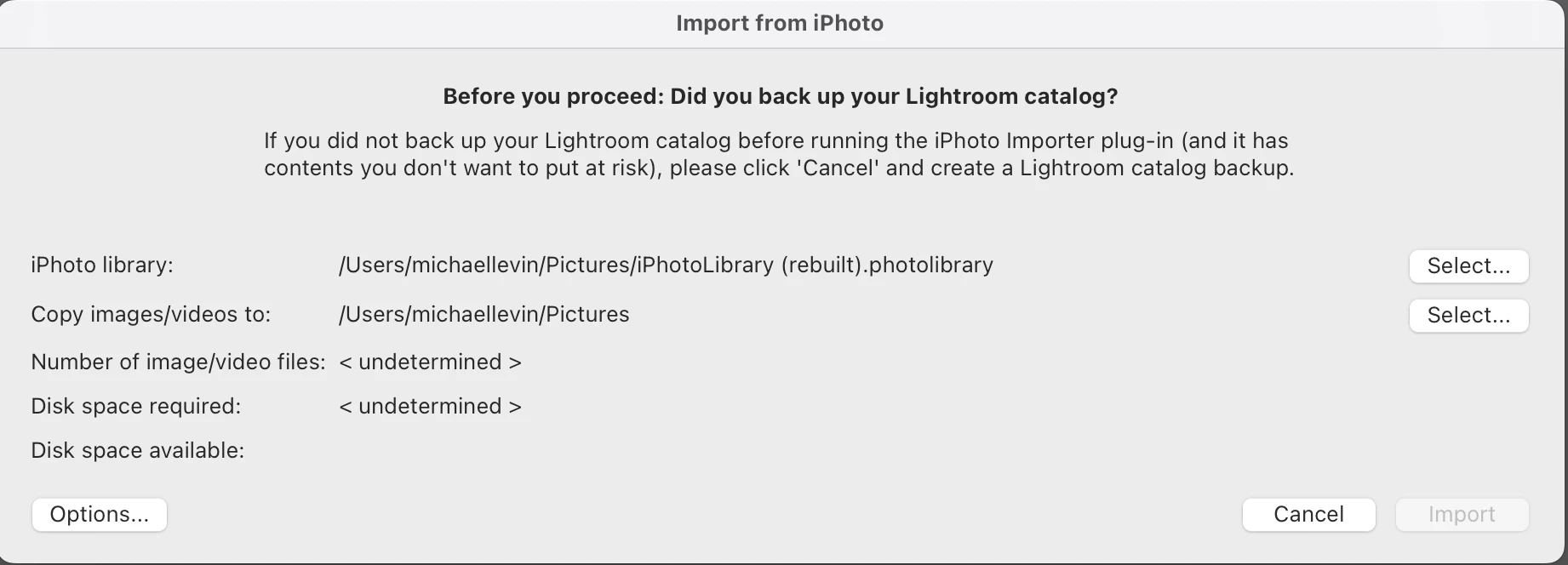
Why is Import button grayed out?

  • August 6, 2023
  • 2 replies
  • 556 views

I'm trying to import from iPhoto. I've gotten this far on the plug-in, but the Import button is grayed out! why?
This topic has been closed for replies.

2 replies

JohanElzenga
Community Expert
Community Expert
September 24, 2023

Maybe too easy, but how long have you waited for this dialog to change? The button becomes active once the plugin has determined how many images need to be imported and how much space the copying of the images takes. That may take a while.


-- Johan W. Elzenga
Participating Frequently
September 24, 2023

Interesting!! I admit that I have a large catalog (600 GB) so maybe it's still thinking?!  I will leave it up for a few days and test that. Too bad there's no progress bar or way to know what it's doing, but I hope you are right, let's see.

GoldingD
Legend
August 6, 2023

Looks like you need to deal with both those Select buttons, before the Import button will be available. Basically no images have been selected. and no destination has been selected, despite the paths currently shown.


It also looks like Apple really really does not want you to accomplish this, and appears to be warning that dire consequences may occur, and to not do this without a backup in place.

Participating Frequently
August 6, 2023

thank you! but I don't understand. I did hit those Select buttons; the first one wants me to select the iPhoto library, which I did (and I know it took, because when I selected someting else as a test, it told me that that wasn't an iPhoto library - an error it doesn't show when I choose my real iPhoto library, so I believe it knows what it's been pointed to and has verified it). For the other button, I created a new folder and pointed it to that. What else can I do? It looks to be now not an Apple issue, but a Lightroom issue, right - why would it give a grayed out button with no indication of what's wrong?

johnrellis
Legend
August 6, 2023

The built-in Aperture/iPhoto Plugin has always been very buggy, and Adobe has never acknowledged the bugs, much less fixed them. You could use the manual ("old") migration method described here:

http://lightroomsolutions.com/articles/migrating-from-aperture-to-lightroom-where-do-i-begin/


or you could use the Avalanche program, which will preserve all your metadata and edits. Lots of posts in the LR forums from satisfied users, and their support appears very responsive. It costs $59, but how much do you value your time and your photos?