
Participant
December 29, 2017
Answered

Why Is Lightroom making adjustments to my RAW photos on import?!

  • December 29, 2017
  • 2 replies
  • 991 views

Hi Everyone,

Lately Lightroom has been adjusting my RAW photos when I import them and putting some shit filter on them. I shoot on a canon 7D and DJI Phantom 4 Pro and want complete control of my images. Light room is adding contrast, saturation and white balance adjustments and has only just started doing it. I am very pressed for time and would love any answers.
This topic has been closed for replies.
Correct answer Rob_Cullen

Something to try-

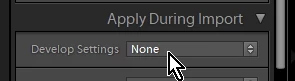
1) Check your Import dialog in the [Apply During Import]  panel, and the "Develop Settings" should be set to "None"

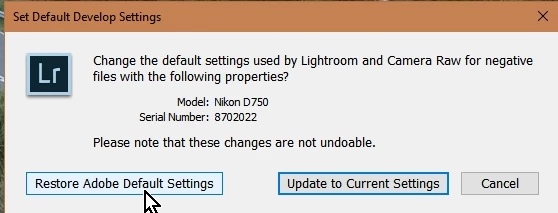
2) While in the Develop module- click the Menu -Develop>Set Default Settings and click the button to "Restore Adobe Default Settings"

Or you could Edit a photo in the Develop module, setting every possible adjustment to '0' then change defaults -"Update to Current Settings"

Setting Default Develop Settings will only be noticed for future imports but I think you could select images in the Library Grid view and click on [Reset All] in the Quick Develop Panel to correct the adjustments you are seeing. (Warning: this will delete any editing you have done!!)

2 replies

Participant
November 29, 2022

Were you able to correct this error? I tried to work through the answer given to you, but it does not fix the same problem you had. I am experiencing the same errors as you are.

dj_paige
Legend
November 29, 2022

Explain your problem in detail, from scratch. Do not say "its the same problem". Explain what you did. Show us screen captures (use the "Insert Photos" icon, do not attach files).

Rob_Cullen
Community Expert
Rob_CullenCommunity ExpertCorrect answer
Community Expert
December 29, 2017

Something to try-

1) Check your Import dialog in the [Apply During Import]  panel, and the "Develop Settings" should be set to "None"

2) While in the Develop module- click the Menu -Develop>Set Default Settings and click the button to "Restore Adobe Default Settings"

Or you could Edit a photo in the Develop module, setting every possible adjustment to '0' then change defaults -"Update to Current Settings"

Setting Default Develop Settings will only be noticed for future imports but I think you could select images in the Library Grid view and click on [Reset All] in the Quick Develop Panel to correct the adjustments you are seeing. (Warning: this will delete any editing you have done!!)

Regards. My System: Windows-11, Lightroom-Classic 15.4.1, Photoshop 27.8, ACR 18.4, Lightroom 9.4, Lr-iOS 10.4.0, Bridge 16.0.3 .