
Participant
August 26, 2022
Question

Why is LR reverting my Presets to their original names upon import?

  • August 26, 2022
  • 1 reply
  • 118 views


Hello!


I have a question.  I'm working on Windows 11 with Lightroom Classic CC.  I'm importing my old Presets into LR but before I do, since I have so many, I'm renaming all the files so that they're more easily organized and cataloged.


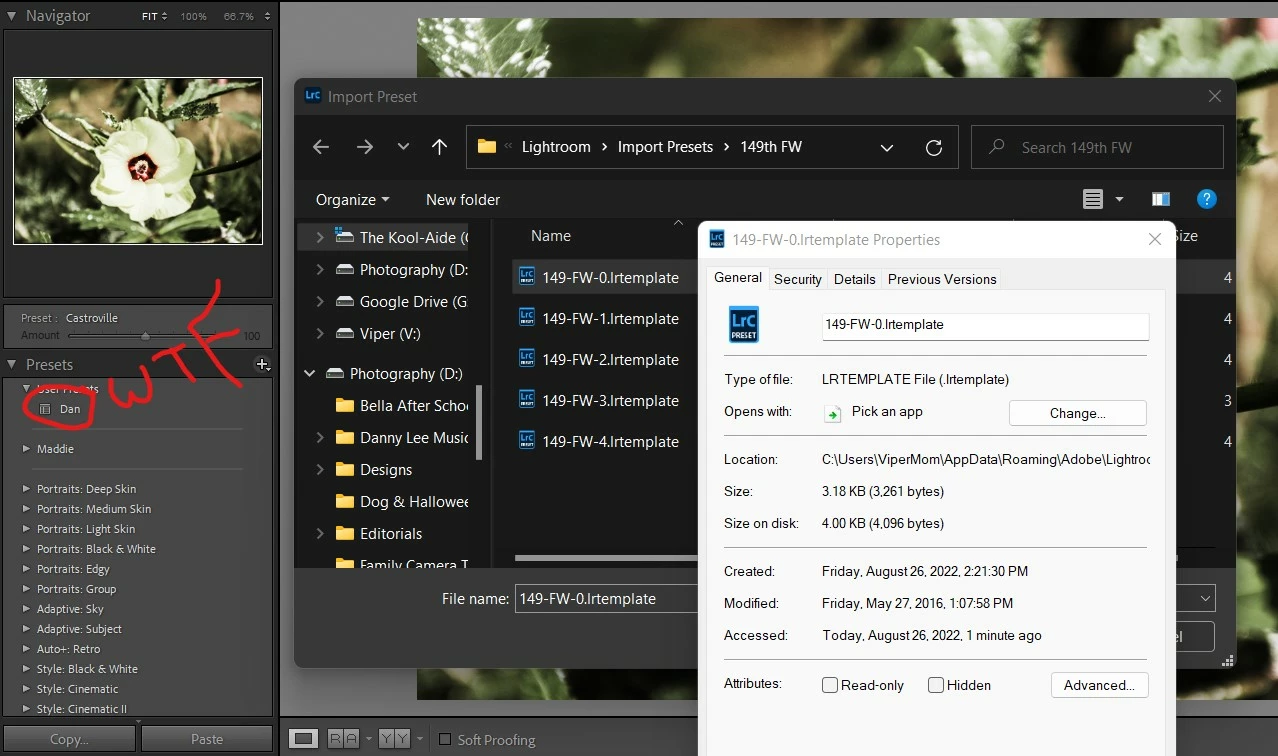
I'm using PowerShell to batch rename the .lrtemplate files to what I want them to be.  In the screenshot below I renamed the Preset file "Dan" to "140-FW-0.lrtemplate" then imported it by:


Select Import Presets > Open File Location > Select 149-FW-0.lrtemplate > Import


Upon Import, the Preset name changes to "Dan."


I want to keep the file name as "149-FW-0" but am not having any luck.


Does anyone have any insight into this?
 

This topic has been closed for replies.

1 reply

Rob_Cullen
Community Expert
Community Expert
August 26, 2022

LrC Develop Preset files have both an 'External' Name (the Filename) and an 'Internal" Name-(embedded in the code of the Preset file).

You can change the Filename, but that does not alter the Internal name that LrC displays in the Preset panel. The Internal Name can be changed by editing the Preset File in a Text editor. (I do not have the details of this at the moment).


Regards. My System: Windows-11, Lightroom-Classic 15.1.1, Photoshop 27.3.1, ACR 18.1.1, Lightroom 9.0, Lr-iOS 10.4.0, Bridge 16.0.2 .
johnrellis
Legend
September 1, 2022

If you want to rename presets and move them into folders using Mac Finder or Windows File Explorer, use the Fix Presets plugin to then reflect the reorganization back into the Presets panel.