

rbanks88
Inspiring
February 13, 2023
Question

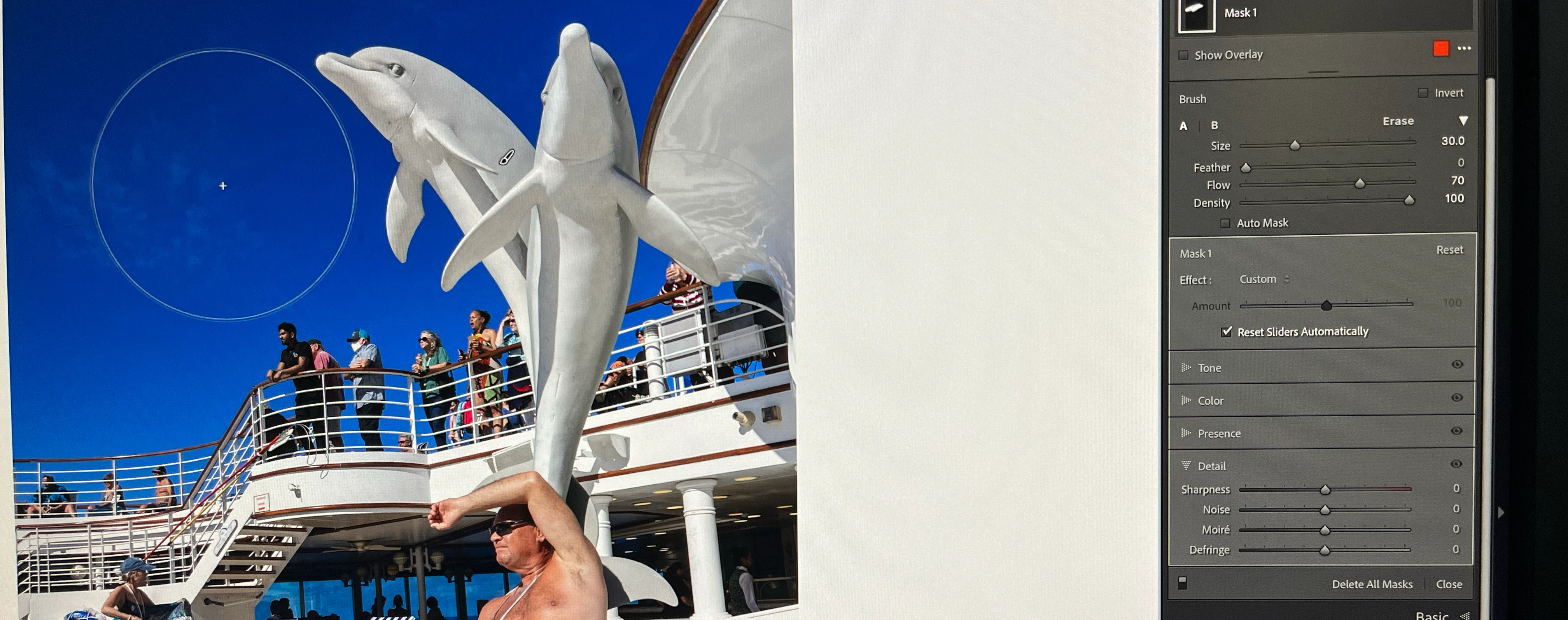
Why is my brush displaying much larger than the slider specifies?

  • February 13, 2023
  • 7 replies
  • 1072 views

On the screen, my brush is much larger than the slider indicates. On the attached screenshot, you can see that the brush is set to 30 pixels, but on the image display it's covering an area that's about 1300 pixels diameter. (The image is 4160 x 6240.)


 I have the pointer size in Accesibility set to the smallest size. If I make it bigger, the display brush zoom is even more oversized. (And I’d really like to have the pointer on the large side for my aging eyes!) I've tried it with the graphics processor turned off and it makes no difference.


I'm using an M1MacBook Air with an Eizo 27" display, with native resolution 3840 x 2160 pixels (164 ppi).


I see that the brush stays the same size regardless of the zoom level set in the navigator. Should it change? Seems a bit confusing that when it's to 30 pixels it doesn't display 30 pixels wide. 


Thanks,
Russell


P.S. On a somewhat related matter, is there a way to establish default settings for the A and B brushes and the eraser, and then go back to those settings after you've changed them while editing the masks?
 

This topic is closed to new replies. Start a new post to keep the conversation going.

7 replies

JohanElzenga
Community Expert
Community Expert
February 13, 2023

I think that this number is not 30 pixels, but the percentage of the maximum size the brush can have. The slider cannot go beyond 100, which would be rather small if it were pixels. If you select 'Show Overlay', then you will see that the circle does represent the true size of the brush, however.


-- Johan W. Elzenga
rbanks88
rbanks88Author
Inspiring
February 13, 2023

The Adobe online help says: 

Size: Specifies the diameter of the brush tip in pixels.

It's probably not worth it to dig up what's really going on, and just look at the number as some relative amount, like the percentage you suggested.

Thanks,
Russell


Rikk Flohr-Retired
Adobe Employee
February 13, 2023

Please forward me a link to that statement so I can have it corrected.
Was it this one: https://helpx.adobe.com/lightroom-classic/help/apply-local-adjustments.html 


Thanks!

Rikk Flohr: Adobe Photography Org