Inspiring
February 18, 2018
Answered

Why is my uploading destination folder "not available"?

  • February 18, 2018
  • 3 replies
  • 6036 views

Hi guys,

Upon inserting my memory card and clicking Import I immediately get the following message (before even selecting an Import preset) - which message leaves me no option but to Quit.

a) why is this happening and,

b) what to do?

Thanks a lot,

Raphael
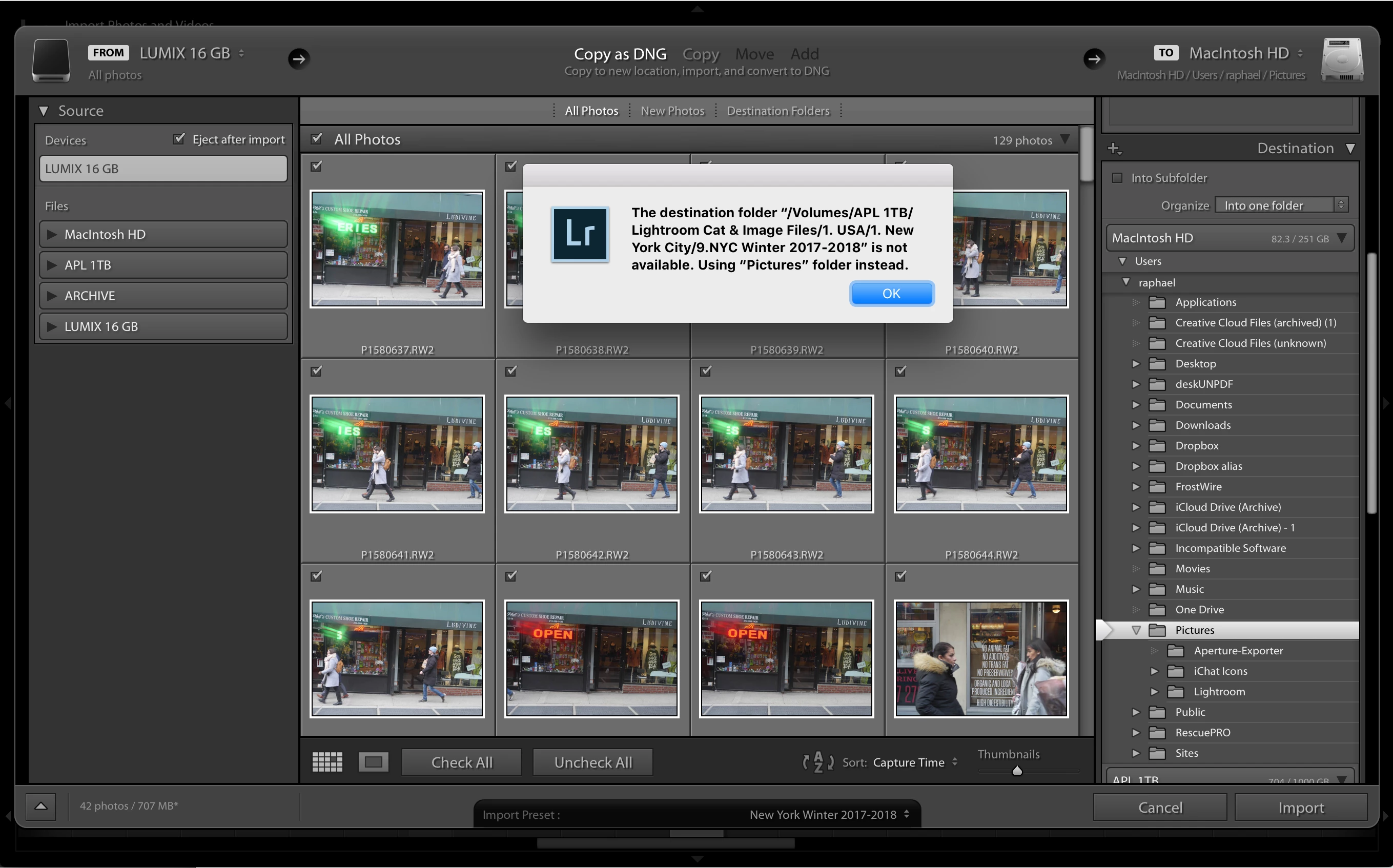
This topic has been closed for replies.
Correct answer Just Shoot Me

Here you go:


Set your Import Preset to None then manually select that folder from the Destination area.

I suspect something has happened to the import preset you saved and it isn't pointing to the correct folder.

Do an import, If the error comes up click OK, Set the Import Preset to "None", then manually select that same folder for the Destination section.

3 replies

JHOW
Participating Frequently
August 10, 2018

Screen shot below.  Problem seems to be that the error message shows a “/“ after the LaCie, but the file name is a “_”.

This has happened on both of my laptops after updating the software.  The import function works and the Destination folder is properly selected.  But the error message is a pain.  All the files were created from within LR.

cmgap
Community Expert
Community Expert
August 10, 2018

It looks like the folder was renamed. That will do it... change the name back to it's original as shown in the error message. _Photo_ is missing.

JHOW
Participating Frequently
August 10, 2018

I tried that a few times. That might be the issue on my Mac air but not on the other laptop. Will try again.

Problem is the volume name separator from the folder name. That separator / is out in automatically by LR. Right?

John Howard

Cell: +1 239.919.0124

Email: j.how@me.com

Facebook: https://www.facebook.com/JohnPaulHowardPhotography?ref=hl

Flickr: https://www.flickr.com/photos/jhow60/sets

Twitter: @lightwriter13

cmgap
Community Expert
Community Expert
February 18, 2018

How much space is left on this 5-year old drive?

Inspiring
February 18, 2018

Lots. It's a 1 TB drive. 704GB available.

Just Shoot Me
Legend
February 18, 2018

raphaels28255986  wrote

Lots. It's a 1 TB drive. 704GB available.

It's 5 years old. More than likely starting to fail.

If this is the only drive that your images are on I suggest you get another ASAP and back up all your images.

JP Hess
Inspiring
February 18, 2018

What IS the destination folder? Is it on an external hard drive that isn't connected? Is it on a hard drive that is write protected? A few details would really help.

Inspiring
February 18, 2018

A subfolder in LR called "NYC Winter 2017-2018", to which I've imported often recently.

JP Hess
Inspiring
February 18, 2018

Where is that folder? Can you tell me what there is about that folder that could make it "not available"?