Participant
February 6, 2017
Resuelto

Why Lightroom gives different results between built in lens profile and manually selecting it?
  • February 6, 2017
  • 1 respuesta
  • 359 visualizaciones

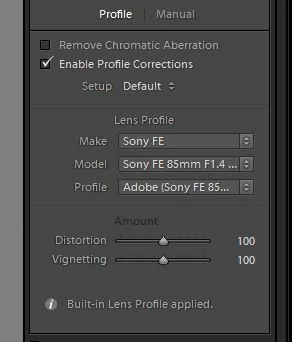
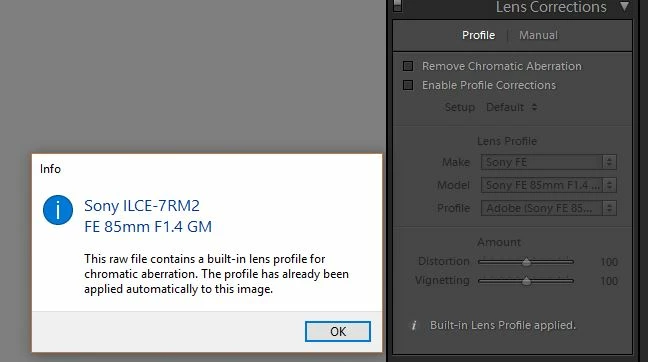
I am on the latest version of Lightroom and I noticed that under Lens Correction my lenses will show a message:

"Built in Lens Profile applied". But if I choose Enable Profile Corrections and select the correct lens there, then the photo looks different.

Am I applying double "correction" or is this choosing between the Camera built in Profile correction and the Lightroom profile corrections???

    Este tema ha sido cerrado para respuestas.
    Mejor respuesta de F. McLion

    Let me correct this: Your embedded profile is for chromatic aberration only. So, you must not manually activate this.

    However, you still need to manually enable the distortion correction if you want it to be corrected.

    Note the difference in the info text on your post and the linked page.

    1 respuesta

    F. McLion
    Community Expert
    Community Expert
    February 6, 2017

    With the built-in profile you must not put a check mark to enable the correction.

    Work with lens profiles in Adobe Photoshop, Lightroom, and Camera Raw

    --- Got your issue resolved? Please label the response as 'Correct Answer' to help your fellow community members find a solution to similar problems. ---
    F. McLion
    Community Expert
    F. McLionCommunity ExpertRespuesta
    Community Expert
    February 6, 2017

    Let me correct this: Your embedded profile is for chromatic aberration only. So, you must not manually activate this.

    However, you still need to manually enable the distortion correction if you want it to be corrected.

    Note the difference in the info text on your post and the linked page.

    --- Got your issue resolved? Please label the response as 'Correct Answer' to help your fellow community members find a solution to similar problems. ---