
Inspiring
October 10, 2023
Answered

Will LrC 13 Still Run if GPU Does Not Support DirectX 12?

  • October 10, 2023
  • 1 reply
  • 514 views

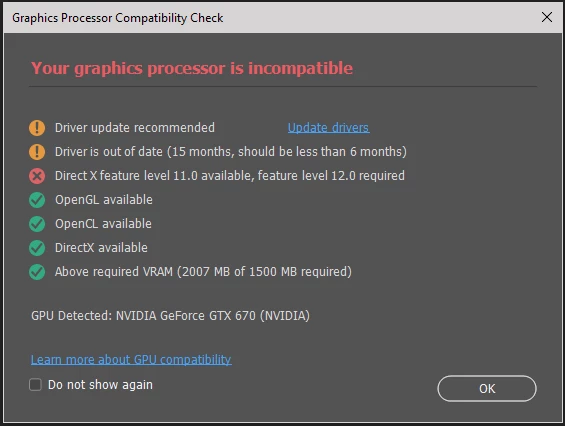
I have an older PC (2014)  running Windows 10. The GPU has 2GB of memory and only supports DirectX 11 and not 12.

When I run PS I always get the following message, but PS still runs. This works for me because I infrequently use PS. Also, there are no longer updates for this GPU.

Will LrC also run without DirectX 12? I know there is a Catalogue update with 13 so want to avoid a messy manual rollback.

And, yes, I am planning to upgrade my system.

Thanks
 

This topic has been closed for replies.
Correct answer DS256

Thanks @AxelMatt. I've decided I'm going to update my computer system before upgrading my Adobe products. This includes switching from PC to MAC.


1 reply

AxelMatt
Community Expert
Community Expert
October 10, 2023
quote

I have an older PC (2014)  running Windows 10. The GPU has 2GB of memory and only supports DirectX 11 and not 12....


Will LrC also run without DirectX 12? I know there is a Catalogue update with 13 so want to avoid a messy manual rollback.


By @DS256


Yes LR will work, but you can't enable the GPU support. So the functions that use GPU must be handled by the CPU and will be slower. How much slower and whether you can and want to accept that depends on the rest of your hardware configuration. It's definitely not a bad idea to replace your hardware with a more powerful one.


My System: Intel i7-8700K - 64GB RAM - NVidia Geforce RTX 3060 - Windows 11 Pro 25H2 -- LR-Classic 15 - Photoshop 27 - Nik Collection 8 - PureRAW 6 - Topaz Photo AI
DS256AuthorCorrect answer
Inspiring
October 18, 2023

Thanks @AxelMatt. I've decided I'm going to update my computer system before upgrading my Adobe products. This includes switching from PC to MAC.