J.R. Baizán
Participant
September 6, 2022
Answered

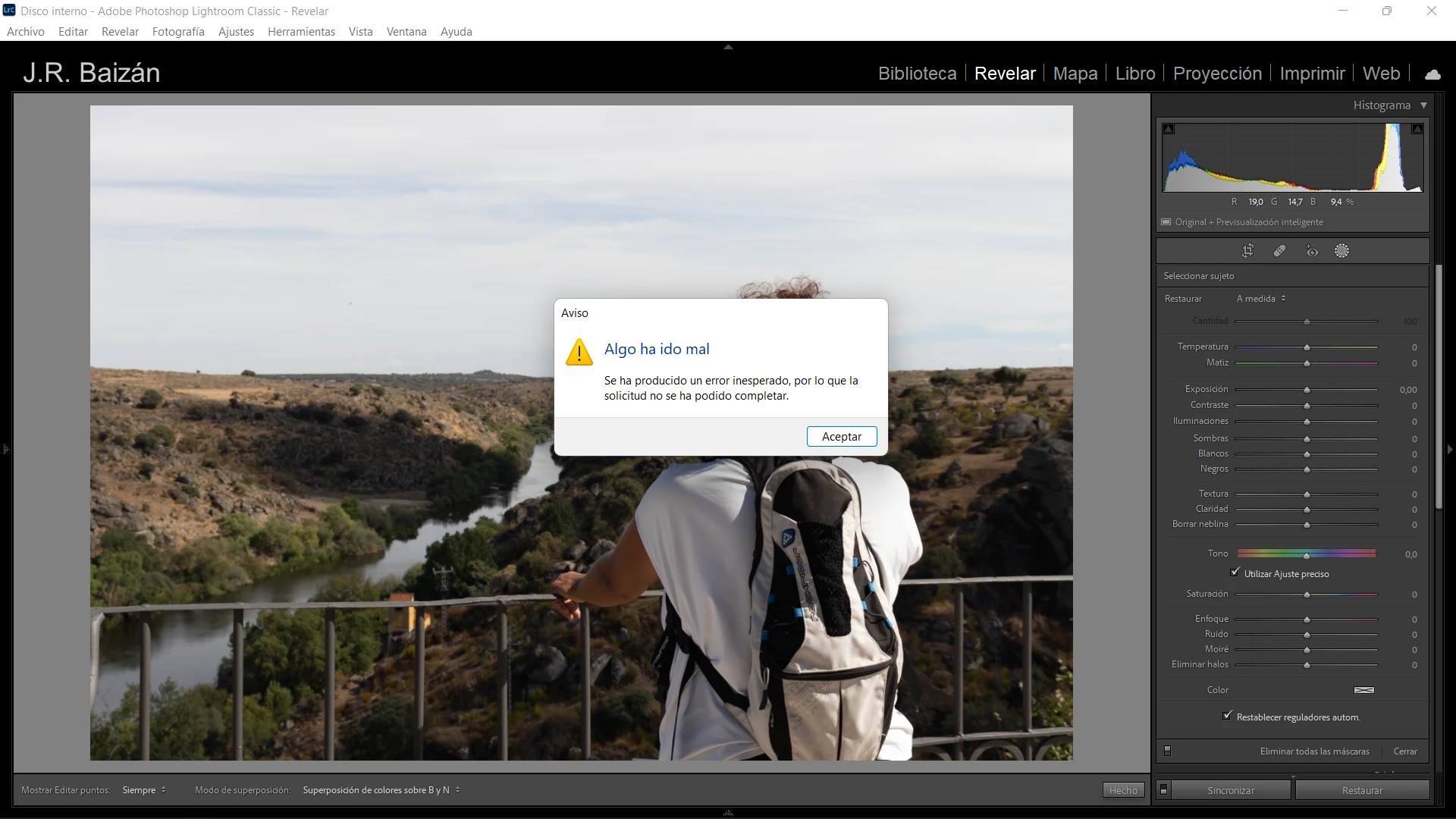
(Window 11) Lightroom Classic v11.5 Error en mascara "seleccionar sujeto"

  • September 6, 2022
  • 2 replies
  • 384 views

Hola.


Hace días que no puedo usar la máscara "seleccionar sujeto" porque siempre me aparece un "error inesperado". He actualizado Lighroom Classic y aún así no ha desaparecido. Adjunto captura de pantalla con el mensaje de error.


Ligtroom Classic versión 11.5

Windows 11


{Thread title updated by moderator}

This topic has been closed for replies.
Correct answer Sameer K

Hi there,


Thanks for reaching out. Welcome to the Lightroom Community. I'd love to help you figure this out.


Does this error show up with a specific set or range of files? What type of images do you work with? RAW or JPEG?

Have you tried any troubleshooting steps?


Try to reset the GPU caches by following these steps. Please go to the following locations

  • C:\Users\<Username>\AppData\Roaming\Adobe\CameraRaw
  • Press the Windows > Enter 'Run' > Type %appdata%\Adobe\CameraRaw > Hit OK
  • Rename the GPU folder as 'GPU.old' (add .old at the end)
  • Restart Lightroom Classic again


If this does not help, try this suggestion and let us know if the selections work better.

  • Go to Lightroom > Preferences > Performance > Use Graphics Processor > Set it to OFF if it is on Custom or Auto.


Let me know how it goes,

Thanks!
Sameer K

2 replies

GoldingD
Legend
September 6, 2022

Please post your System Information as Lightroom Classic (LrC) reports it. In LrC click on Help, then System Info, then Copy. Paste that information into a reply. Please present all information from first line down to and including Plug-in Info. Info after Plug-in info can be cut as that is just so much dead space to us non-Techs.

J.R. Baizán
Participant
September 6, 2022

Thank you for offering your help! 🙂 @Sameer K gave me two choices and the first I tried (the easiest way) worked.

Sameer K
Community Manager
Sameer KCommunity ManagerCorrect answer
Community Manager
September 6, 2022

Hi there,


Thanks for reaching out. Welcome to the Lightroom Community. I'd love to help you figure this out.


Does this error show up with a specific set or range of files? What type of images do you work with? RAW or JPEG?

Have you tried any troubleshooting steps?


Try to reset the GPU caches by following these steps. Please go to the following locations

  • C:\Users\<Username>\AppData\Roaming\Adobe\CameraRaw
  • Press the Windows > Enter 'Run' > Type %appdata%\Adobe\CameraRaw > Hit OK
  • Rename the GPU folder as 'GPU.old' (add .old at the end)
  • Restart Lightroom Classic again


If this does not help, try this suggestion and let us know if the selections work better.

  • Go to Lightroom > Preferences > Performance > Use Graphics Processor > Set it to OFF if it is on Custom or Auto.


Let me know how it goes,

Thanks!
Sameer K