Inspiring
September 9, 2017
Answered

Workflow when trying several different color treatments on a photo

  • September 9, 2017
  • 2 replies
  • 297 views

I am trying around 12 different color treatments on a photo.  The way I did this was to create a virtual copy from the original, apply some adjustments to it, go back to the original, make another virtual copy and try something different, and I repeated this over and over.

1. Is there a better way of trying out many different adjustments to the same photo to accomplish what I am trying to do?

2. Is there some way to name a virtual copy, or apply a note to one so I can quickly see what each virtual copy is without going through the History for each Virtual Copy?

Thanks.
    This topic has been closed for replies.
    Correct answer johnrellis

    Is there some way to name a virtual copy

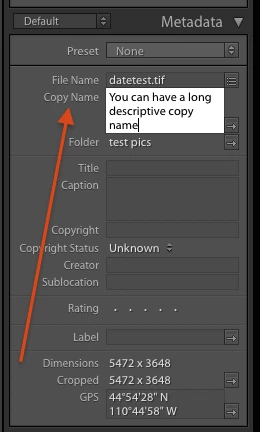
    You can put a long descriptive name in the Copy Name field in the Library's Metadata panel:

    You can also give descriptive names to snapshots.

    Snapshots and virtual copies each have their advantages. With snapshots, you can immediately see the develop settings used to make the snapshot. With virtual copies, you can export and print them a little easier.  With virtual copies, you can build 1:1 previews and then switch between several of them in full screen much faster than you can in Develop.

    2 replies

    johnrellis
    johnrellisCorrect answer
    Legend
    September 9, 2017

    Is there some way to name a virtual copy

    You can put a long descriptive name in the Copy Name field in the Library's Metadata panel:

    You can also give descriptive names to snapshots.

    Snapshots and virtual copies each have their advantages. With snapshots, you can immediately see the develop settings used to make the snapshot. With virtual copies, you can export and print them a little easier.  With virtual copies, you can build 1:1 previews and then switch between several of them in full screen much faster than you can in Develop.

    Rob_Cullen
    Community Expert
    Community Expert
    September 9, 2017

    I like to create Virtual Copies. They give an visible thumbnail in the library grid. (and can be stacked!)

    Another option is to work on the one photo (Original or VC) and when you see something you like create a Snapshot. You will only see the most recent edit when you develop but you can choose any saved snapshot to view it at those 'saved' moments in time.

    Regards. My System: Windows-11, Lightroom-Classic 15.3, Photoshop 27.5, ACR 18.3, Lightroom 9.3, Lr-iOS 10.4.0, Bridge 16.0.3 .