

nunos87925695
Participant
June 11, 2019
Answered

Working in the same catalogue in different computers (iMac, laptop, etc)

  • June 11, 2019
  • 2 replies
  • 214 views

Hello All,

I'm looking to find a way to work on the same catalogue in different machines.

I have my "working basecamp" which is my iMac back in my office where I have the HDD with all photo stored and organize my collections etc.

When I'm away travelling, I can work on all the pictures using my iPhone/ipad with no issue using the Lightroom mobile. And its working on the catalogue I've created on my iMac, right?

However when I start the Lightroom CC on my laptop, a message pops up:
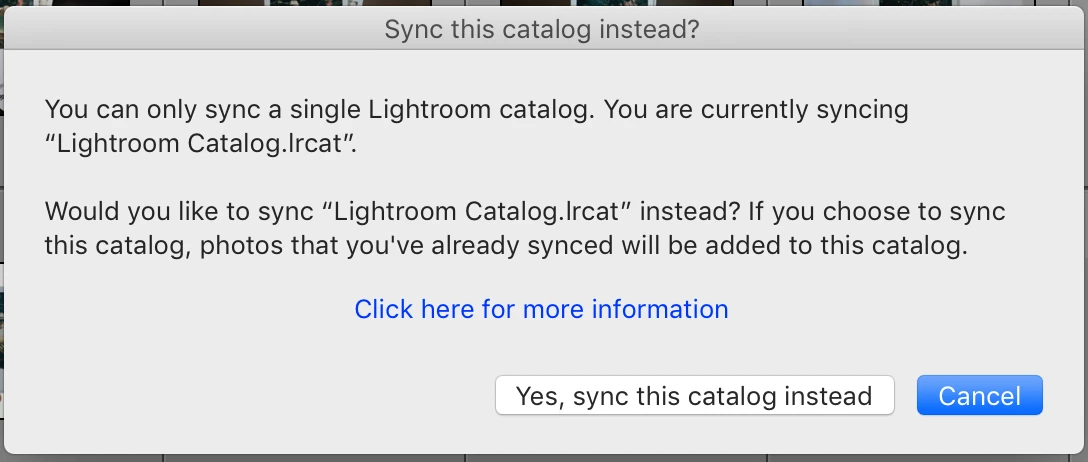
Is there any way I can make my Lightroom Classic on my laptop access the catalogue I've created on the iMac from my office and work on it directly?

How do you guys do in such situation? What ways do I have to solve this issue?

Many thanks for you support      

Nuno Sousa

This topic has been closed for replies.
Correct answer johnrellis

There are no great solutions to sharing a catalog between two computers, but there are several adequate ones for various use-cases.  This article thoroughly explores the options: https://www.lightroomqueen.com/how-to-lightroom-catalog-multiple-computers/

2 replies

johnrellis
johnrellisCorrect answer
Legend
June 11, 2019

There are no great solutions to sharing a catalog between two computers, but there are several adequate ones for various use-cases.  This article thoroughly explores the options: https://www.lightroomqueen.com/how-to-lightroom-catalog-multiple-computers/

Just Shoot Me
Legend
June 11, 2019

You can work on the same catalog with the same images files on 2 or more computers by putting the catalog and image files on an external drive. But you can only sync with the web/mobile system from one of system.