Inspiring
November 11, 2022
Answered

Working with Photomechanic and Lightroom

  • November 11, 2022
  • 1 reply
  • 2414 views

Does anyone work on the forum with both Photomechanic and Lightroom ?


I am in contact with Camera Bits about this issue, but they also suggested I send a query to Adobe (and the forum).


I use Photomechanic to cull images and attach a headline, caption, and keywords when filing news images to a news feed.

The process has suddenly become very erratic. Sometimes ithe metadat attachs, sometimes it doesn't.   To put this another way it looks like the metadata is being attached in PS, but it doesnt always appear in LR. I have no other presets, or develop settings set prior to tarnsferring mages to LR, so it does appear as though LR is not capturing the transferred metadata. This happened all of a sudden. I changed nothing in either program, neither have I changed browser, nor Mac OS platform.


Would anyone have any ideas or suggestions, in particular an Adobe Pro (who may be best placed to answer).


Thank you in advance.


This topic has been closed for replies.
Correct answer bridgetc15672952

[This post contains formatting and embedded images that don't appear in email. View the post in your Web browser.]


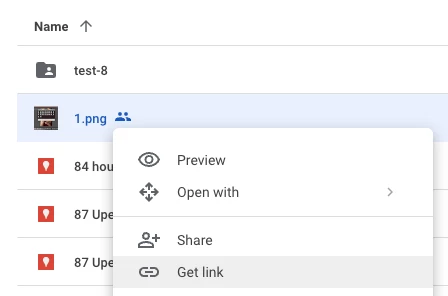
To share a file uploaded to Google Drive, right-click the upload file and do Get Link:

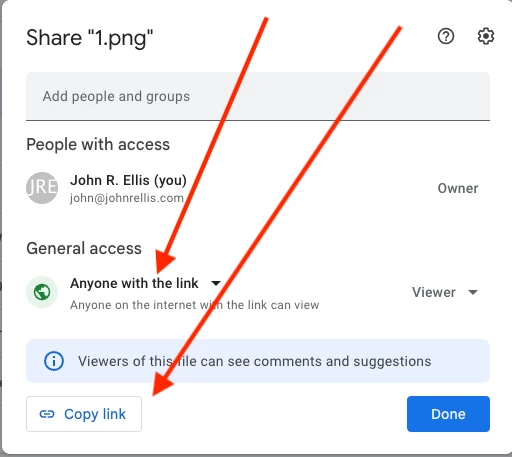
Change General Access to Anyone With The Link and do Copy Link:


Paste the link into your reply here.


Thank you so much !

Easy when you know how.


https://drive.google.com/drive/folders/1qA-NP360oNL5JyXAxIjsS1cCrGtIMua9?usp=share_link

Has that worked ?


Images very underexposed - a result of 'new camera' syndromw. But that is the only new thing in the equation, and this was happening with files taken with my other camera and transferred.


Thank you again !


1 reply

johnrellis
Legend
November 11, 2022

Using Photo Mechanic with LR can be fussy.  Troubleshooting steps:


1. Please do the LR menu command Help > System Info and copy/paste the first ten lines here.


2. Describe in detail the step-by-step workflow involving LR and Photo Mechanic. Details matter.


3. In LR Library, select a photo that doesn't show the metadata you added with Photo Mechanic. Right-click it and do Show In Finder.  Upload the photo (and it's .xmp sidecar if it's raw) to Dropbox, Google Drive, or similar and post the sharing link here.  I can put both files under the microscope, likely narrowing down where the problem is.

Inspiring
November 11, 2022

Thank you very much !


First part below.

Second part (3) will have to send on Sunday when I've worked out how to do it. I don't think I can send by Dropbox as I use the free app only. Its getting late here (UK time) and tomorrow I have committments. 


1. 

Lightroom Classic version: 12.0.1 [ 202210260744-9e008017 ]
License: Creative Cloud
Language setting: en
Operating system: Mac OS 11
Version: 11.7.1 [20G918]
Application architecture: x64
Logical processor count: 4
Processor speed: 2.7GHz
SqLite Version: 3.36.0
Built-in memory: 8,192.0 MB


2.

PM:   Select 'tagged' images using drop down menu; select all (Cmd A); Cmd I (opens image content dialogue box); apply template to selected; Cmd E (images transferred to LR import ).


Thank you very much !

Will reply back on Sunday.

Inspiring
November 11, 2022

I'm afraid I have no idea how to  share.

I hope I have put the files in Google drive, but I'm not sure what the sharing link is.