Participant
April 3, 2018
Answered

X-Rite ColorChecker Camera Profiles

  • April 3, 2018
  • 2 replies
  • 5371 views

Custom camera specific color profiles are a major part of my Lightroom Classic CC workflow. With 7.4, all of my previous custom profiles show up as being B&W, not color. Touching any camera profile changes locks me out of my previously generated custom COLOR profiles. Help needed. Using X-Rite ColorChecker Passport and X-Rite's ColorChecker Camera Calibration software v1.1.1 - which uses Adobe DNG as an Adobe LR Classic plug-in.
This topic has been closed for replies.
Correct answer Ian Lyons

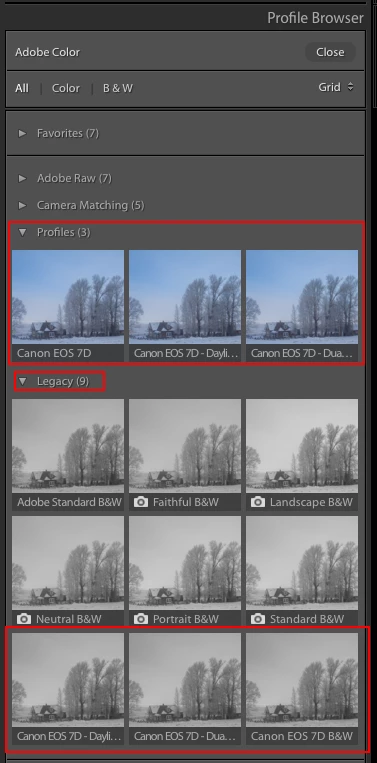
Your X-rite profiles should also be listed under the 'Profiles' segment in Profile Browser. The B&W interpretations of same are shown in Legacy segment.

Edit: below screenshot might help

2 replies

Participant
November 23, 2019

Lightroom will not let me select DNG profiles to import into lightroom. I am usng Mac OS currently, never had an issue with my PC. Why doesn't the current Lightroom on my Mac allow X-Rite DNG profiles to be imported? 

Ian Lyons
Community Expert
Ian LyonsCommunity ExpertCorrect answer
Community Expert
April 3, 2018

Your X-rite profiles should also be listed under the 'Profiles' segment in Profile Browser. The B&W interpretations of same are shown in Legacy segment.

Edit: below screenshot might help

jhoytvaAuthor
Participant
April 3, 2018

Many thanks, that is exactly what I needed to know. I had looked only under "Legacy."

Ian Lyons
Community Expert
Community Expert
April 3, 2018

Yep, I expect 'Legacy' will cause confusion for a while. This segment contains B&W 'interpretations' of the old 'Adobe Camera' profiles (not to be confused with the 'Camera Matching' profiles) and any custom created profiles. Only the colour versions of these profiles actually exist.