
Participating Frequently
February 5, 2022
Question

XMP file not being created in Lightroom anymore - One day it was, next day it stopped

  • February 5, 2022
  • 4 replies
  • 3580 views

Hi everyone. I thank you and I appreciate any help in advance!


So I'm a real estate photographer. I shoot in raw and get 3 bracketed shots per scene. Afterwords I import them into Lightroom classic and create an HDR TIF file with a program called Enfuse. In the end I WAS getting an XMP files created in the same "ORIGINALS" folder with my RAW files and my TIF file. 
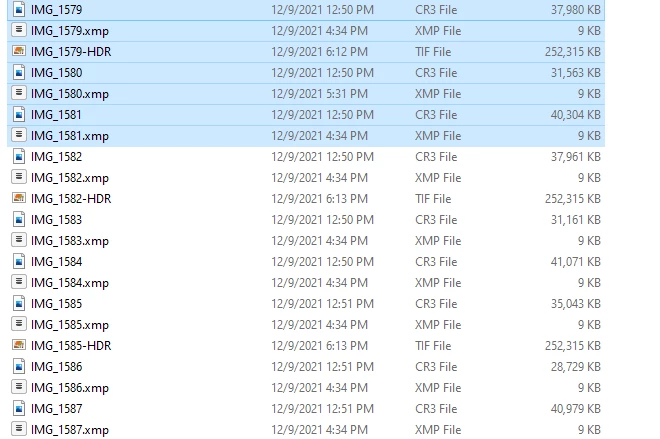
 

Then one day it stopped (December 10, 2021).
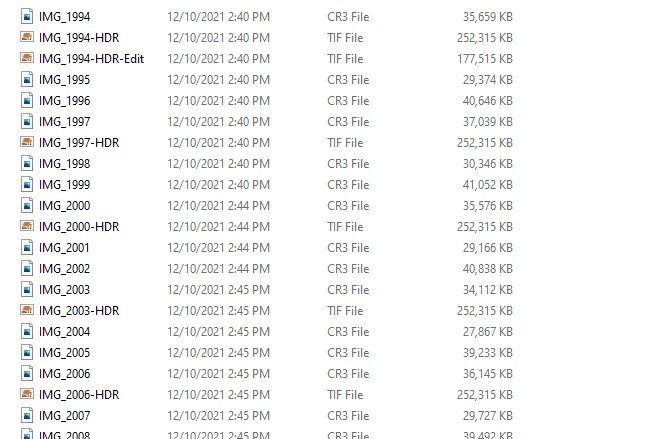
 

The ORIGINALS folder for the project that day now showed NO XMP files. As far as I know I didn't change anything. And I already checked and the check mark boxes WERE checked that should be so that I would be getting XMP files.
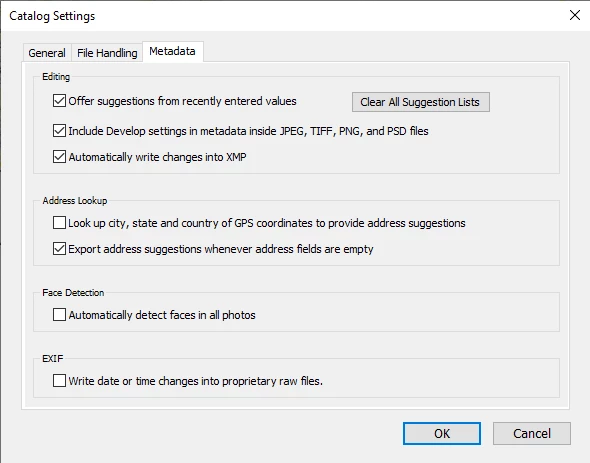


What in the world am I doing wrong or different that changed this to where I'm not getting XMP files anymore. I need those so that I can keep the changes between each file (specifically the TIF files which are the HDR files). And it's way to cumbersome and laggy to try to never remove any files from LR. So I need those XMP files in case I have to go back to files to do further edits.

Thanks for any insight!

4 replies

Participant
December 26, 2022

I had exactly the same problem; one day (maybe early in 2022?) Lightroom just stopped creating .xmp files on my system, despite my having that option enabled in Catalog Settings. I did two things, and I think it was the first that fixed it, but if that doesn't work for you, try the second (which I think will work whether or not Lightroom AUTOMATICALLY creates the .xmp files for you.


1. In the Catalog Settings, I disabled the "Automatically write changes into XMP" option, then clicked OK, then entered Catalog Settings again and re-enabled it. I did not have to restart Lightroom, but that would have been my next step.

2. In the Develop module, I selected all the photos in the Collection I was working on, then from the pop-up menu I selected Metadata > Save Metadata to Files. As stated above, I believe this would likely create the sidecar files whether you have the option enabled in the Catalog Settings.


After making these changes I spot-checked a number of projects I'd worked on this year, and there were XMP files for all of them. If you have this problem, I recommend trying the same as I did.

Inspiring
December 26, 2022

"If you have this problem, I recommend trying the same as I did." That fixes missing XMP's but to ensure that XMP's are created on import, I apply lens correction to all photos. At one point, XMP's were not created if no editting was done on them.


Participant
December 26, 2022

Understood. I don't see much point in creating a sidecar file for a file that is completely unedited, I guess. But I'm glad we've each found fixes for our issues!

JP Hess
Inspiring
February 20, 2022

It's "possible" that a problem has developed with your preferences file. You might want to consider creating a new preferences file and setting all your preferences appropriately again and then see if that resolves your problem.

Inspiring
February 5, 2022

The ORIGINALS folder for the project that day now showed NO XMP files. As far as I know I didn't change anything. And I already checked and the check mark boxes WERE checked that should be so that I would be getting XMP files.


By @Kevin M Lepp


Yup, I had the same issue. LrC changed. XMP's are now only written when a change occurs. This is even when you have write XMP set. 


What I did was to added 'Lens Correction' to DEVELOP SETTINGS in APPLY DURING IMPORT. Now I get XMP files written for all imports.


Community Expert
February 5, 2022

No change in behaviour here.


XMP has always been created in the first instance or - if already in existence - further updated ONLY when:


  • either some NEW change to the image's editing happens inside the Catalog (it is also necessary for "automatically write XMP" to have been ON at the moment the change happened, this does not work retrospectively)
  • or there is external writing of metadata on demand, e.g. with Ctrl+S key shortcut. In this case it does not matter when or whether the image has been edited, and it does not matter if "automatically write XMP" is on or off, LrC simply does what you manually tell it to do.


Importing is not, in itself, a change to the image's editing since any editing that may already exist alongside the image is read in the same.


Also later turning on the "automatically write XMP" option does nothing immediately. It only changes LrC's subsequent behaviour, whenever a new change happens to images' editing going forward.

Inspiring
February 5, 2022

"Importing is not, in itself, a change to the image's editing since any editing that may already exist alongside the image is read in the same." Agreed, that's why I added the Lens Correction on import (see above) to force creating an XMP on Import. Works for me. I now have XMP's for all imported photos.

DdeGannes
Community Expert
Community Expert
February 5, 2022

I am not sure why the xmp are not showing when you have the option to Automatically save xmp to the file. Have you created a new Catalog?
Lightroom by default saves all the work including the edits you do in the Catalog file. Writing xmp data to the file is an option that allows Bridge / Adobe Camera Raw to utilize your Lightroom edits.

when you are working in Lightroom it is reading and writing to the Catalog File as long as you keep your Catalog file safe and create backups you work will be safe.

You stated " So I need those XMP files in case I have to go back to files to do further edits." You do not need to be concerned.

Lightroom will read from xmp files if they are present at import. Lightroom does not read automatically from xmp file, you have to use the menu to manually read from the file if the info has been altered by another application like Camera Raw / Bridge.


Regards, Denis: iMac 27” mid-2015, macOS 11.7.10 Big Sur; 2TB SSD, 24 GB Ram, GPU 2 GB; LrC 12.5,; Lr 6.5, PS 24.7,; ACR 15.5,; (also Laptop Win 11, ver 24H2, LrC 15.0.1, PS 27.0; ) Camera Oly OM-D E-M1.
Participating Frequently
February 5, 2022

Thanks for the reply! The problem is I dont have the XMP files for recent jobs because its not saving it. I even tested some by opening them up in LR, but as I figured, the develop settings weren't applying because there was no XMP files. I know they read them automatically if they're there, but I can't create them for some reason so that 's whats bothering me.


thanks!


GoldingD
Legend
February 5, 2022

Assuming LrC v11


For a test


  1. Import a new photo
  2. Verify that no xmp file exists yet
  3. Accomplish a develop modoule edit
  4. See if the xmp has now been created