


Participant
October 4, 2026
Answered

Add a "Not in any album" filter to Lightroom

  • October 4, 2026
  • 4 replies
  • 30 views

As a library grows, it gets hard to tell which photos have been organized and which haven't. Right now there is no way to find photos that aren't in an album. The only workaround is to open every album, flag all its photos, and then filter All Photos by "Unflagged". That is slow, error-prone, and has to be repeated whenever albums change.

Proposed solution:
Any of these would solve it:

  • A filter option under the All Photos filter menu: Album: None
  • A built-in view or smart album called Unorganized or Not in an Album
  • Support for smart albums with rules such as "Album is none", which would also open up other useful rules

Use case:
After an import or a shoot, I want to see only the photos I haven't sorted into albums yet, so I can work through them until none are left. This would also make it much easier to clean up and organize an existing library.

Impact:
This helps anyone who uses albums as their main organizing tool, and it matters more the larger the library gets.

    Correct answer leiman

    I have a smart album for every year that grabs all pictures that are not in another album for each year.  Although you could use the date rules to narrow down to a particular date of shooting. 


    Create Smart Album → Add New Rule → Album → Then “Select” the Album → At the bottom you will see “Not in Any Album”.  I then add a second rule that only captures the year or time frame.  


    4 replies

    JohanElzenga
    Community Expert
    Community Expert
    October 4, 2026

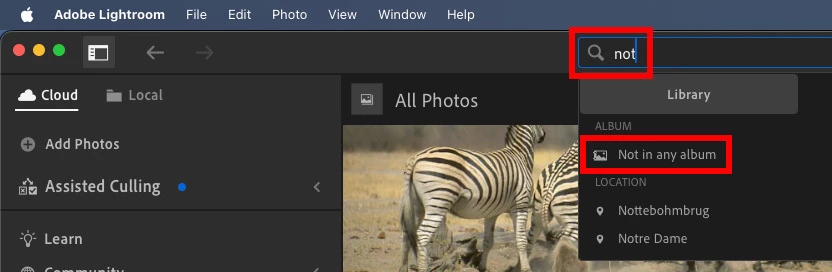
    That filter already exists, but you have to type in the criterium. In the search bar, start typing ‘Not in any album’. It will already come up after you only typed ‘not’.


    -- Johan W. Elzenga
    Participant
    October 5, 2026

    Thank you!

    leiman
    leimanCorrect answer
    Participant
    October 4, 2026

    I have a smart album for every year that grabs all pictures that are not in another album for each year.  Although you could use the date rules to narrow down to a particular date of shooting. 


    Create Smart Album → Add New Rule → Album → Then “Select” the Album → At the bottom you will see “Not in Any Album”.  I then add a second rule that only captures the year or time frame.  


    Participant
    October 5, 2026

    Love this approach! Thank you so much.