Participant
October 16, 2018
Question

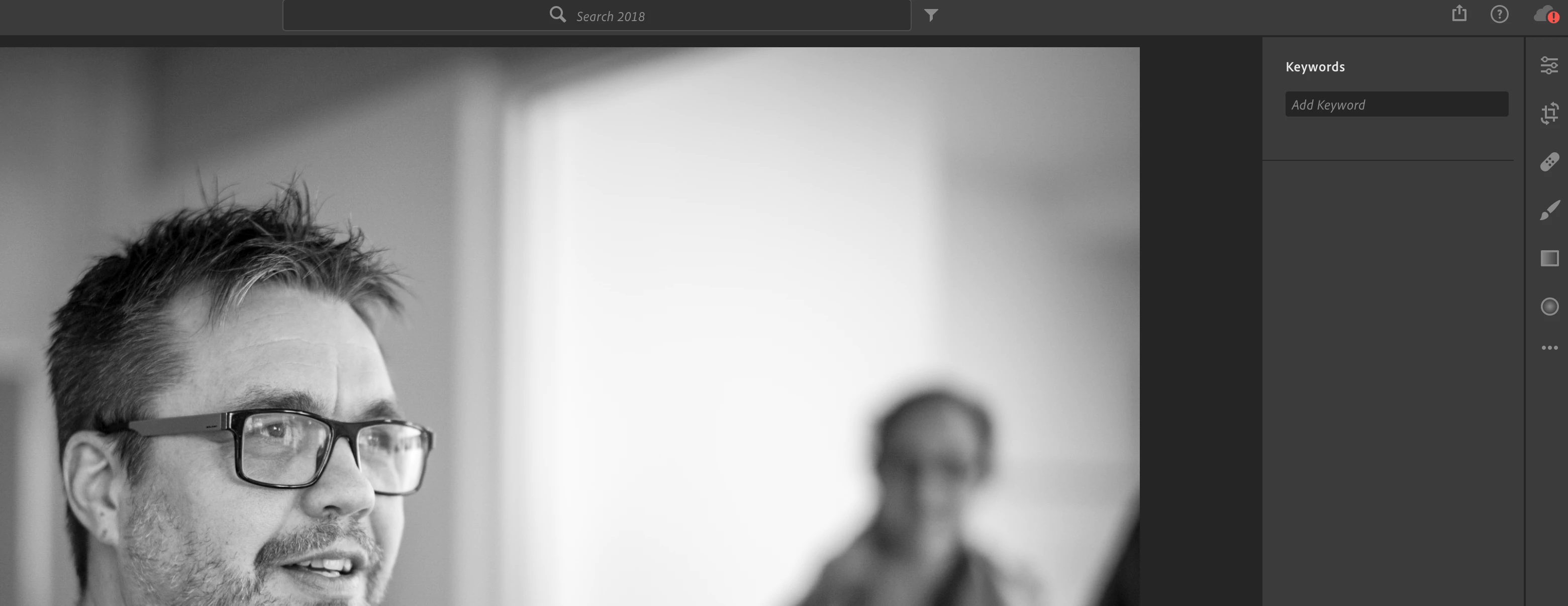
Add name of person is missing in keyword tab

  • October 16, 2018
  • 1 reply
  • 818 views

On most of my photos I can not add a person´s name. The option is simply missing in the keywords tab. It seams like LR does not recognise that there are persons in the picture.

This topic has been closed for replies.

1 reply

selondon
Community Expert
Community Expert
October 16, 2018

Have you assigned a name to Cluster in People View?

Find and organize photos of people in the People View

I believe that’s the only was to assigned names currently.

Known Participant
October 21, 2018

selondon  wrote

Have you assigned a name to Cluster in People View?

Find and organize photos of people in the People View

I believe that’s the only was to assigned names currently.

selondon, that article indicates that you can add a name to people in the photo in the keywords panel though... which like detlefm46834450I can't see an option for:

Add names to a photo in the Keywords panel

To add a photo to a People cluster, follow these steps:

  1. Select the desired photo from the grid or Filmstrip.
  2. In the panel at the right side of the screen, click Keywords to view the Keywords panel.
  3. Under People in the Keywords panel, you can add the person's name in the Add Name field. Press Enter or click outside the name field to set the name.