



DevCK
Participant
September 25, 2022
Question

Add photos button (+) greyed out; can't import photos

  • September 25, 2022
  • 4 replies
  • 309 views

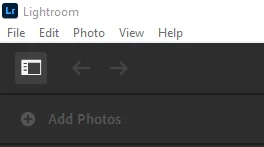
Hi, I just got done with a shoot and had to get these photos done within a few days. I opened Lightroom CC (the latest version) and it shows the "Add Photos" button to be greyed out. I've looked everywhere but can't find a solution to this. I've tried reinstalling, installing older versions, signing in and out of Creative Cloud, and rebooting so far. The add/import photos button on the menu is also greyed out. If anyone could help, that would be fantastic!


Thanks.


Screenshot of the issue: 
 

This topic has been closed for replies.

4 replies

selondon
Community Expert
Community Expert
October 20, 2022

As a workaround have you tried adding photos at http://lightroom.adobe.com/?

DevCK
DevCKAuthor
Participant
October 27, 2022

I haven't actually tried that. Although this might not be a direct fix, it's certainly the most helpful thing I've heard so far! I'll use this as a workaround for the time being until the issue is fixed, if it ever is fixed. Thanks!

DevCK
DevCKAuthor
Participant
October 20, 2022

Update: Had to use camraw for the photos mentioned in the post since LRCC wasn't working and they turned out mediocre compared to what I would have done with the tools, presets, and compatibility of Lightroom. I just updated to the most recent version of LRCC but the issue still persists. Please, if anyone finds a solution to this, let me know! It is frustrating to say the least as I can't even use the program itself.

DevCK
DevCKAuthor
Participant
September 25, 2022

- I've seen others say that this problem occurs because of lack of cloud storage available, but I just upgraded to the 1TB photography plan and still have the same issue...