
Participant
June 23, 2024
Answered

Adobe Lightroom Downloader Sign In not working

  • June 23, 2024
  • 6 replies
  • 3553 views

All, 


I have a paid account with adobe lightroom and I am trying to download adobe lightroom on my laptop. When I use adobe lightroom downloaded ( which is the default option ) and try and use my log in ID and password, it keeps displaying this message below:
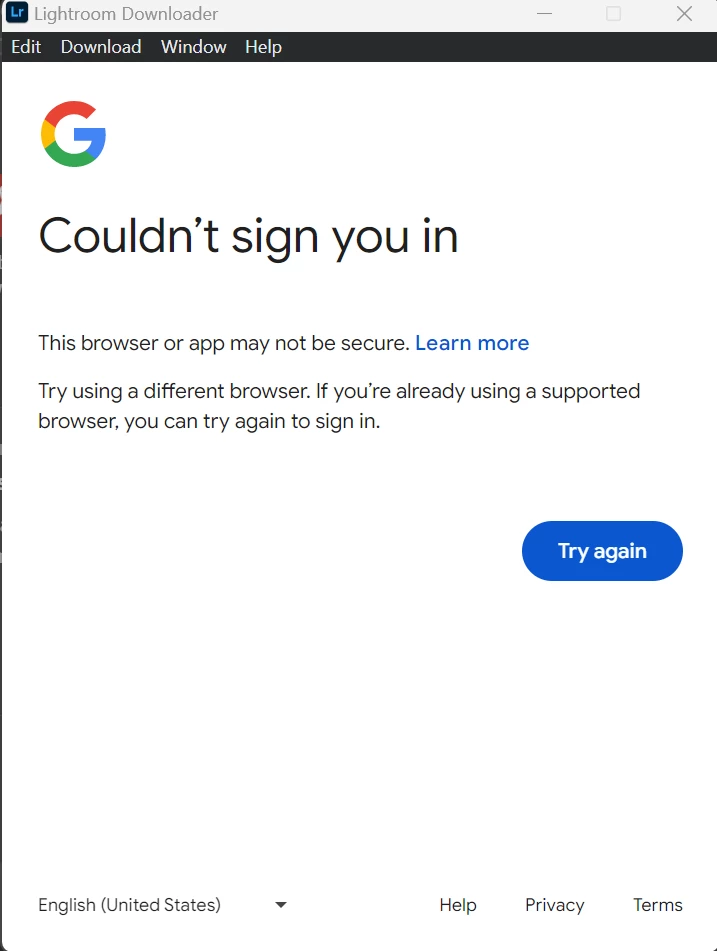
I have used the approved list which is Chrome, Edge, Mozilla and have java script enabled on all of them and it does not work. When I press the help button or the contact me button, that yields no response. 

To make sure the AI in your system can actually process my list, I AM REPORTING A BUG AND HERE ARE THE REQUIREMENTS YOU NEED:

1) Version of the App : May 2024

2) Platform and OS: PC and Windows 11 64-bit Pro

3) Basic Steps to reproduce the problem: Open the laptop, go to google chrome, sign in to my adobe account, navigate to the adobe lightroom downloader section, download the files, unzip them, place them on my C drive, press the "Set-up" file, go through the steps, reach the adobe lightroom downloader page, fill out the account details and then the above screenshot shows up. 

4) Expected Result & Actual Result:

Expected Result: That Adobe Lightroom downloads and can run

Actual Result: The above screenshot shows up and the realisation that money has been wasted on people who choose to not deliver a product because they are so complacent and happy with their mediocre life. 
Correct answer Rob_Cullen

@Hollywood93   Looking at your screenclip, you also are using the wrong "Downloader".!

This is NOT the way to install Lightroom. You do NOT use the "Lightroom Downloader".

You first install the ADOBE CREATIVE CLOUD DESKTOP APP- 

Sign in to the the CC Desktop App and [INSTALL] Lightroom using the CC DESKTOP APP.   

https://www.adobe.com/au/creativecloud/desktop-app.html


6 replies

Participant
August 21, 2025

I'm having the same issue, but I AM trying to use the Lightroom Downloader to download all my lightroom photos to my desktop. The executeable .app file automatically chooses Chrome to try to log me in, so there are no other options, and yet I'm still getting this error. Any solutions from people here?

Participant
August 21, 2025

Alright solved for me - 2 possible solutions: Realized I was logged into a different account (work) on my desktop Creative Suite, AND I was trying to log in using the Sign In With Google button. I was able to get the photo Downloader to work once I entered my email and password straight up without Single Sign On.

Participant
October 2, 2025

Excellent!!!  Entered my email and password straight up without Single Sign On and it also worked for me. Thanks!

Participant
August 3, 2025

Same truble but on Mac, i used different browsers but nothing will download Lightroom, it doesn't sign in!!!

Rob_Cullen
Community Expert
Rob_CullenCommunity ExpertCorrect answer
Community Expert
August 3, 2025

@Hollywood93   Looking at your screenclip, you also are using the wrong "Downloader".!

This is NOT the way to install Lightroom. You do NOT use the "Lightroom Downloader".

You first install the ADOBE CREATIVE CLOUD DESKTOP APP- 

Sign in to the the CC Desktop App and [INSTALL] Lightroom using the CC DESKTOP APP.   

https://www.adobe.com/au/creativecloud/desktop-app.html


Regards. My System: Windows-11, Lightroom-Classic 15.1.1, Photoshop 27.3.1, ACR 18.1.1, Lightroom 9.0, Lr-iOS 10.4.0, Bridge 16.0.2 .
Rob_Cullen
Community Expert
Community Expert
July 3, 2024

I might be wrong in my assesment of the OPs question, but-

The "Lightroom Downloader" app is designed for downloading photo files from the Lightroom Cloud catalog. It is NOT for installs.  https://helpx.adobe.com/au/lightroom-cc/kb/download-lightroom-photos.html

 INSTALLING Lightroom is done in the Adobe Creative Cloud Desktop App that both downloads and installs Lightroom (v7.4.1)   CREATIVE CLOUD APP DOWNLOAD 


Regards. My System: Windows-11, Lightroom-Classic 15.1.1, Photoshop 27.3.1, ACR 18.1.1, Lightroom 9.0, Lr-iOS 10.4.0, Bridge 16.0.2 .
Participant
June 27, 2024

Same problem here... I wish Adobe would fix this.

Participating Frequently
July 2, 2024

Hey Ishan38203395007p. Welcome to the Lightroom Community. Sorry, you're having trouble.


I'll help you figure this out. Could you try turning off Wi-Fi and signing in with cellular data to see if that helps?


You can check here for troubleshooting steps about Lightroom Downloader. https://adobe.ly/4eQbDV4


Let us know if this helps.

Thanks! 

Shivani 

Participant
July 4, 2024

I am connected with the ethernet to my laptop. I don't think that is the issue. 

Participant
June 25, 2024

All, 


I'm experiencing the same issue. Did someone solved it?

jane-e
Community Expert
Community Expert
June 23, 2024


quote

To make sure the AI in your system can actually process my list,

By @Ishan38203395007p


This forum is answered by real live humans, not AI. I've moved your post from Using the Community to the Lightroom forum where you are more likely to get help with your issue.


Jane