


Participating Frequently
December 17, 2022
Answered

Adobe Lightroom License not being detected

  • December 17, 2022
  • 3 replies
  • 941 views

I've just bought the 'Free Trial' license on the Windows Store and no matter what I do, Adobe Lightroom will not recognise it. I've clicked the 'renew' button which tells me Lightroom is ready to use:
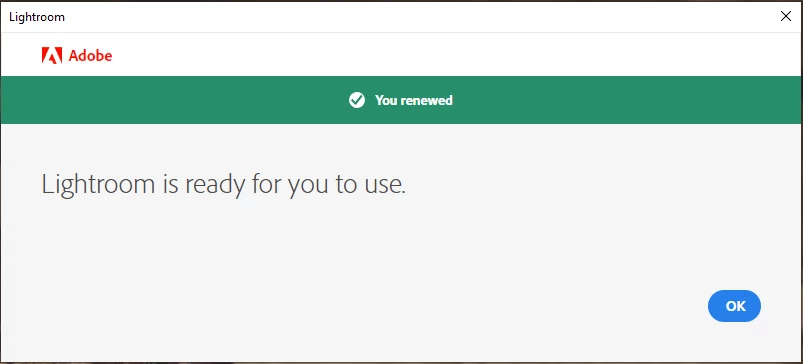
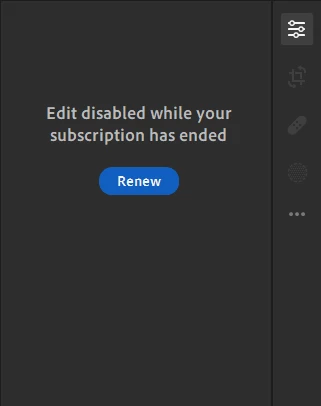
But the right-hand 'edit' pane still wont renew. 
  • I've uninstalled it and reinstalled it from both the Windows Store and via my Adobe Account and the Creative Cloud Desktop app.
  • I've logged out of my account and back in via the "Help" menu on the task bar.
  • I've tried to force the application to update to see if that forced a 'sync'.
  • I've tried running the application directly and over a VPN connection.
  • I've tried connecting to the cloud storage option to see if that forced a 'sync'.

It just seems like, no matter what I do, the right-hand pane will not accept my licnese.

Can someone please get back to me ASAP because my trial is only short and I want to see if it's worth spending £8 per month on. At the moment, it isn't.

This topic has been closed for replies.
Correct answer peter-b8062983

Apologies for all of your difficulty.  It looks like the trial information did not go through properly to our service.  Can you please try again and let us know if  it is working now?


-Peter

3 replies

Participating Frequently
December 19, 2022

Below is an overview of my experience so far:


  1. I bought a license for Adobe Lightroom from the Microsoft Store which included a 1-week trial.
  2. I tried the bullets at the bottom of this list*
  3. Managed to get in-touch with Support on Saturday evening. They asked me to follow a number of guides, including deleting the Adobe certificates and uninstalling/reinstalling the application. None of it worked, but they said someone would call me Monday at 1430 for a call.
  4. Monday at 1445 - nobody called, so I messaged support. Support again asked me to follow a guide on removing my certificates and, this time, added the cached credentials in the credential manager. Didn't work.
  5. Another support representative asked me to visit lightroom.adobe.com to see if it worked - which it did, except I couldn't upload images for some reason.
  6. Another support representative requested that I give them complete control over my computer and turn off all antivirus/security software and that this, apparently, was the only way they could support me. I'm sorry, but this is bonkers. I am more than happy to conduct actions on their behalf, but I do not want them taking over my PC. If this is the only way of providing support, then Adobe needs to revaluate itself and its policies.
  7. Finally, another support representative is now asking for my contact details so they can arrange ANOTHER call back service.


*

  • I've uninstalled it and reinstalled it from both the Windows Store and via my Adobe Account and the Creative Cloud Desktop app.
  • I've logged out of my account and back in via the "Help" menu on the task bar.
  • I've tried to force the application to update to see if that forced a 'sync'.
  • I've tried running the application directly and over a VPN connection.
  • I've tried connecting to the cloud storage option to see if that forced a 'sync'.
  • Tried a password reset on my Adobe account.


peter-b8062983
Adobe Employee
peter-b8062983Correct answer
Adobe Employee
December 20, 2022

Apologies for all of your difficulty.  It looks like the trial information did not go through properly to our service.  Can you please try again and let us know if  it is working now?


-Peter

Participating Frequently
December 20, 2022

Can confirm it's now working.


Thanks for helping. Not sure why it took your support teams so long to sort it out. One of them that phoned me (the one that insisted he must have full access to my PC without antivirus on to do anything) even tried to deflect my issue back to Microsoft. It's been pretty appaling. 


But thank you, Peter, for helping. Appreciate it.

Participating Frequently
December 19, 2022

I've just had another support representative demand that the only way he could provide support is for me to provide complete control over my computer and turn off my Antivirus software.


What kind of show are you guys running? What sort of request is that? This is bonkers!

Participating Frequently
December 19, 2022

Been trying to fix this since Saturday. Reached a point where the weekend team could go no further and was told that someone would call me at 1430 GMT. Nobody rang, so I messaged in.


Guy I then spoke to didn't read my ticket history and made me explain it all again. Asked me to carry out some actions (one of which I'd already done) and restart my PC. Did that, still didn't fix the issue, when I came back on, I was put on to someone different again. Who then made me explain my issue again instead of reading the ticket.


This is legitimately some of the worst support I've ever received. My trial will be over by the time I even get to use the damn thing.

Participating Frequently
December 19, 2022

Now the latest support guy is trying to tell me I don't have an active subscription - which I do.