Participant
May 6, 2018
Answered

Adobe sync error

  • May 6, 2018
  • 2 replies
  • 639 views

Hello,

I'm getting this error every time I close Lightroom CC. Does anyone know how to resolve this? I'm on Windows 10.

Thanks,

Lucas
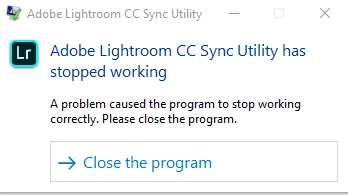
    This topic has been closed for replies.
    Correct answer Mohit Goyal

    Thanks for sharing the crash logs, please refer the following discussion related to the same error and try the offered help: ucrtbase.dll Issues anyone have a Fix for this.  Please help Cant launch Premiere

    Let us know the results.

    Thanks,

    Mohit

    2 replies

    Participant
    June 19, 2018

    I reset the settings, but the problem persists. I also updated to version 1.4 and that also didn't resolve the problem. I found this in the event viewer:

    Faulting application name: lightroomcchelper.exe, version: 1.4.0.0, time stamp: 0x5b1bd15f

    Faulting module name: ucrtbase.dll, version: 10.0.16299.248, time stamp: 0xe71e5dfe

    Exception code: 0xc0000409

    Fault offset: 0x000000000006b79e

    Faulting process ID: 0xaa4

    Faulting application start time: 0x01d407fa4e3d04a9

    Faulting application path: C:\Program Files\Adobe\Adobe Lightroom CC\lightroomcchelper.exe

    Faulting module path: C:\WINDOWS\System32\ucrtbase.dll

    Report ID: f40ef6d6-06a1-43e2-929c-87077b624f56

    Faulting package full name:

    Faulting package-relative application ID:

    Do you know what it means?

    Mohit Goyal
    Community Manager
    Mohit GoyalCommunity ManagerCorrect answer
    Community Manager
    June 20, 2018

    Thanks for sharing the crash logs, please refer the following discussion related to the same error and try the offered help: ucrtbase.dll Issues anyone have a Fix for this.  Please help Cant launch Premiere

    Let us know the results.

    Thanks,

    Mohit

    Mohit Goyal
    Community Manager
    Community Manager
    May 8, 2018

    Hi lucask,

    Could you please let us the exact version of Lightroom you are using now? Also, open Creative Cloud desktop app and check if there are any pending updates for Lightroom?

    Regards,

    Mohit

    Participant
    May 8, 2018

    Hello,

    I just checked and it's version 1.3. Also there aren't any updates pending in the Creative Cloud application.

    Is there any other information I should provide?

    Thanks,

    Lucas

    Mohit Goyal
    Community Manager
    Community Manager
    May 8, 2018

    A corrupt preference file can often result in strange behaviour. If you haven't tried resetting the Lightroom preference file then I think you should give it a try How to set Lightroom Classic CC preferences

    Open Lightroom CC while holding down Shift + Alt Key and click yes to reset Lightroom CC preferences.

    Regards,

    Mohit