Known Participant
September 23, 2019
Question

AdobeID for family member who only wishes to view shared albums

  • September 23, 2019
  • 5 replies
  • 1347 views

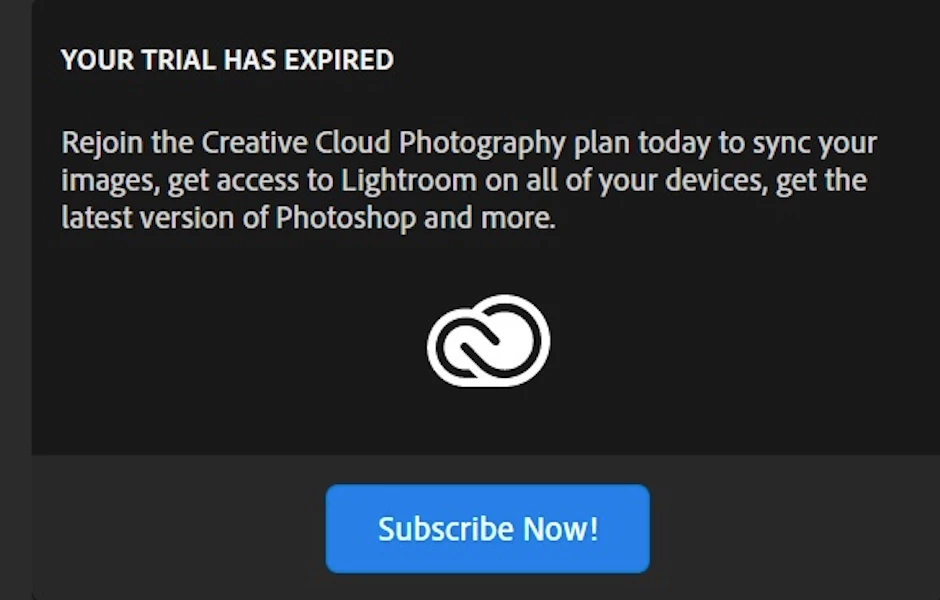
I have a creative cloud membership (Photography plan). I primarily use LR classic but also LR cloud/web/mobile to sync some of my collecitons/albums.  I turned on sharing in LR cloud and sent an invitation to my sister. Everything worked great. The photos are in my cloud, and my sister can view the album. ... but now (about 1 month in) when she tries to view she gets the message in the screenshotp below.... she has NOT downloaded any software, nor will she pay for any subscritiption.

Another boad I wrote this on assured me that her adobe ID allows her to see my photos for free foreever, but that doesn't seem to be working.  what should I tell her to do?
This topic has been closed for replies.

5 replies

Jim Wilde
Community Expert
Community Expert
September 28, 2019

That message about the expired trial can be ignored....your sister IS logged in to her Adobe account, and can therefore click on the invitation link again and it should open into the online album where she can review and comment as before.


The problem seems to be caused by the "clock" starting on the trial period as soon as the user creates a new Adobe account, even if no attempt to download any apps is made. Thus when the user logs into the account again some time later, they are met with that accurate but distinctly unhelpful message....I ran into the same issue yesterday using an old test ID that I had created months ago, but I did verify that the "expired status" did NOT prevent me from accessing online albums as a "signed-in" user.

DaveWRIAuthor
Known Participant
October 1, 2019
Thanks Jim. I have also been having a parallel conversation with adobe help... their first solution was to have my sister pay (we rejected that) and now they have requested that my sister directly contact them to "untrial" her account. However I'll now also get het to try the link again and will report back
Jim Wilde
Community Expert
Community Expert
October 1, 2019
Make sure she logins in to the Adobe account again (just in case she routinely clears the browser cache), before clicking on the link.
Rob_Cullen
Community Expert
Community Expert
September 25, 2019

"Send an Invite" is designed for other Lightroom users to comment on photos.

For family members you only need to set your Synced Collection as "Public" and give them the web link.

Done very simply in Lr-Classic-

Click the [Make Public] tab above the Grid view of the Synced Collection,

and you get a web link to share to anyone. And they do not need an Adobe ID, nor do they need to Sign-In.

Regards. My System: Windows-11, Lightroom-Classic 15.1.1, Photoshop 27.3.1, ACR 18.1.1, Lightroom 9.0, Lr-iOS 10.4.0, Bridge 16.0.2 .
DaveWRIAuthor
Known Participant
October 1, 2019
Thanks. However making the album public then doesn't give the option for password etc. I don't want the entire world to see our childhood photos...
Jim Wilde
Community Expert
Community Expert
October 1, 2019
"Make Public" only means that any member of the public that you share the URL with can view the album without having to have an Adobe ID. They still need that URL though.....
Nancy OShea
Community Expert
Community Expert
September 24, 2019

To cancel a trial or subscription, log-in to your Adobe Account at

https://account.adobe.com

For details, see this help article

https://helpx.adobe.com/manage-account/using/cancel-subscription.html

Nancy O'Shea— Product User & Community Expert
Nancy OShea
Community Expert
Community Expert
September 23, 2019

That screenshot is definitely a software notice that the free trial to Photography Plan has ended.  Maybe your sister took out a trial and is confused about how all this works.


You have free Portfolio as part of your Photography Plan.  Why don't you use it?  

https://portfolio.adobe.com/


And Portfolio syncs to your Lightroom Albums/Collections to make uploading images  a snap.  If desired, you can password protect your Portfolio sites or pages to keep the public out. 

https://help.myportfolio.com/hc/en-us/articles/360000628673-How-does-password-protection-work-


Nancy O'Shea— Product User & Community Expert
DaveWRIAuthor
Known Participant
September 24, 2019
Thanks. Yes I'm pretty sure she did somehow start a trial. But since she lives in UK and i'm in US i can't pop round to check. How do I suggest she undoes the trial and just has an adobeID without strings?
Legend
September 23, 2019

What app is your sister using to look at your shared album? It looks rather as if she may be trying to run Lightroom.