Participant
July 4, 2026
Question

AI Denoise on Lightroom Desktop showing as mobile slider version

  • July 4, 2026
  • 2 replies
  • 29 views

Lightroom Desktop AI Denoise tool not working.

My AI Denoise was a Denoise button you clicked and a window would pop up with a percentage slider then click denoise. It was saying the photo format was not supported (but it worked last week- photo formats were cr2 and cr3).

I unistalled and reinstalled and then the new Lightroom Desktop did not have AI Denoise, but instead a Denoise slider (like the mobile version on my ipad).

How do i get back the AI Denoise with percentage slider for desktop? I have a Mac Mini M4.

    2 replies

    JohanElzenga
    Community Expert
    Community Expert
    July 4, 2026

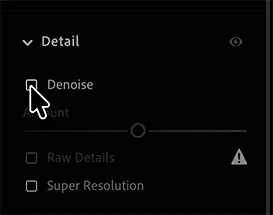
    Please post a screenshot. Denoise changed some time ago. Lightroom used to create a denoised new DNG file, but it no longer does that. Right now, Denoise is a normal non-destructive edit, like all other edits.


    This is how it should look now:


    -- Johan W. Elzenga
    WolfAuthor
    Participant
    July 5, 2026

    Thank you for the response.

    I should’ve done a screen shot. But your explanation makes sense. I did really like that DNG file. It makes it such a massive file though and my whole workflow was built around how slow that process was. I am not a fan of this version of Denoise but its not like i have a choice.


    Thank you so much Johan, i appreciate it.

    WolfAuthor
    Participant
    July 4, 2026

    Just to clarify I do not use LR Classic, it was just LR Desktop version. I’ve had it for a couple years.