


madesco
Inspiring
August 4, 2023
Answered

Album disappeared; sent to Photoshop only by mistake

  • August 4, 2023
  • 1 reply
  • 260 views

Hi, group! I really hope someone can help me with this.


I was in the process of sharing some albums using Lightroom on my iPad. However, I wasn't careful enough and clicked something called "Show only in Photoshop" (I'm using the French version, so my translation may not be exact) and, lo and behold, one of my albums disappeared.


I see it in Photoshop on my Mac, under "Lightroom Photos", but can't find how to bring it back. I can't recreate it in Lightroom, because it tells me I already have an album with this name.


Help! Thanks in advance.
This topic has been closed for replies.
Correct answer Charlie.D

Hello @madesco 

I think I understand what happened.  It is possible to choose "Only show in Shared Photos" when tapping the 3-dots button for an album displayed under "My shared albums."

To make the album visible again, go to the Lightroom tab. 
At the top left, tap the down-arrow button to see the list of all albums.
Under "My Albums," open the "Shared folder.
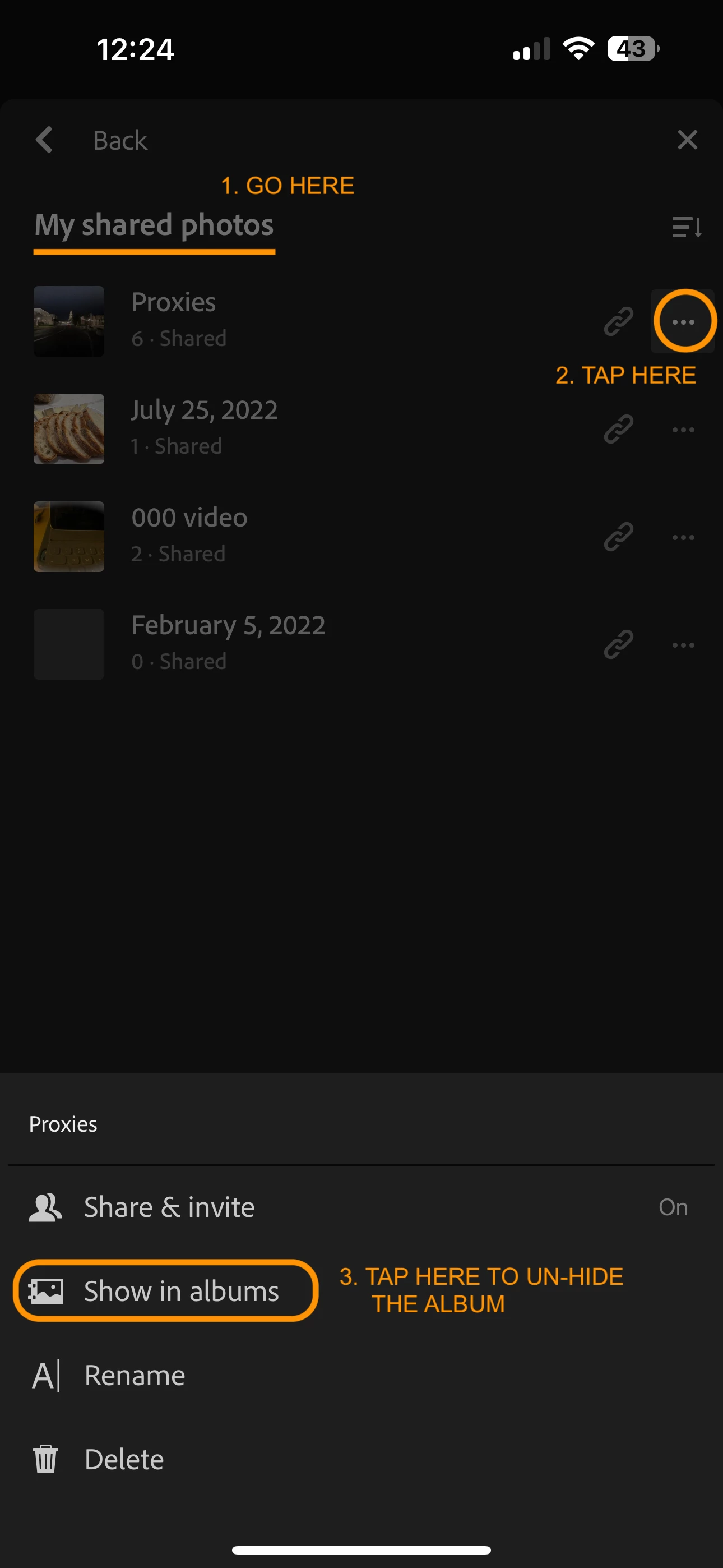
In the Shared view, tap on "My shared photos" -- you should see the hidden album here.
Tap on the 3-dots button to the right of your album, and select "Show in albums"

====This will restore the album, so that it is no longer hidden from your main view.

1 reply

Charlie.DCorrect answer
Inspiring
August 4, 2023

Hello @madesco 

I think I understand what happened.  It is possible to choose "Only show in Shared Photos" when tapping the 3-dots button for an album displayed under "My shared albums."

To make the album visible again, go to the Lightroom tab. 
At the top left, tap the down-arrow button to see the list of all albums.
Under "My Albums," open the "Shared folder.
In the Shared view, tap on "My shared photos" -- you should see the hidden album here.
Tap on the 3-dots button to the right of your album, and select "Show in albums"

====This will restore the album, so that it is no longer hidden from your main view.

madesco
madescoAuthor
Inspiring
August 7, 2023

Thank you so much! I had found a work-around, but this is much simpler and better. I'll know next time I make the same mistake... because I know it'll happen again!