June 2, 2021
Question

All edit controls greyed out and unusable

  • June 2, 2021
  • 2 replies
  • 543 views

All options for editing my photos (Edit, Crop & Rotate, etc.) are unusable. Example below:
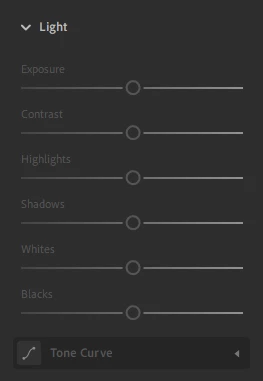


I am running Windows 10. Using the same account as on my PC, Lightroom on my iMac has no issues. I have tried uninstalling and reinstalling. Not quite sure what to do.


Any help would be greatly appreciated!

This topic has been closed for replies.

2 replies

Participant
June 2, 2021

Hi , if someone wanna get access to awesome Japaese clothes He can visit the Harajuku fashion store here because editors like Adobe and light room are only usable if your clothes are good enough to be edited . You can get it here.

Jim Wilde
Community Expert
Community Expert
June 2, 2021

What does the sync status say (click on the cloud icon top right). Also check the Help menu to make sure Lightroom is not waiting for you to sign in.

June 2, 2021

Sync status is 'Synced and Backed Up' and I am signed in.

Jim Wilde
Community Expert
Community Expert
June 2, 2021

Any clues from the sync status of the individual image? Select the image and open the Info panel, down near the bottom of the panel will be the sync status of that image (tells you what file type is in the cloud and locally). If that all looks normal (i.e. you have at least a smart preview locally), it might be worth signing out from the Creative Cloud app and then back in again.