Participant
April 16, 2020
Resuelto

Beginners info required for Tone Curve and Point Curve

  • April 16, 2020
  • 2 respuestas
  • 901 visualizaciones

Hi, new to photography and lightrooms here...


Trying to learn everything I can before I edit my honeymoon pictures (South African safari). I'm finding it hard to find specific information regarding Lightrooms CC in general as most guides are for the Classic.


Anyway.. I can't find a detailed defination of the difference between the Tone Curve and the Point Curve - and how to use them. Would someone mind pointing me in the right direction ?


Thank you,

Bradley
Este tema ha sido cerrado para respuestas.
Mejor respuesta de Rob_Cullen

The Guides for Lightroom-Classic can be adapted for Lightroom-Desktop (Lightroom on a Laptop)

Basically there are two views in Lr-Desktop (and Lr-Classic)-

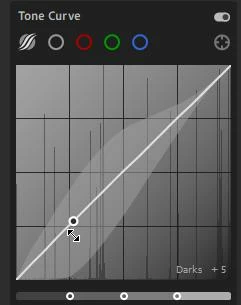
1) Tone Curve:  Where you are limited to a large degree and can only move the curve in sections (Shadows, highlights, etc). You will see a grey area appear when you use the Curve in this manner, and only one point on the curve that slides up/down. (Basically doing the same as the Tone sliders in the 'Light' panel would be doing)

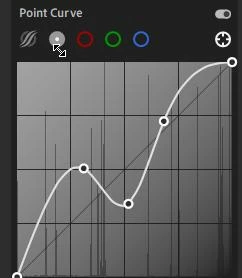
2) Point Curve: Gives you free-rein to add multiple points to the curve line and move them any-which-way you want.

In 'Point-Curve' mode the Curve panel works in a similar manner to most other software (eg. Photoshop)

https://digital-photography-school.com/make-color-adjustments-using-tone-curves-lightroom/


2 respuestas

Participant
April 17, 2020

Thank you. I think I get it now... it's the same axis for both charts but Tone Curve is targeted and the Point Curve offers more freedom.  

Rob_Cullen
Community Expert
Rob_CullenCommunity ExpertRespuesta
Community Expert
April 17, 2020

The Guides for Lightroom-Classic can be adapted for Lightroom-Desktop (Lightroom on a Laptop)

Basically there are two views in Lr-Desktop (and Lr-Classic)-

1) Tone Curve:  Where you are limited to a large degree and can only move the curve in sections (Shadows, highlights, etc). You will see a grey area appear when you use the Curve in this manner, and only one point on the curve that slides up/down. (Basically doing the same as the Tone sliders in the 'Light' panel would be doing)

2) Point Curve: Gives you free-rein to add multiple points to the curve line and move them any-which-way you want.

In 'Point-Curve' mode the Curve panel works in a similar manner to most other software (eg. Photoshop)

https://digital-photography-school.com/make-color-adjustments-using-tone-curves-lightroom/


Regards. My System: Windows-11, Lightroom-Classic 15.3, Photoshop 27.5, ACR 18.3, Lightroom 9.3, Lr-iOS 10.4.0, Bridge 16.0.3 .