
Participant
September 17, 2024
Answered

Bitte um Hilfe / externer Anbieter Filter Fotografie funktioniert nicht auf LR

  • September 17, 2024
  • 2 replies
  • 214 views

Servis zusammen ... ich habe ein Problem. 
ich habe von Woodland Present ein Filterpaket zur Fotobearbeitung . Jedoch funktioniert es nicht da LR den Dateityp nicht unterstützt . 

die Download Dateien sind gezipt . 
ich habe sie normal runtergeladen 

jetzt haben wir ein xmp Format 


wenn ich ein Foto  von mir öffne und dann die Datei ( zip ) aus dem Ordner hole xmp und in lR einfügen möchte gehr es nicht . An was liegt das ? den sogenannten"katalog" gibts vei mir auch nicht unter bearbeiten . 

Kann mir einer schritt für schritt erklären was ich machen müsste dass es klappt ? 

vielen dank 😃
This topic has been closed for replies.
Correct answer Rob_Cullen

"Paste into Lr" is not the way to install Presets!  The correct method is-

1. Edit a photo in Lightroom, open the Presets panel [Shift+P]

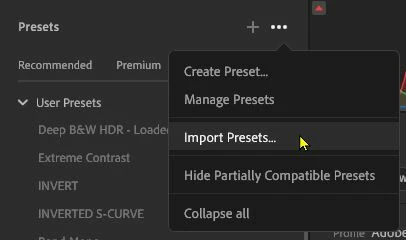
2. Click on the three dots icon [...]

3. Select [Import Presets...]

4. In the browser dialog navigate to and select the downloaded ZIP of presets, and [Import]. Or if XMPs have been extracted- select the XMPs and [Import].

"The so-called "catalogue" is also not available to me under Edit. "

Explain more. Are you perhaps looking at instructions for Lightroom-Classic (an entirely different app)?


2 replies

Rob_Cullen
Community Expert
Rob_CullenCommunity ExpertCorrect answer
Community Expert
September 18, 2024

"Paste into Lr" is not the way to install Presets!  The correct method is-

1. Edit a photo in Lightroom, open the Presets panel [Shift+P]

2. Click on the three dots icon [...]

3. Select [Import Presets...]

4. In the browser dialog navigate to and select the downloaded ZIP of presets, and [Import]. Or if XMPs have been extracted- select the XMPs and [Import].

"The so-called "catalogue" is also not available to me under Edit. "

Explain more. Are you perhaps looking at instructions for Lightroom-Classic (an entirely different app)?


Regards. My System: Windows-11, Lightroom-Classic 15.3, Photoshop 27.5, ACR 18.3, Lightroom 9.3, Lr-iOS 10.4.0, Bridge 16.0.3 .
Participant
September 18, 2024

Thank you very much 🙂 It worked.. I'm really happy. Thanks again, the instructions were great 🤗 
have a nice evening . Best regards from Bavaria 

kglad
Community Expert
Community Expert
September 17, 2024

in the future, to find the best place to post your message, use the list here, https://community.adobe.com/

p.s. i don't think the adobe website, and forums in particular, are easy to navigate, so don't spend a lot of time searching that forum list. do your best and we'll move the post (like this one has already been moved) if it helps you get responses.


<"moved from using the community">