Known Participant
May 10, 2021
Answered

Brush Issues - Adjustment tools have no effect when brush tool is activated -

  • May 10, 2021
  • 1 reply
  • 736 views

I finally found a very good simple Youtube showing how to use Brush in Lightroom CC. I've been fighting this issue for some time now thinking that I was too thick to grasp its usage. But after several viewings of this video and attempts in the Lightroom program it just wdoesn't work. I'm on a Macbook Pro retina with Big Sur.


Here's my steps:

Activate Brush with a Fuji RAF photo selected

Slightly adjust exposure and contrast sliders

Tick masking box

Move curser to image and begin painting area of photo I want darkened

That's when it all stops. I have the area I wanted painted in red, none of the sliders have any effect at all, and when the Brush icon is clicked off the red remains on the image and no other effects have occurred.


This is very basic stuff here, but my constant failure to use this tool successfully has led me to wonder if I've got a bad copy of the download.  Hoping there's a solution - Thanks


This topic has been closed for replies.
Correct answer Rob_Cullen

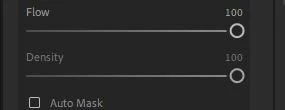
Are your Flow & Density sliders set at Maximum?

If not,  a- Slight adjust to exposure and contrast sliders, may not even be visible on an image. Start with a Maximum Exposure setting, brush, then 'back off' adjust the Exposure slider to desired level.


"Brush icon is clicked off the red remains on the image"

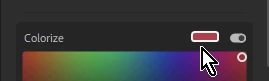
Is it possible you are Brushing a Color set for the Brush?

A No-color brush would look like this-

The 'Red' Mask & Brush Tool overlay can be toggled by repeated presses of keyboard [O].

[Hide > Show Tool Overlay > Show Mask Overlay > Show Tool and Mask Overlay > Hide.]


1 reply

Rob_Cullen
Community Expert
Rob_CullenCommunity ExpertCorrect answer
Community Expert
May 10, 2021

Are your Flow & Density sliders set at Maximum?

If not,  a- Slight adjust to exposure and contrast sliders, may not even be visible on an image. Start with a Maximum Exposure setting, brush, then 'back off' adjust the Exposure slider to desired level.


"Brush icon is clicked off the red remains on the image"

Is it possible you are Brushing a Color set for the Brush?

A No-color brush would look like this-

The 'Red' Mask & Brush Tool overlay can be toggled by repeated presses of keyboard [O].

[Hide > Show Tool Overlay > Show Mask Overlay > Show Tool and Mask Overlay > Hide.]


Regards. My System: Windows-11, Lightroom-Classic 15.1.1, Photoshop 27.3.1, ACR 18.1.1, Lightroom 9.0, Lr-iOS 10.4.0, Bridge 16.0.2 .