
Participant
July 25, 2025
Answered

Can I keep my current pics on one exhd and future ones on another exhd and flip back and forth?

  • July 25, 2025
  • 2 replies
  • 117 views

I have Lr. cloud and use MacOS.  My 10 TB external HD is just about filled up.  I am buying  a 20 TB drive.

Is there a way that I can continue to use the 10 TB drive for all of the 48,800 pictures on it and put new, future pictures onto the 20 TB drive, keeping both drives available to view/ active?
Correct answer Rob_Cullen

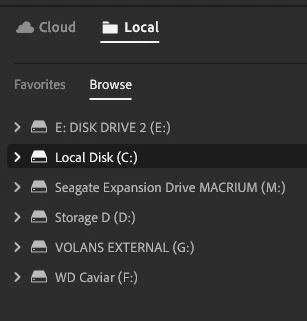
@BRUCE28461361nn3h  You will not be able to import 10TB of photos to a 1TB Lightroom Plan. But when Lr is used in Local mode, then yes, you can have acccess to any attached drive by browsing.

2 replies

Rob_Cullen
Community Expert
Rob_CullenCommunity ExpertCorrect answer
Community Expert
July 25, 2025

@BRUCE28461361nn3h  You will not be able to import 10TB of photos to a 1TB Lightroom Plan. But when Lr is used in Local mode, then yes, you can have acccess to any attached drive by browsing.

Regards. My System: Windows-11, Lightroom-Classic 15.1.1, Photoshop 27.3.1, ACR 18.1.1, Lightroom 9.0, Lr-iOS 10.4.0, Bridge 16.0.2 .
Participant
July 28, 2025
Thanks. I will let you know how it works. I will be trying to keep my access to my current 48K pics on the 10TB drive, and start putting new pics on the 20 TB drive when I get it.
Bruce
Community Manager
July 25, 2025

Hi @BRUCE28461361nn3h! You can absolutely use an external hard drive with Lightroom, but just a heads-up, the app stores your photos in the cloud by default. You can choose to keep a local copy of your originals on your computer or an external drive, but the cloud remains the main storage location.

Let me know if you have any other questions!

Alek

*(If you mention me with an @, like @Aleke, I’ll get a notification and can respond faster.)*