
Participant
January 4, 2022
Answered

Can't export my edited images to my iPhone camera roll

  • January 4, 2022
  • 2 replies
  • 1381 views

On Lightroom mobile, why can't I export my edited images to my iPhone 12 camera roll? My images in Lightroom mobile are in raw format and then I edit them and then I want to export them to my iPhone camera roll. When I do click the export to camera roll, it saids Downloading Original but it never completes this. 


What does Downloading Original mean in Lightroom mobile? I'm not sure what is making this happen?


This topic has been closed for replies.
Correct answer Jao vdL

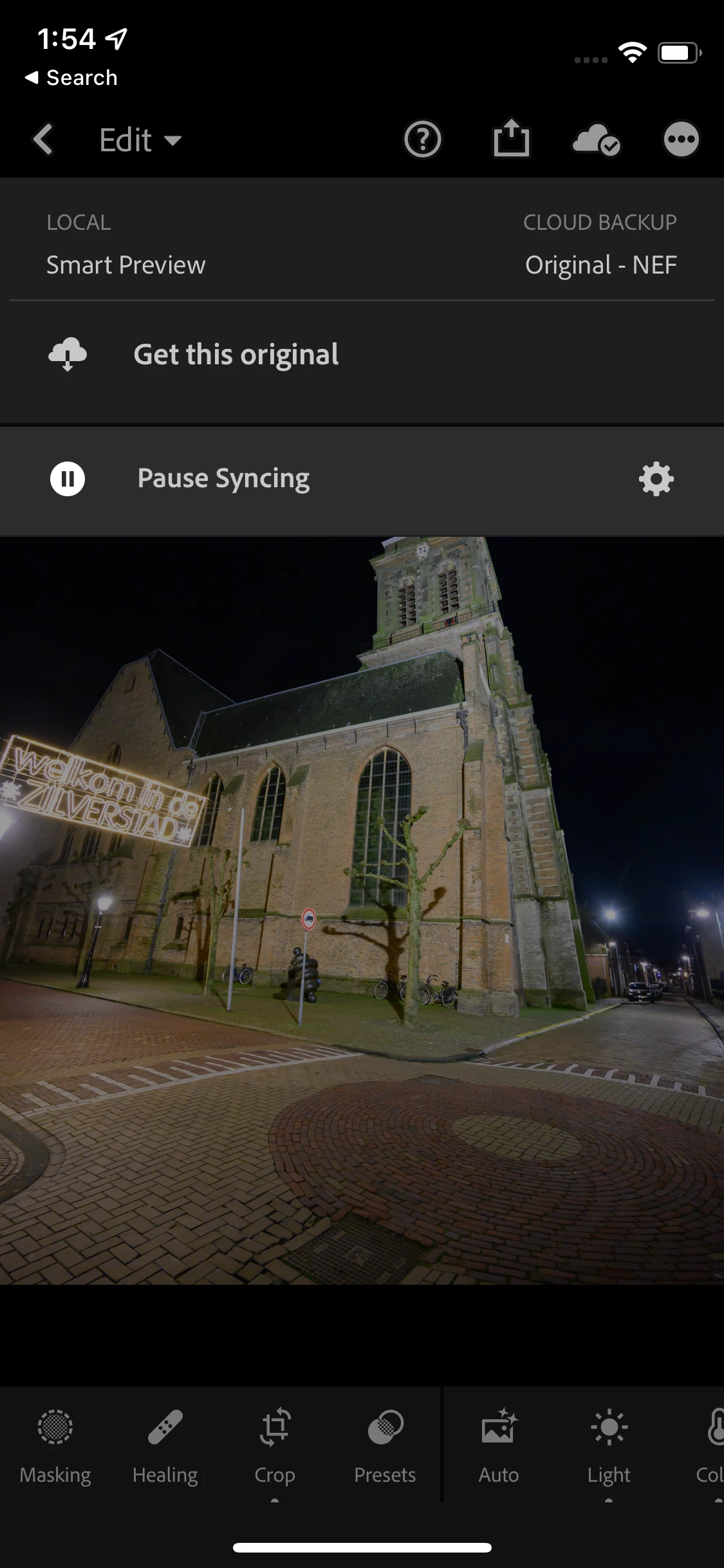
It means that the original raw image is only available in the cloud and not actually present localy on your device. You were editing a smart preview probably. You can see the status of images when you are editing by tapping on the cloud icon. It will show you the status of the image. You can also force the download of the original from that screen as you can see in the screenshot below.

2 replies

Community Expert
January 4, 2022

When it is stuck downloading an original it typically means your internet connection is bad or you don't have wifi.

Jao vdLCommunity ExpertCorrect answer
Community Expert
January 4, 2022

It means that the original raw image is only available in the cloud and not actually present localy on your device. You were editing a smart preview probably. You can see the status of images when you are editing by tapping on the cloud icon. It will show you the status of the image. You can also force the download of the original from that screen as you can see in the screenshot below.