Participant
January 20, 2025
Answered

Can't find photos that aren't in an album

  • January 20, 2025
  • 3 replies
  • 275 views

Hi

I'm looking for a way to find all photos that aren't in any album... I saw online threads that said that I need to type "Album:" in the search bar then options are going to appear letting my select all photos not in any album

However, when I typr "Album:" in the search bar, nothing happens. I've tried on the web and on the ipad.

Is there something I am missing?


Thank you

David
Correct answer Rob_Cullen

This works in Lr-Desktop, not in Lr-Web, and I don't know if possible in iPadOS.- another forum member may know sbout iPadOS.


in Lr-Desktop

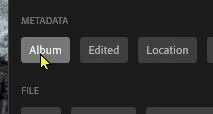
Click in the Search bar window and choose the [Album] button in the 'Metadata' section-

This will give you a list of ALL your albums,

Scroll right to the bottom of your album list and you will see-


3 replies

selondon
Community Expert
Community Expert
January 21, 2025
selondon
Community Expert
Community Expert
January 21, 2025

Unfortunately, searching Not In Any Album still isn't possible on iOS (I don't have Android but assume that's the same)

Rob_Cullen
Community Expert
Rob_CullenCommunity ExpertCorrect answer
Community Expert
January 21, 2025

This works in Lr-Desktop, not in Lr-Web, and I don't know if possible in iPadOS.- another forum member may know sbout iPadOS.


in Lr-Desktop

Click in the Search bar window and choose the [Album] button in the 'Metadata' section-

This will give you a list of ALL your albums,

Scroll right to the bottom of your album list and you will see-


Regards. My System: Windows-11, Lightroom-Classic 15.3, Photoshop 27.5, ACR 18.3, Lightroom 9.3, Lr-iOS 10.4.0, Bridge 16.0.3 .