
Participant
August 17, 2020
Answered

Can’t upload images to Lightroom mobile

  • August 17, 2020
  • 1 reply
  • 817 views

I'm using Lightroom iOS version 5.3.1 on an iPhone X iOS 13.6.1 and it won't let me import photos. I click to add and only my videos show up in my camera roll. No photos even show up as options. I've tried deleting images in case I'm out of storage, restarted the app and phone with no luck.
This topic has been closed for replies.
Correct answer Charlie.D

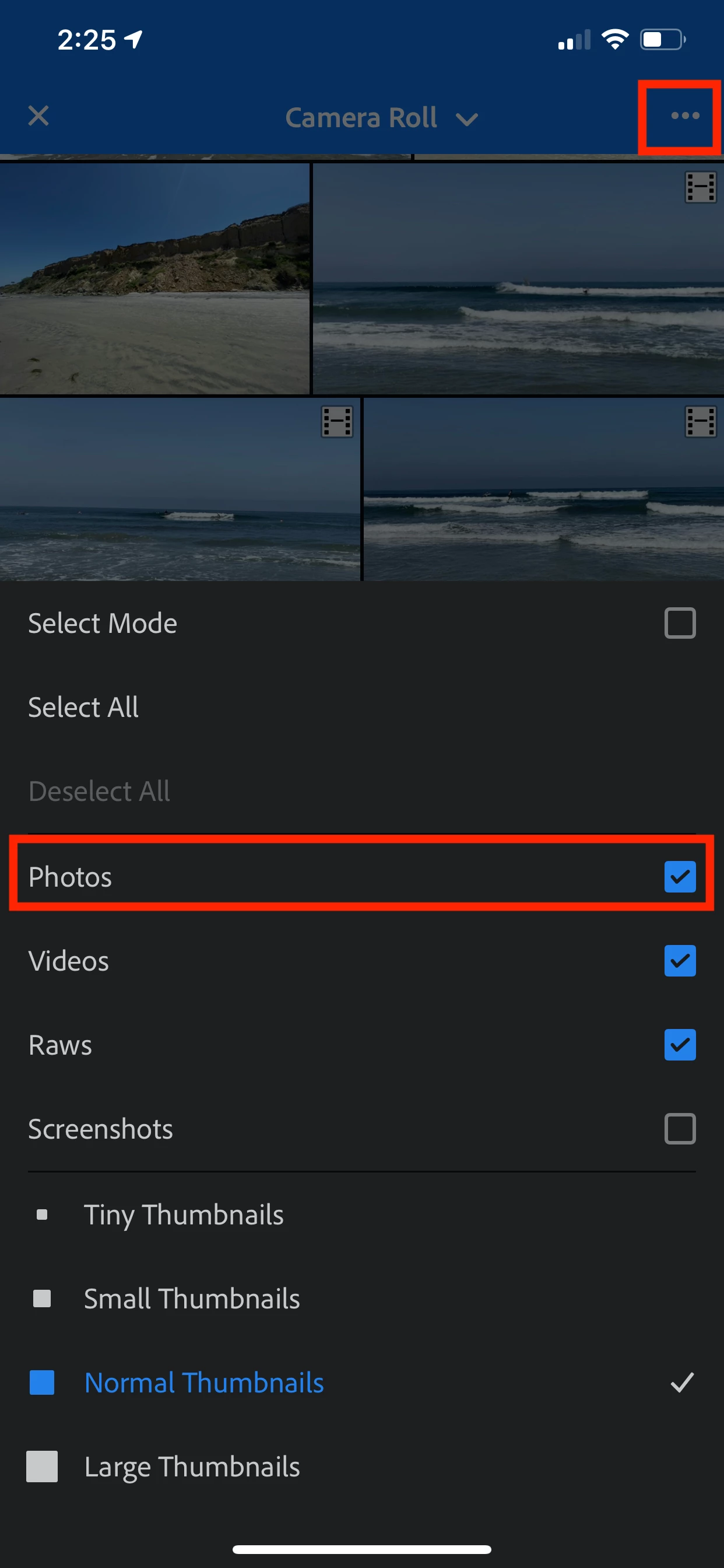
Tap the import button again, and in the photo/video import selection screen do you see a '3-dots' button?  Tap that -- it should open an import options menu.  Is it possible that "Photos" needs to be enabled again?


This is the import options screen I mean:


1 reply

Charlie.DCorrect answer
Inspiring
August 17, 2020

Tap the import button again, and in the photo/video import selection screen do you see a '3-dots' button?  Tap that -- it should open an import options menu.  Is it possible that "Photos" needs to be enabled again?


This is the import options screen I mean:


Megan5E7BAuthor
Participant
August 17, 2020

Hi! Thanks for your reply!

This is my options screen when I click the '3 dots' button. It doesn't seem that there are any import options to select photos.

Inspiring
August 17, 2020

Hi

Sorry for the confusion here.  The 3-dots menu options sometimes change based on the view you're in.  The screenshot you shared is from the All Photos view of your images.  If you scroll upwards a little, you should see the import/camera buttons that are blue.  The same buttons appear if you back out of All Photos to look at all the albums listed in your account.


Tap on the blue import button to see the import screen: 


After you tap that and open the Import screen, you will see the 3-dots menu button that shows import options like I mentioned above.


This Help page may provide some additional useful info: https://helpx.adobe.com/lightroom-cc/using/import-mobile-ios.html


Hope this helps a bit!