Participant
July 3, 2020
Answered

can you please tell me how to save a crop, and if the number of pixels on its longest edge

  • July 3, 2020
  • 1 reply
  • 1890 views

can be chosen for that crop, I wish to have the original photo not destroyed so a 'save as' option please, or where is the best place to find these answers please


This topic has been closed for replies.
Correct answer Rob_Cullen

Edit: Sorry my answer below is for Lr-Classic!

In Lightroom: Export the photo, and set the Custom Long edge dimension!  (simple as that!)
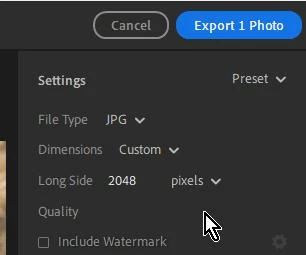
The crop tool in Lightroom-Classic does not work in the way that Photoshop or many other photo editors work.

1. Your original  image files are not/never touched or changed by any edits you do in LrC.

2. The Crop Tool uses 'Ratios'. eg. 4x3 8x10, 1x1, etc. You can do a 'Custom Crop' but it will still be a 'Ratio'.

3. To create a file of specific 'Pixel' dimensions you must Export a derivative copy from LrC, with dimensions set in the 'Resize' panel.

4. The use of Virtual Copies is helpful to see variations of different crops.

https://www.youtube.com/watch?v=FzgnUmS9J8U&feature=youtu.be&list=PLmXfFxjdp3CHCRpDULlvcaqWfK_zLPWF2

https://www.youtube.com/watch?v=oi5O-XmbuOw&feature=youtu.be&list=PLmXfFxjdp3CGrMbqtNj6XQ5IkQUqiIfN7



1 reply

Rob_Cullen
Community Expert
Rob_CullenCommunity ExpertCorrect answer
Community Expert
July 4, 2020

Edit: Sorry my answer below is for Lr-Classic!

In Lightroom: Export the photo, and set the Custom Long edge dimension!  (simple as that!)

The crop tool in Lightroom-Classic does not work in the way that Photoshop or many other photo editors work.

1. Your original  image files are not/never touched or changed by any edits you do in LrC.

2. The Crop Tool uses 'Ratios'. eg. 4x3 8x10, 1x1, etc. You can do a 'Custom Crop' but it will still be a 'Ratio'.

3. To create a file of specific 'Pixel' dimensions you must Export a derivative copy from LrC, with dimensions set in the 'Resize' panel.

4. The use of Virtual Copies is helpful to see variations of different crops.

https://www.youtube.com/watch?v=FzgnUmS9J8U&feature=youtu.be&list=PLmXfFxjdp3CHCRpDULlvcaqWfK_zLPWF2

https://www.youtube.com/watch?v=oi5O-XmbuOw&feature=youtu.be&list=PLmXfFxjdp3CGrMbqtNj6XQ5IkQUqiIfN7


Regards. My System: Windows-11, Lightroom-Classic 15.0, Photoshop 27.0, ACR 18.0, Lightroom 9.0, Lr-iOS 10.4.0, Bridge 16.0 .
Participant
July 4, 2020

TYVM for your help that IS a relief!!...I worry about original photos!!!!