
Participant
June 19, 2018
Answered

Cannot find HSL Color picker

  • June 19, 2018
  • 3 replies
  • 3353 views

Hi,

What I want to do is edit the HSL of a specific color in an image, not just for the selectable colors in the color mixer.

Looking at the forums I found this thread: Re: HSL color adjustment eyedropper gone? and get the impression there is a bug. But this is an old post now, and I reckon it ought to be fixed? I have googled this quite a lot and not found a solution.

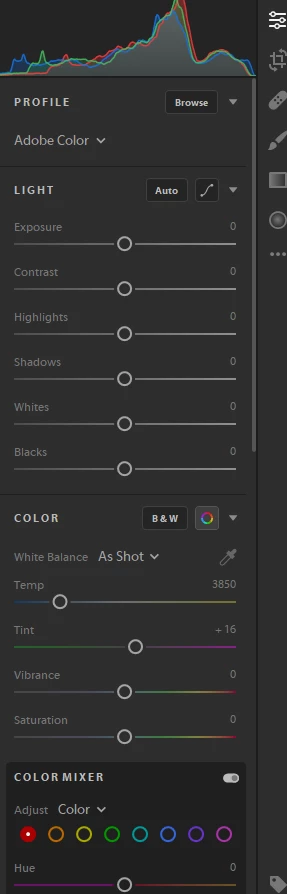
I am posting an image of what my tools look like.

Using Windows 10 and just upgraded Lightroom CC from the cloud, a trial version right now. Any help appreciated.
This topic has been closed for replies.
Correct answer Rikk Flohr_Photography

Lightroom CC does not yet have a Target Adjustment tool yet.

Lightroom Classic CC and the mobile apps do have this tool.

3 replies

Participating Frequently
June 19, 2018

Oh, sorry, I misread.

Rikk Flohr_Photography
Community Manager
June 19, 2018

Lightroom CC does not yet have a Target Adjustment tool yet.

Lightroom Classic CC and the mobile apps do have this tool.

Rikk Flohr: Adobe Photography Org
Participating Frequently
June 19, 2018

Rick, what's this? Screen shot from my iPad:

Rikk Flohr_Photography
Community Manager
June 19, 2018

As I said above - it is in the mobile apps but not yet the desktop version of Lightroom CC.  It is on our list.

Rikk Flohr: Adobe Photography Org
Participating Frequently
June 19, 2018

I can access it on my iPad but not on either of my desktop/laptop installations.

Most of the bug reports I've seen relate to LR CC Classic rather than this version, but maybe it's related.