


Cant Organize presets in LR V6.0?
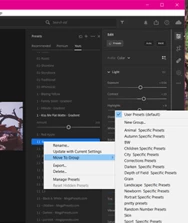
Hello! Im needing help with trying to organize my literally thousands of presets (no judgments please, I have realized i have too many) into groups i create within the preset folder in the module. The new version does not allow me to click and drag into groups i created, I cant just click on a menu and try to find the file explorer folder to be able to take a file that I could just click and drag into specific folders that I created in the preset folder, I have to literally right click on EACH PRESET then choose 'move to group' and choose. I cant sit here for HOURS upon DAYS to move all these?! please tell me theres an easier way to do this?? PLEASE HELP!!!
Lightroom version: 6.0 x64 [ 20220928-0910-e5c3644 ] (Sep 28 2022)
NGL Version: 1.31.0.19
WF Version: 5.0 0e17e26
VF Version: 1.0.119.3
HIL Version: 40405
Operating system: Windows 10
 AdChoices