Inspiring
May 4, 2019
Answered

Capture date in Lightroom CC

  • May 4, 2019
  • 2 replies
  • 4328 views

I have read through some of the other questions and I don't see a happy path. I am wondering if someone had a suggestion.

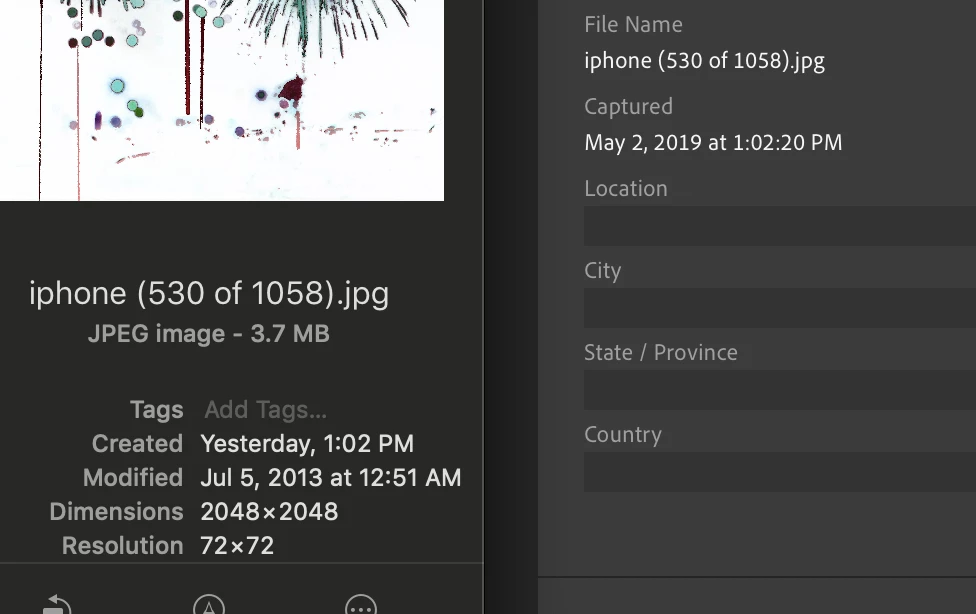
I am moving photos from prior years from and old PC to a drive and importing them into LR CC via MacBook. I am doing it old school because the PC doesn't have a great connection and that is a lot of files to move. The problem is the created date is being overwritten to today (day I copy it). The modified date still shows the original date the photo was taken but when it is imported to LR I have the most recent date and it is organized into a 2019 folder rather than 2013 (for example). So clearly it is reading the create date. There is no modified date in LRCC. (I believe there was in classic?)

See the image if that isn't totally clear.

Any suggestions on how to fix this short of modifying thousands of photos by hand in an interface that doesn't handle it well? Will code.
    This topic has been closed for replies.
    Correct answer Jim Wilde

    Are those jpegs SOOC originals, or were they created by a save/export process? I suspect the latter, and I also suspect that metadata wasn't included during that process. In that event, all the EXIF data from the original, which includes all the capture date/time information, is not present in the file header.....that means that LRCC (or LR Classic) is not able to show the correct capture date/time, so defaults to the only date it can see, which is the file creation date/time.

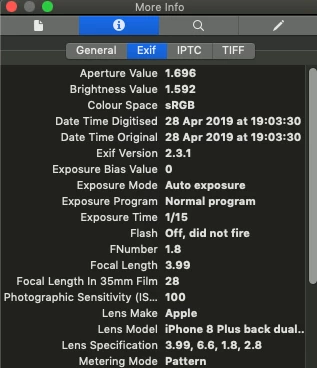
    Check one of the images, but not using "Get Info" as that doesn't show the image capture date, only the file creation/modified date. If you open the image file using Preview, then click on the Tools menu and select "Show Inspector", then click on the Exif tab under the "More Info" section of the Inspector, you'll then see what Exif information is available in the file. Here's an example of a file exported from LR Classic with "All Metadata" selected in the Export Dialog>Metadata panel:

    As you can see, all the EXIF information, including the image capture date (Date Time Original) is correctly encoded in the file header, so LRCC would be able to show the correct capture date if I import it.

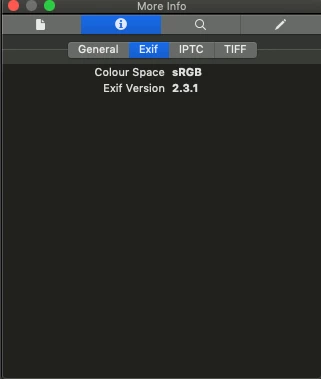
    Here's the same file, this time exported with "Copyright Only" selected in the Export Dialog>Metadata panel:

    Here, there is no EXIF data at all, so if I import that file into LRCC it will show the file creation date/time (10 minutes ago) as the "Capture Date".

    So, check your files to make sure the valid capture date, not just the file creation date, is available in the file header. If it is, and LRCC still does not show it, then there's another problem here which we'll need to investigate further.

    2 replies

    smashcrashboing
    Participating Frequently
    December 20, 2024

    The only way I've found to preserve the meta data on a photo after I've manipulated it is to move it, not copy it.  If moving isn't possible, then I've used rsync to sync the file without affecting the original so the "copy" is an actual "copy" not a newly created image with a new date stamp.

    Rikk Flohr_Photography
    Community Manager
    December 20, 2024

    You’ve posted to an ancient thread. It is highly unlikely that the issue described in this thread, though not impossible, is the same one you are currently experiencing. Rather than resurrect an old thread that is seemingly similar, you are better off posting to a new thread with fresh, complete information, including system information, a complete description of the problem, and step-by-step instructions for reproduction. 


    If the issue is the same, we will merge you back into the appropriate location. 

This thread will be locked. 


    Thank you!


    Rikk Flohr: Adobe Photography Org
    Jim Wilde
    Community Expert
    Jim WildeCommunity ExpertCorrect answer
    Community Expert
    May 4, 2019

    Are those jpegs SOOC originals, or were they created by a save/export process? I suspect the latter, and I also suspect that metadata wasn't included during that process. In that event, all the EXIF data from the original, which includes all the capture date/time information, is not present in the file header.....that means that LRCC (or LR Classic) is not able to show the correct capture date/time, so defaults to the only date it can see, which is the file creation date/time.

    Check one of the images, but not using "Get Info" as that doesn't show the image capture date, only the file creation/modified date. If you open the image file using Preview, then click on the Tools menu and select "Show Inspector", then click on the Exif tab under the "More Info" section of the Inspector, you'll then see what Exif information is available in the file. Here's an example of a file exported from LR Classic with "All Metadata" selected in the Export Dialog>Metadata panel:

    As you can see, all the EXIF information, including the image capture date (Date Time Original) is correctly encoded in the file header, so LRCC would be able to show the correct capture date if I import it.

    Here's the same file, this time exported with "Copyright Only" selected in the Export Dialog>Metadata panel:

    Here, there is no EXIF data at all, so if I import that file into LRCC it will show the file creation date/time (10 minutes ago) as the "Capture Date".

    So, check your files to make sure the valid capture date, not just the file creation date, is available in the file header. If it is, and LRCC still does not show it, then there's another problem here which we'll need to investigate further.

    michanne5Author
    Inspiring
    May 5, 2019

    Yep, you are correct. That was vintage iphoneography. I was doing a lot of manipulating using iPhone and iPad apps and not all of them retained the EXIF data. I even had an app to deal with that. Too bad they doubled the price of classic which i had been leaning towards returning to. I would try to fix them but it will probably be easier to purge whatever is part of the 'growing as an artist' process from what is actually interesting and fix those. Thanks for your help.

    Jim Wilde
    Community Expert
    Community Expert
    May 5, 2019

    michanne5  wrote

    Too bad they doubled the price of classic which i had been leaning towards returning to.

    No, they haven't doubled the price of Classic....Adobe were doing some "split-testing" which basically hid the $9.99 Photography Plan from some users, but following the inevitable outcry I believe everything has returned to normal.