
Participant
April 27, 2024
Answered

Cellular sync not supported when using an eSIM
  • April 27, 2024
  • 4 replies
  • 1022 views

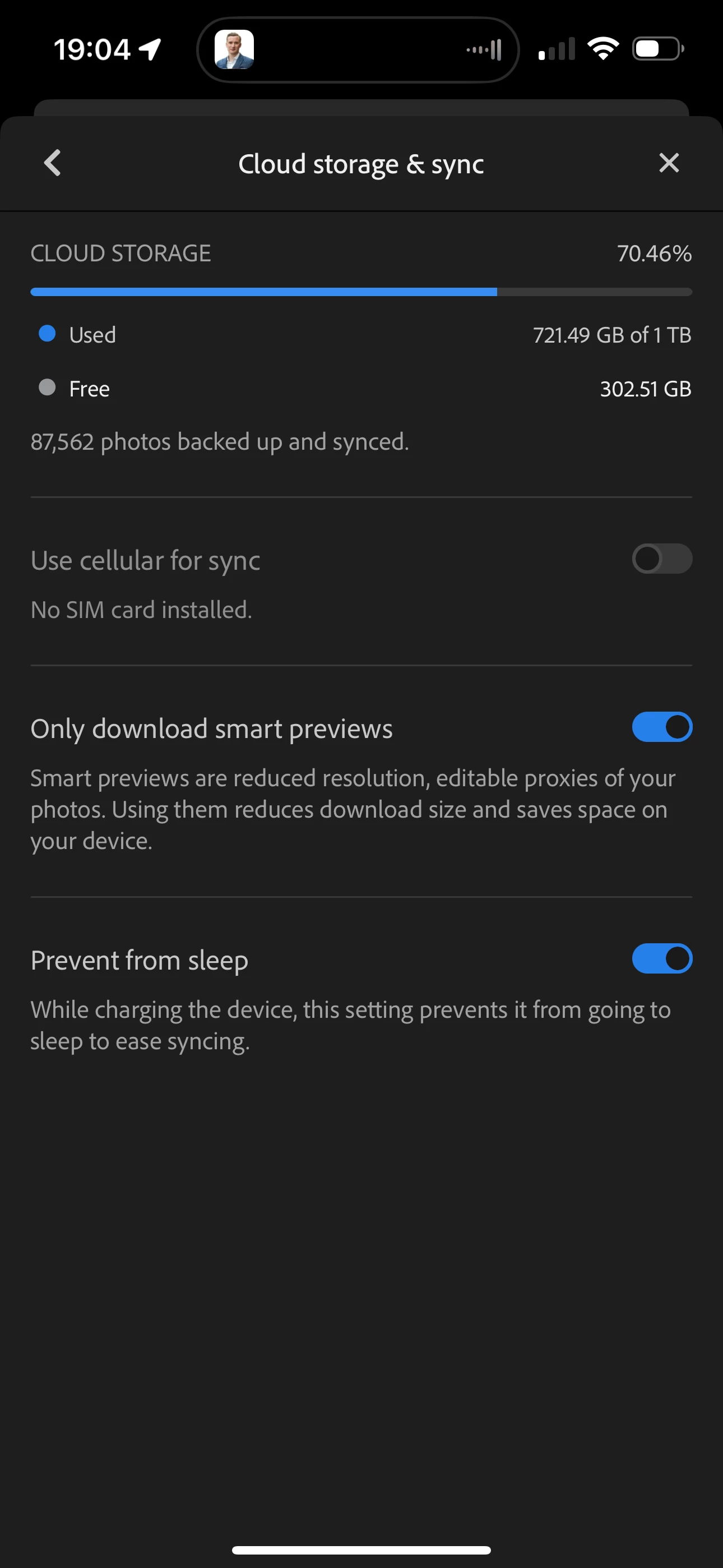
I recently bought a new phone and transferred my SIM card to it digitally. The physical SIM on my old phone no longer works, and the new phone now has the SIM provisioned as an eSIM.

However, I've noticed that Lightroom does not seem to recognize that a SIM is available, even though cellular service is working correctly on the phone with the eSIM. It appears that Lightroom may be checking for the presence of a physical SIM card rather than detecting that any valid SIM (physical or eSIM) is available.

Could someone from the Lightroom development team please look into this potential bug? I would appreciate any guidance or a fix to resolve the issue and get Lightroom working properly with my eSIM.


Correct answer Charlie.D

Hello @irfanhabib2k11 

I have an iPhone 15 with eSIM and I cannot reproduce the error your screenshot shows.


In iOS Settings > Cellular please confirm your service is active.  Then, in iOS Settings > Lightroom, please confirm that Cellular Data is enabled.  If all of that is enabled, could you please try restarting your phone.  

4 replies

Participant
May 22, 2025

Lightroom should work with both physical SIMs and eSIMs, as it typically relies on the device's network connectivity rather than the SIM type itself. However, if the app is not recognizing the presence of an eSIM, it could be a bug or compatibility issue.

We recommend the following steps:

  1. Ensure Lightroom is updated to the latest version from the App Store or Play Store.

  2. Restart your device after the eSIM is activated.

  3. Check app permissions, especially for network access.

  4. Contact Adobe Support directly through the app or Adobe’s support website so the issue can be logged and investigated by the development team.

Participant
May 22, 2025

Let me know if the issue is fixed related to the eSIM card.

Participant
July 27, 2024

I have the same problem with an Android device after switching carriers where a physical sim was replaced with an e sim.

Participant
April 23, 2025

same here with esim but I just activated with esim and never used the sim card. Samsung S9+ tab

Inspiring
May 3, 2024

This might be a long shot, but under each service plan in the iPhone settings, you have a "Data Mode" ( iOS Settings > Mobile Service > [Plan name] > Data Mode )
Sometimes on a new install, I've seen it on "Low Data", which could pause some tasks.

I have mine set at "Allow more data on 5G"
While I don't use Lightroom a lot on my iPhone, I have no issue with my eSIM.

iPad Pro M4 - Lightroom iPad
Charlie.DCorrect answer
Inspiring
April 29, 2024

Hello @irfanhabib2k11 

I have an iPhone 15 with eSIM and I cannot reproduce the error your screenshot shows.


In iOS Settings > Cellular please confirm your service is active.  Then, in iOS Settings > Lightroom, please confirm that Cellular Data is enabled.  If all of that is enabled, could you please try restarting your phone.  

Participant
May 3, 2024

Thanks! 


The issue was for some reason in iOS Settings > Lightroom, please confirm that Cellular Data was disabled.