


Question
Change DPI in Lightroom
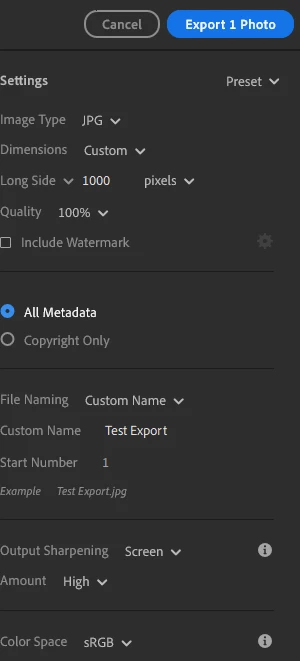
I am using LR CC (Win) and exported an image then uploaded it to Sharepoint. It looks good.
I am trying to export another image, but when I do, it displays distorted.
I do not remember 'how' or what settings I used to export the first image, but when I look at the image details of both images, the dimensions are the same, but the DPI's are not.
The details for original image that looks good are:
Dimensions: 4160 x 2768
Resolution: 72 DPI
Bit Depth: 24
Color Representation: sRGB
I cannot figure out how to lower the DPI to 72 when exporting the 2nd image.
There is no resolution setting to change, only quality.
Does anyone know how to do that and maintain image quality?
 AdChoices