Answered
Change montlhy plan
I want to change my monthly plan into yearly how can i do this?

I want to change my monthly plan into yearly how can i do this?
People in this forum cannot help with subscription changes.
My knowledge and my reply is mainly about Lightroom-Classic. For Lightroom-mobile it might be simply visiting account.adobe.com
I have seen suggestions to visit account.adobe.com and Manage your Plan (see link and quote below), but when I do this I cannot see any option to change 'monthly' to 'yearly' (I am already paying yearly)
You may need to contact Adobe Support with a chat and ask "Change my current Plan to pay Yearly."
For Lr-Classic subscribers- Insist that you do not want to be changed to the new (More expensive Plans). Note: I am sure some Adobe support staff do not understand the difference!
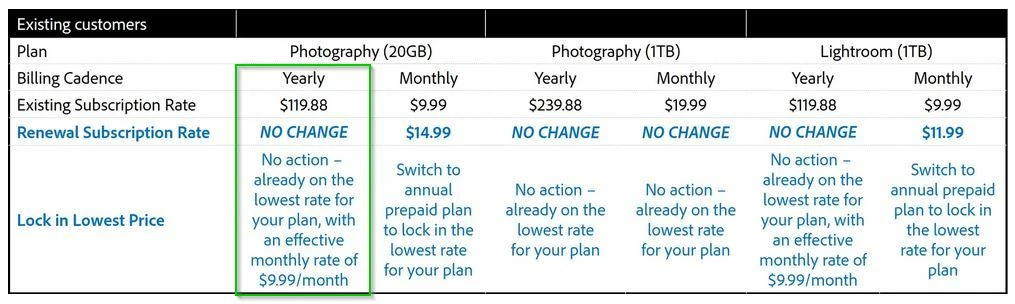
If you have a current (and paid up) Photography 20GB plan you should not get a price increase by changing to pay yearly..
https://helpx.adobe.com/creative-cloud/faq/ccpp-20gb.html
"If your Photography plan (20GB) is currently on an annual plan, paid monthly, you can switch your billing to annual plan, prepaid, by visiting your Adobe Account page and following these steps: Select the Manage Plan button, then the Update Subscription button. Follow the next steps to complete your request. You can also do so by contacting Adobe’s Customer Support."
And here- New innovations and Photography pricing updates in 2025 | Adobe Blog
Already have an account? Login
Enter your E-mail address. We'll send you an e-mail with instructions to reset your password.


 AdChoices