
Participant
Nov 10, 2026 7:50 AM UTC
Answered

Changes to Lightroom interface

Just updated Lightroom, loved it all this while but now there is suddenly an annoying white rectangle border around the top part of the UI, and it is *very distracting*. It wasn’t there before, and I would really appreciate if the tech team can fix it back to how it was before.
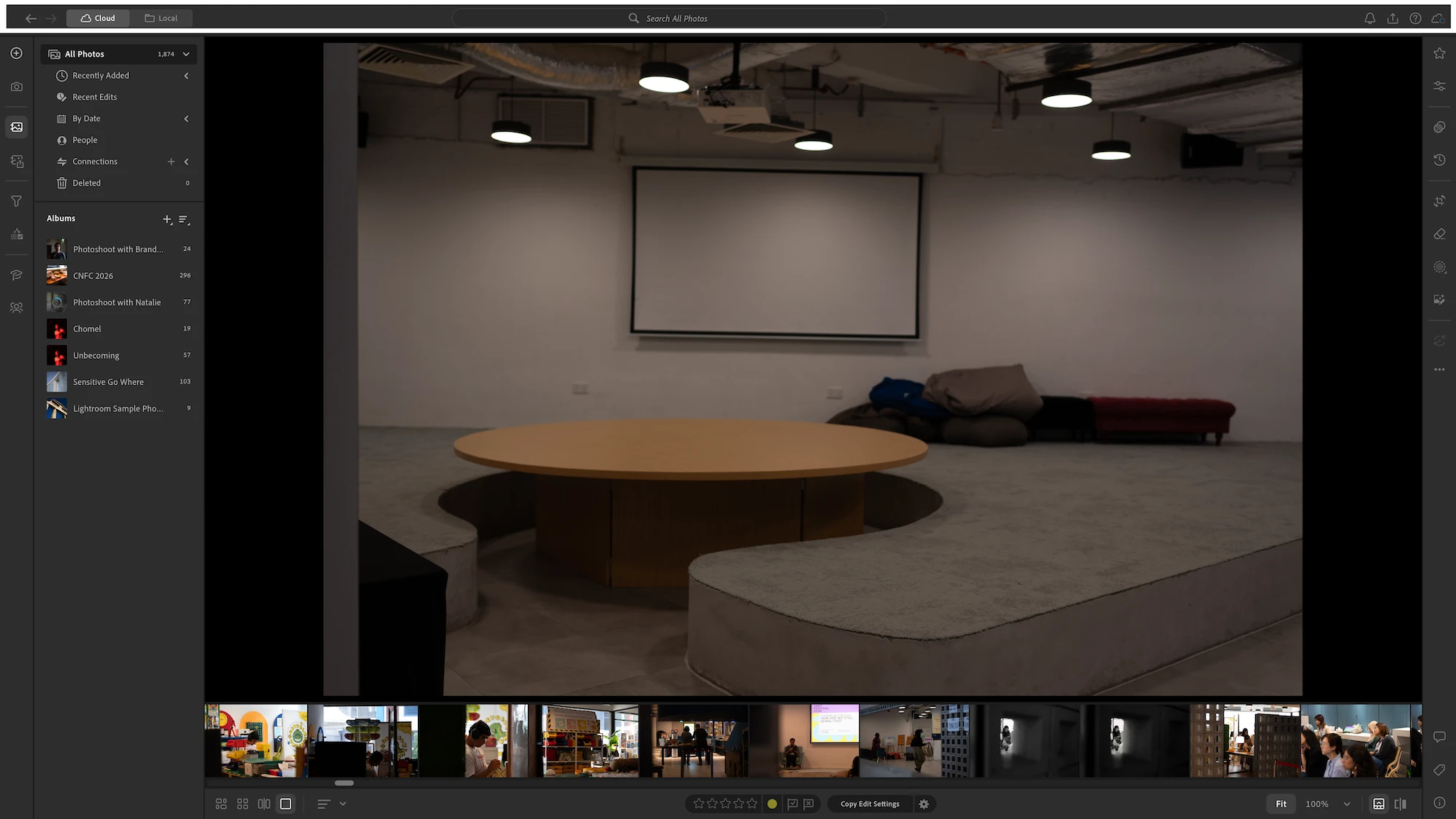
 

Why is there now a thick white rectangle at the top of the window? So distracting


    curious_Odyssey9894Correct answer
    Participant
    Nov 13, 2026 5:30 AM UTC

    UPDATE: It seems that the appearance of the white rectangle is tied to my Mac’s theme, which currently is on Auto. So in the Day, the white rectangle appears (Mac is on Light theme), and at night, the rectangle turns black (Mac is on Dark theme). 

    If I don’t set my Mac to Auto, and make it permanently Dark, then Lightroom follows upon restart. 

    This wasn’t the case prior to the update though, and I can’t seem to find a way to decouple Lightroom from my System’s theme. 


    Within Lightroom, my choice of theme for the interface is still fixed on Dusk. Hope that helps!

    9 replies

    Participant
    Nov 14, 2026 12:02 AM UTC

    I see the same behavior on my Mac in MacOS 26.6.2. There is still a problem, at least to my eyes because the Dark MacOS appearance setting in the menu and window bar is a different color. In Dark or Dusk mode, LrD still has a box around the top, it’s just less noticeable than my initial finding. Still a bug IMHO.

    Translate
    Participant
    Nov 13, 2026 2:44 PM UTC

    Same thing here on a Mac. The white line is very distracting as is the panel on the left that cannot be made to completely disappear (takes up screen real estate). 

    Translate
    curious_Odyssey9894AuthorCorrect answer
    Participant
    Nov 13, 2026 5:30 AM UTC

    UPDATE: It seems that the appearance of the white rectangle is tied to my Mac’s theme, which currently is on Auto. So in the Day, the white rectangle appears (Mac is on Light theme), and at night, the rectangle turns black (Mac is on Dark theme). 

    If I don’t set my Mac to Auto, and make it permanently Dark, then Lightroom follows upon restart. 

    This wasn’t the case prior to the update though, and I can’t seem to find a way to decouple Lightroom from my System’s theme. 


    Within Lightroom, my choice of theme for the interface is still fixed on Dusk. Hope that helps!

    Translate
    Participant
    Nov 15, 2026 1:46 AM UTC

    Thank you!!! This worked.

    Translate
    Participant
    Nov 13, 2026 2:19 AM UTC

    In LrD 10.0 on MacOS 26.6.2, downloaded from CC, a new bug in full screen mode...

    I hit green button in upper left hand corner of Lr window to expand to full screen. New desktop opens, menu bar turns white on black (I use light appearance mode exclusively, so otherwise menu bar is black on white), window expands to full screen. At top of the window, below the menu bar, a white box appears around the top elements of the windows. (See attached picture.) This wasn’t behavior in pre-10.0 versions of LrD and serves to obvious function. It appears to be a bug. 

    This is consistent in dark, light, and auto MacOS appearance mode. In Lr’s new light mode, the white box blends into the rest of the window but the white box is prominent in dark and dusk mode. 


    Translate
    Victoria Bampton LR Queen
    Community Expert
    Community Expert
    Nov 12, 2026 5:41 PM UTC

    Do you have any accessibility options enabled in Lightroom’s preferences or in System Settings? It just reminds me of the Voiceover highlighting.

    Translate
    Victoria - The Lightroom Queen
    Participant
    Nov 13, 2026 5:28 AM UTC

    ​@Victoria Bampton LR Queen no I don’t have the Accessibility options enabled. Would that make a difference?

    Translate
    Sameer K
    Community Manager
    Community Manager
    Nov 10, 2026 9:22 AM UTC

    Hey, @curious_Odyssey9894. Welcome to the Lightroom Community. I'll need more info to help you figure this out.

    You're working on Windows. How many displays do you have connected at the time Lightroom launched?


    Please share more details about your workflow and the system info from Lightroom. Go to Help > System info, copy and paste it into a text document, then upload the document here.


    In my quick test, I couldn't recreate this with just my Laptop's screen. Does the issue persist across restarts, or even when you pick Advanced or Classic Workspace?


    Thanks!
    Sameer K
    (Type '@' and type my name to mention me when you reply)

    Translate
    Participant
    Nov 12, 2026 8:01 AM UTC

    Hi ​@Sameer K, I’m using this on Mac actually, and only have a single display, hooked up to my M1 Pro MacBook Pro, running macOS 26.5.2.


    The issue doesn’t happen everytime I open Lightroom, but is there often enough, since the recent update. I’m using the ‘Default Workspace’ option. The white rectangle seems to be there regardless of the workspace option or color theme I choose.
     

    I’ve attached the system info as a .txt for your reference. Look forward to hearing from you soon!

    Translate