


Participant
October 24, 2020
Answered

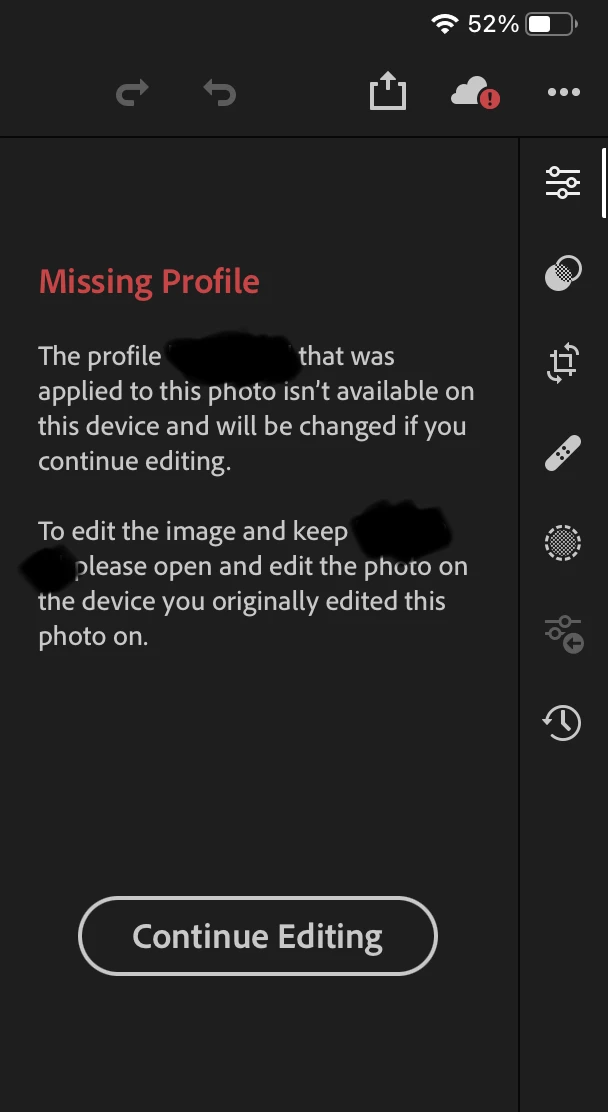
"Continue Editing" when missing profiles doesn't work

  • October 24, 2020
  • 5 replies
  • 4374 views

There's seems to be a bug when a profile is missing. The "Continue Editing" button doesn't do anything?


Previously I was allowed to edit a picture where the profile was missing. 


Moreover, are profile syncs supported or LR Mobile? 


This topic has been closed for replies.
Correct answer Ignacio B.

Hi,

please try out our 6.2 version and let us know how it works.

Thanks,
Ignacio

5 replies

Participant
March 14, 2021

I am getting the same error.  Imported DJI Mini 2 Raw files directly into my iPad Pro, applied a preset, and now I cannot undo or edit the photo on any device. Photo is now unusable, and I no longer have access to that drone's SD card.


When I click on "Continue Editing," nothing happens.


Also, my Import settings have always been "Adobe Default."


Ignacio B.Community ManagerCorrect answer
Community Manager
March 15, 2021

Hi,

please try out our 6.2 version and let us know how it works.

Thanks,
Ignacio

Participant
March 16, 2021

Works!  Woohoo!

ferggren
Participant
November 10, 2020

Same here. "Continue Editing" doesn't do anything and i am blocked from editing my drone photos. Buton was working a few versions ago

Community Manager
December 4, 2020

Hi, 

could you please let us know your Import/Raw Default settings.
Does it help to set them as Adobe Default?

Thanks,
Ignacio

fliplip1
Inspiring
December 4, 2020

Just wanted to post back a say, for me, it seems to be working ok now. I had a lot of missing profile images over the past week or so but all would allow me to go further. 

Participant
October 29, 2020

Having exactly the same issue here, both on my iPhone and iPad. 

Hopefully it's just a bug and gets fixed soon!

Participant
December 3, 2020

I'm getting the same thing on ProRaw photos from an iPhone 12

Community Manager
December 4, 2020

Hi,

could you please let us know what 
Import/Raw Default settings you have in the app?

Does it help to set it to Adobe Default?

Thanks,
Ignacio

Community Manager
October 29, 2020

Hi,

can you please let us know what the cloud says, if you tap on it?

Thanks,
Ignacio

DanPxAuthor
Participant
October 29, 2020

Hi,


Sure, here it is a screenshot. 


The "Continue Editing" button doesn't work, therefore you are block from editing this photo. Unless I revert back to my Mac Lightroom version


Thanks!

fliplip1
Inspiring
October 29, 2020

Yep, thats the message i get as well. 

fliplip1
Inspiring
October 26, 2020

Just wanted to add that I'm also getting this. I'm not bothered about the missing profile, but i cant go any further and LRM wont allow me to edit the image.

I also notice there is a red error icon on the Sync indication when I'm on one of these images.